



January 26, 2021
This tech article will share the practical experience of using Xtool X100 Pad3 to correct or adjust the mileage of Ford cars. The frequently-asked questions (FAQs) of the users who bought the products from the OBD2TOOL will be listed as the supplement part for reference.
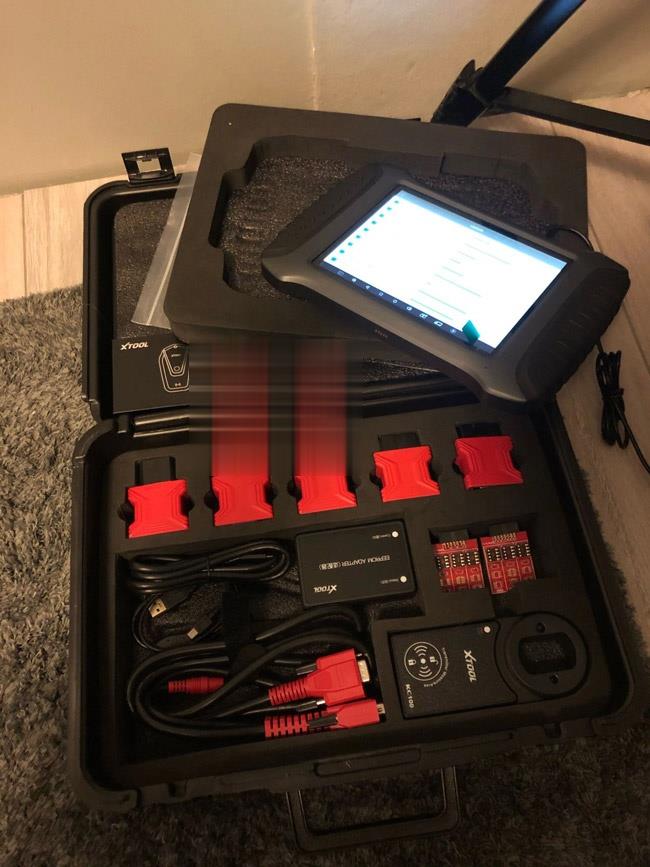
We can’t even wait a second to move on with the content below…
Detailed Operation Instructions:
Let’s first have a look at the current mileage of my Ford car:

It’s 68,679 miles now.
Click "Diagnosis†on the desktop menu>>Click "Odometer adjustmentâ€>>Click "Agree†to confirm the disclaimer
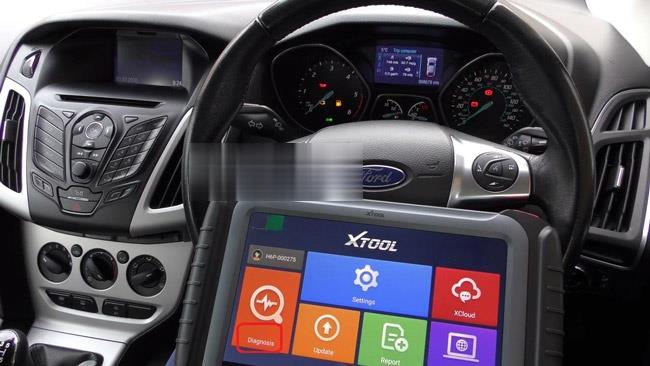
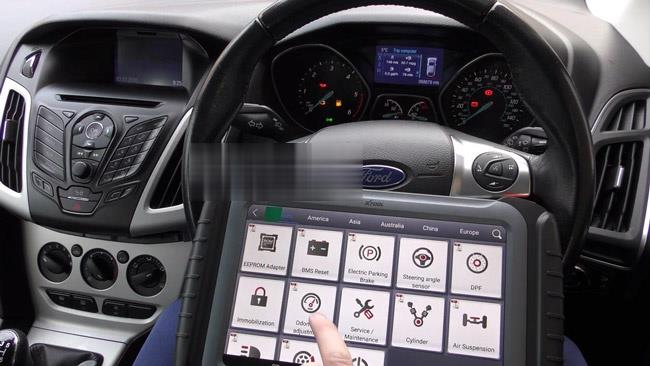
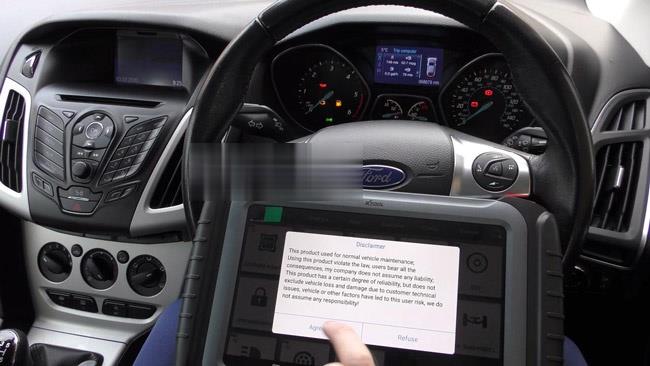
Then, it’s time for us to choose the car models. Here, the car model is Ford Focus 2013.
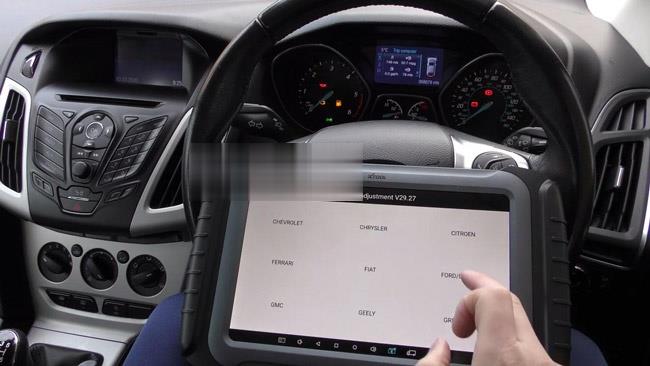

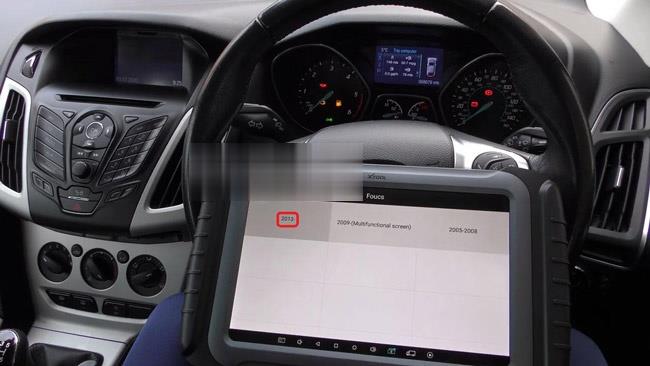
Then Click the button "Mileage adjustmentâ€. The screen will prompt the message as shown below:
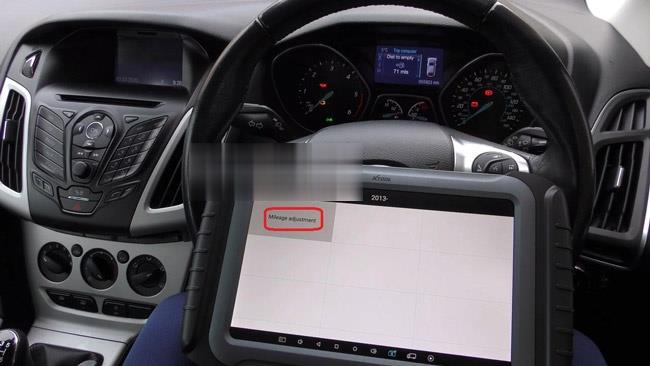
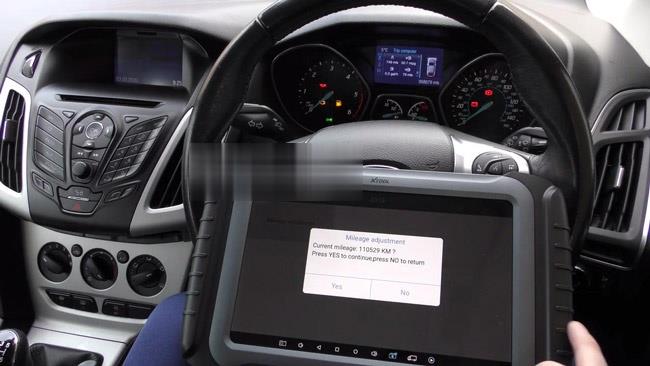
Just press "Yes†to continue. The screen will show you "Please input the mileage of adjustmentâ€. Just type in the mileage number you want to correct in the box below.
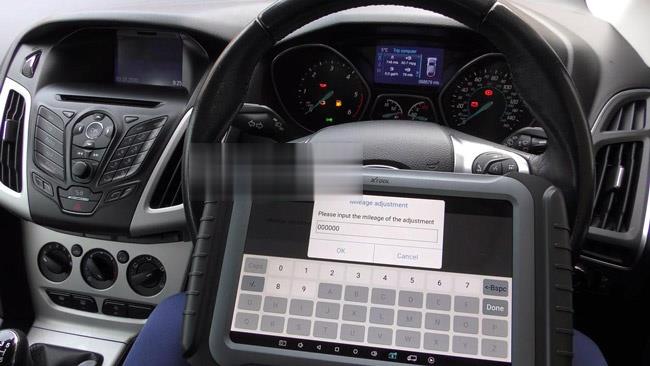
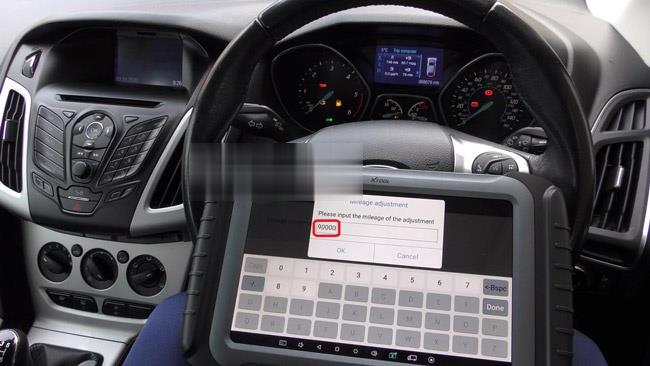
Here, let’s adjust it to 90,000 km. Wait a few seconds and the device will complete the mileage adjustment. At the same time, the mileage system of the car will restart and show the updated mileage on its screen.

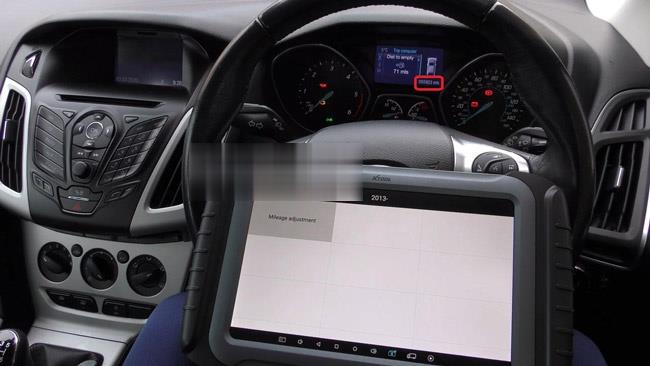
We can see the car screen displays 055923 mls. (1km=0.62137mile). That means we have completed today’s task successfully with X100 PAD3.
This is not being the ending, FAQs collected in recent days is to be added…
This will help us know more about the practical needs or problems that customers care mostly about.
Q1: Will X100 Pad3 program a 2013 Kia Soul Base model with a flip key fob?
A1: Yes, it will work for this car on keys.
Q2: Would Pad3 be able to read BMW codes on a BMW e65/e66 7 series or just read generic OBD codes?
A2: We are not sure about BMW codes, this tool will support engine and some other system’s diagnosis for BWM car brand.
Q3: Is it possible to use Pad3 to program new keys for a 2010 Camry vehicle?
A3: Yes, it will do your 2010 Camry on key programming and add keys.
Q4: May I ask if this X100 Pad3 support blanking or erasing the information of the normal and wireless keys of the Toyotas?
A4: It will work for major car models before 2017 year of Toyota by adding keys orr even all keys lost. And you can provide the specific car models and we will check for you if we tested before.
Q5: Can Pad3 support correcting odometer for American cars, European cars and Asian cars?
A5: For partial car models of these areas car makes, it can support. But for new car models released in recent years, it may not support. You can check the PDF file of the official website below to confirm:
http://www.xtooltech.com/EN/ProductView/X100PAD.html
Q6: Is it possible to use PAD3 to do mileage correction or adjustment and program keys for Honda (crv, accord)?
A6: No, all of our xtool products won’t work for Honda car brand to do odometer correction or key programming.
Q7: 2004 BWM 6 Series (E46) all keys lost with CAS2 security. Will PAD3 support programming a key for it?
A7: Yes, it will do key programming on your BWM for all key lost.
Q8: I want to ask you a question. For the KC100, it needs a registration with its serial number or not?
A8: Yes, it is with the serial number, and need to bundle with x100 pad 3.
Q9: I am interested in buying Xtool diagnostic scanners, want to know
what is the best diagnostics of Xtool currently? Function require: key
coding, coding, special functions, ….
which diagnostic device is the best and which one includes it all?
A9: You can choose X100 Pad3, the current most powerful key programmer. It will totally be worth your money and have all the special function you need for diagnosing your car.
Posted by: Emily white at
06:24 AM
| Comments (1)
| Add Comment
Post contains 658 words, total size 10 kb.
Car model and year: BMW E36 1996 – 2002
Symptom: Seats airbag light on
Take the seats out and have them reupholstered why the car is sitting. I ended up starting the car during the procedure of removal. Now the seats are out and the airbag light is on
How to reset BMW E36 Seats airbag light on?
You need BMW ICOM INPA or a diagnostic tool (I.E Foxwell nt530) to clear it. Airbag lights are not self-clearing. Once the cluster light illuminates the error needs to be corrected (reattach the wiring in this case) and the trouble code erased.
Which current market tools can read the error codes?
1. Inpa: Confirmed
INPA software has reset the light a few times. That’s why I loaded it onto an old laptop. It’s free, except for cost of cables, about $20. Here’s the inpa cable link:
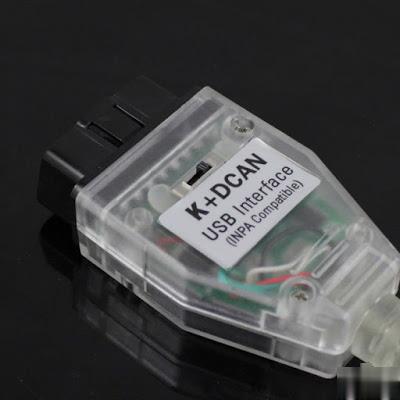
INPA is a factory tool that BMW still uses today. Not dealer, factory. We have access to an older version that snuck out the side door years ago. It provides all the functionality you could need or ask for for this era of BMW. Of course, it needs to be installed on a laptop, but compatible machines can be obtained very cheaply if you dont have one just laying around.
2. The Peake tool: has bug
The Peake tool is NLA, the entire company is gone… about a decade too
late. It is a 1980’s grade tool that they kept trying to limp into this
century with marketing. The Chinese offering off Aliexpress and
Amazon/eBay is a clone of the Peake circuitry and software. It has a
nasty bug in it that has cost many people much time and $$$ chasing the
wrong fault. That bug was copied from the Peake tool.
Go INPA
3. Foxwell N530 BMW scanner: Confirmed
I have the Foxwell N530 tool and it also resets the SRS light as well as OBD2,
maintenance minder, and other modules. Not as capable as INPA but it is
a self contained handheld unit and doesn’t require a laptop.
I just sold my Peake SRS tool.
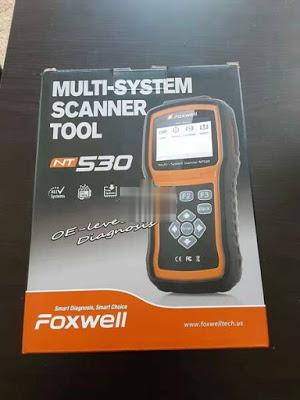
PS: Get a Foxwell tool along with the round 20 pin connector for about $170 and you will have a capable scan tool for this and future work.
Posted by: Emily white at
05:46 AM
| No Comments
| Add Comment
Post contains 388 words, total size 3 kb.
January 04, 2021
This post comes with the introduction to updateMB SD Connect Compact 5 /SD C4/ SD C4 PLUS.
Step 1: Change file name
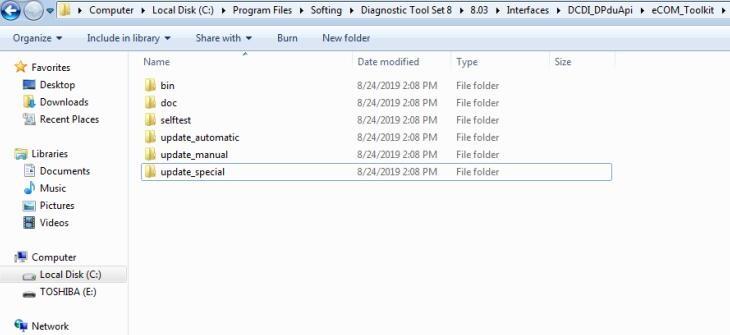
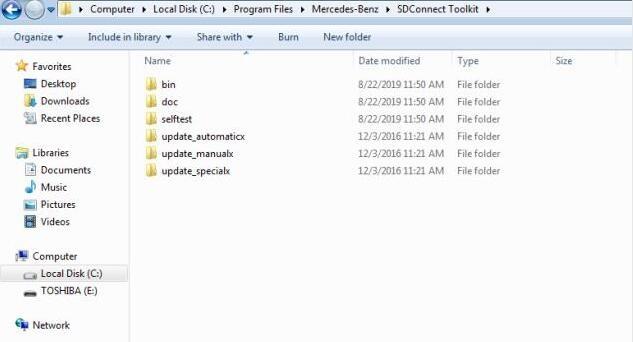
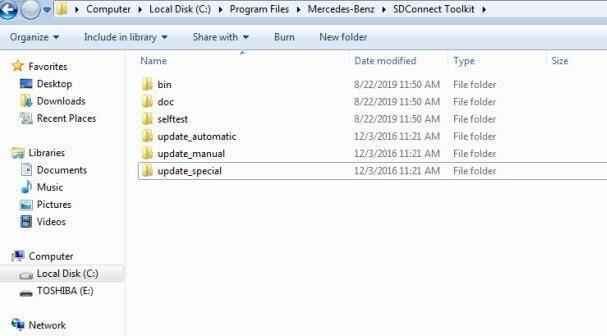
There are two storage path for MB SD Connect Compact 4/ new SD C4 plus/ SD C5.
Path 1: C:\Program Files\Mercedes-Benz\SDConnect Toolkit
Path 2: C:\Program Files\Softing\Diagnostic Tool Set 8\8.03\Interfaces\DCDI_DPduApi\eCOM_Toolkit
Please modify the file name of "update_automaticxâ€, "update_manualx†and "update_specicalx†to "update_automaticâ€, "update_manual†and "update_specicalâ€, it means remove the last letter of all the three file names.


Posted by: Emily white at
12:12 PM
| No Comments
| Add Comment
Post contains 86 words, total size 2 kb.
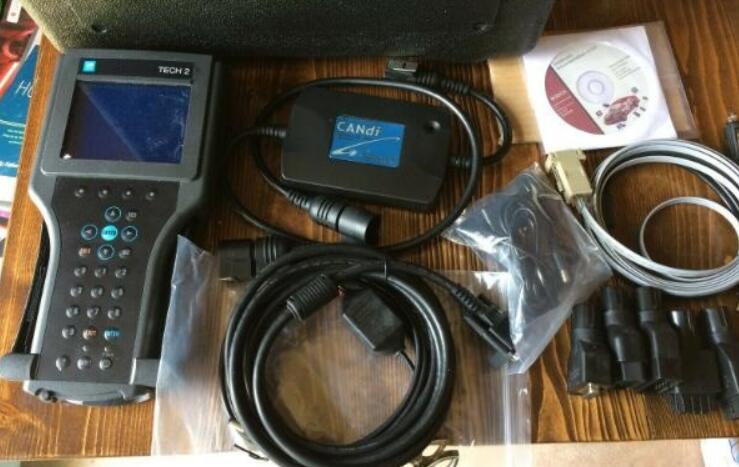
Thanks for the feedback @ Chris on GM Tech2. Here share the problem he got trouble in and offered the corresponding solution.
Problem:
I received the tech 2. Thank you.
But, when I connect to obd2, it says "cannot detect CANDI module, please verify module is connectedâ€. If it helps you, the green light on the candi module is flashing (not solid). I am not sure what to do. Can you help?
 1
1
The solution:
I think I selected the wrong engine designation (there are 3) for my truck and the tech 2 could not communicate
because it was looking for a controller that was not present (which presented the error message "no candi moduleâ€).
So, I think the tech 2 was OK.
It was my fault in my selections. I got it to work now!
Posted by: Emily white at
12:01 PM
| No Comments
| Add Comment
Post contains 143 words, total size 1 kb.
34 queries taking 0.0246 seconds, 166 records returned.
Powered by Minx 1.1.6c-pink.

