



September 26, 2020
Car: Subaru 10 LGT, 08 & 12 forester, 06 legacy RIP
Problem:
The compressor on my 2010 grenaded a few month ago. The variable ac compressor only has a pulley, no clutch. I replaced it, the ac condenser and the expansion valve. It still won’t come on.
I hooked mine up to Subaru SSM3 scanner and when I command the ac solenoid or try to run the relearn procedure – it fails and says the compressor is in ‘protect mode’ I can’t find anything in the FSM about ‘protect mode’ or what triggers it.
No codes present in the AC module
I managed to get 72 PSI into the system by heating the can of Freon with a propane torch and then closing the lowside port. Pressure switch shows 58 MPa and does fluctuate with temperature.
Shows a commanded evap core temperature as well as actual.
It shows zero Freon flow, the compressor just will not engage.
Solution:
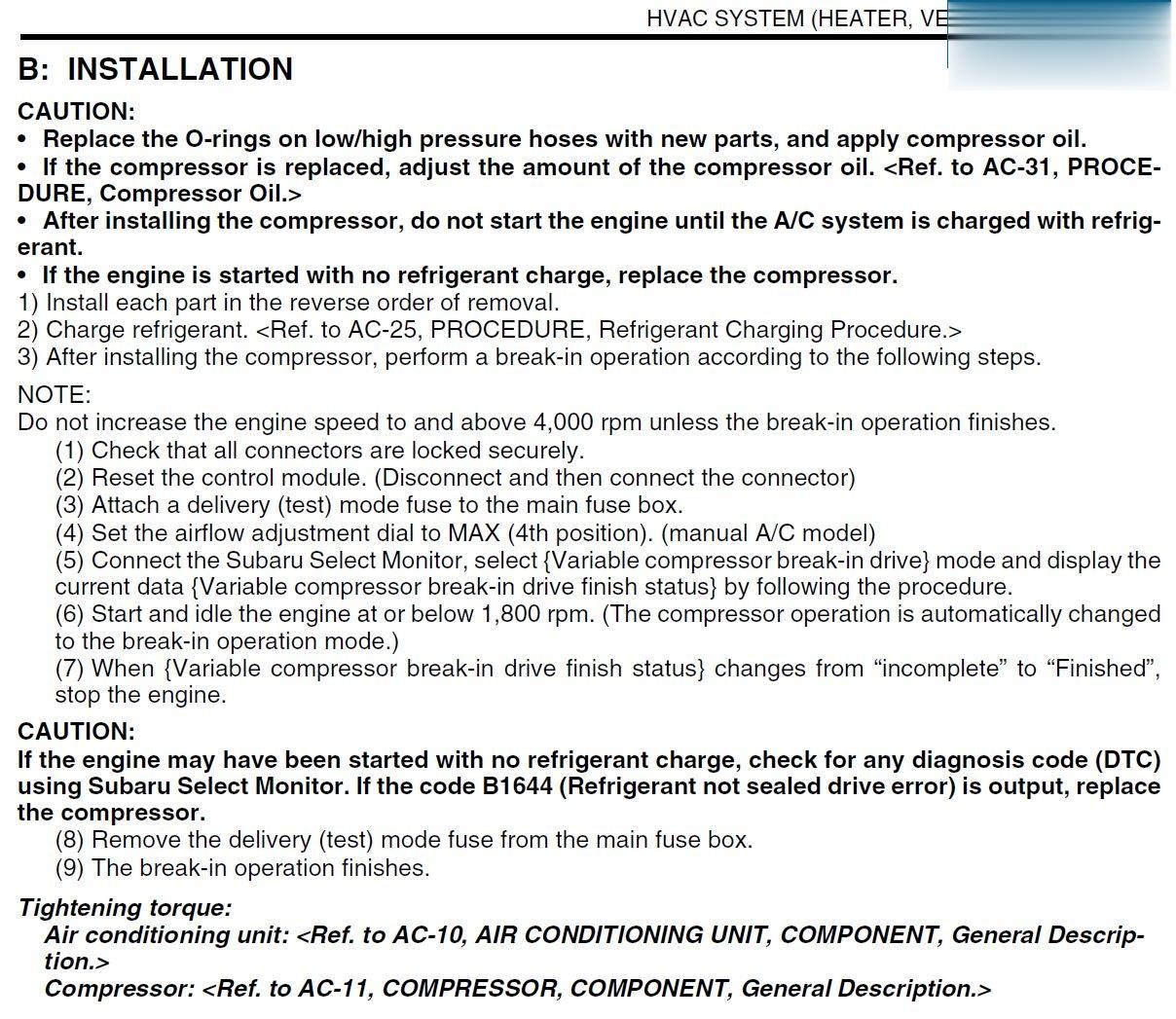
Looks like installing a new compressor requires using the SSM III to
run a variable compressor break-in drive cycle. Also – it notes that
when you install a new compressor, you need to fill the system with
refrigerant before starting the vehicle – if the vehicle is restarted
without filling the system, it says to replace the compressor!
Compressor Installation
Posted by: Emily white at
02:17 AM
| No Comments
| Add Comment
Post contains 227 words, total size 2 kb.
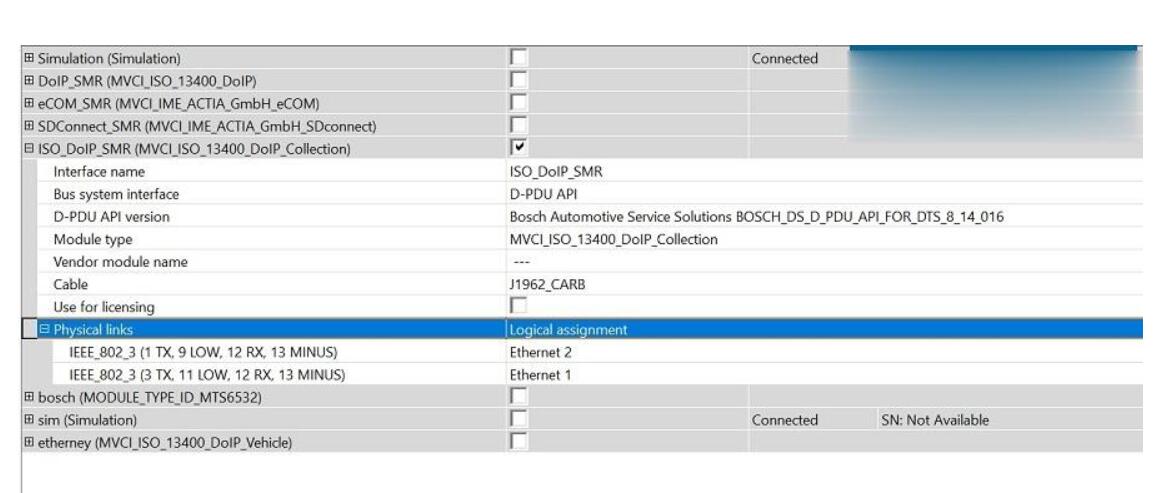
I have seen a few people struggling with DoIP and VXDIAG C6. Please see the attached image of the interface settings for DoIP.
When using DoIP with Vxdiag make sure you uncheck/turn off the CAN
interface(MODULE_TYPE_ID_MTS6532) in DTS. Then connect the interface to the car and laptop, open vxmanager and turn on DoIP for BENZ. Then open DTS and with the project you require and you will see DoIP ECU available in bottom right corner.
If in DTS it shows the DoIP available but no commands work, turn ignition off of vehicle, unplug vci from vehicle and computer, then plug everything back in while rebooting DTS and it should work
I don’t find Vxdiag C6 as stable as original eCOM so only use this if you have to.
You can also make enet cable work for DoIP for DTS but it is not as stable.
Vxdiag C6 use USBï¼
Enjoy!
Posted by: Emily white at
02:05 AM
| No Comments
| Add Comment
Post contains 161 words, total size 1 kb.
September 11, 2020
This post collected the problem "OBD2 Port Not Communicating with Vetronix Tech 2 Scanner†from the user and offered the way to deal with. Hope it may help you when you meet the same
I recently purchased a clone GM Tech2 scanner to access the diagnostics in my 2006 Hummer H2. The scanner is operational and can scan all protocols but can not link to any of them. There are no driveability issues. I performed troubleshooting by doing the following:
Verified that the Power Control Module (PCM) and Data Link Connector (DLC) fuses were okay.
Tested DLC pins 4 (chassis ground) and 5 (PCM ground). The voltage was less than 0.1 which led me to believe low resistance.
Performed a volt reference check on DLC pin 2 (serial data) to determine
if it was 5 volts and actual voltage was between 1 and 2.
Tested DLC pins 4 and 16 (battery) and the voltage was 12.58.
Checked the purple, black, black/white and orange wires on the back of
the DLC for integrity and did not find any issues with fraying or
looseness.
I am not sure what to think, whether the issue is with the PCM or wiring. I am trying to locate a wiring diagram for the PCM and DLC which will give me a better understanding of the wire mapping. I know the PCM has two connectors and I probably should see if there is continuity in the purple wire (Pin 2) and its termination in one or the other connector.
Solution:
"DLC†is the Datalink connector (the connector that pushes into the vehicle) so "DLC-2″ is Data Link Connector pin 2.
"D†is the 26-Way D-Type Connector that screws into your Tech2, "D-4″ is 26-Way D-Type pin 4.
So if you look at the ends of the cable connectors, the pins are numbered as per my sketch.
So detach your TECH2’s cable and check the following:
DLC-2 connects to D-4
DLC-4 connects to both D-8 and D-9
DLC-5 connects to D-2
DLC-16 connects to both D-17 and D-18
These 4 wires are the only important ones, the rest you can ignore, infact DLC-2 to D-4 is the key one, I suspect everything else is OK.
Your TECH2 should have come with a 12V Power Supply that plugs-in just to the right of the 26-Way D-Type, its a standard 12V jack. If you don’t have a PSU one from a PC monitor, just check its 12V.
Connect scope probe tip to DLC-2 and ground clip to either DLC-4 or DLC-5, set the scope to DC, 1V/Division and 200uS/Division. If you can set the scope to "free run†or "continuous†just to prove there is activity then set it to "DC Triggered†with a trigger level of around +1V to +2V. On the TECH2 select the function I mentioned before (even if your vehicle doesn’t have AS) and you should see a signal the moment you hit the key.
If the signal looks similar to the one I posted, then its safe to assume your TECH2 is working OK.
When you say "TheOBD2 Scanner is operational and can scan all protocols but cannot link to any of
them†do you get a communications error? If so make sure you have
selected the correct "Model Year†not the year the truck was 1st bought
e.g. my model year is 2005 but was bought in 2006. I noticed that I get
the same issue when the wrong year is selected.
loading..
Posted by: Emily white at
02:57 AM
| No Comments
| Add Comment
Post contains 591 words, total size 4 kb.
Car model and year: 2002 GMC Sierra 1500
Purpose: to pull codes
Scan Tool or Diagnostic Tool to use – pros and cons
1.GM Tech2 pros and cons
To do work on gm stuff I have knock off Tech2. I like it.
2. My OBD Link MX+ or Konnwei Bluetooth devices with the usual Dash Command, Torque Pro, OBD Link and Motor Data apps work for me for troubleshooting.
For us LS engine swap people that don’t like to pay the HP Tuners folks money to license a new operating system, there are now free alternatives. "Tuner Pro RT†software allows the free editing of a General Motors PCM operating system to get it to work in a swapped vehicle. Then we use "LS Droid†software with my MX+ device to actually write the changed Tuner Pro operating system to the PCM which completely avoids spending money on HP Tuners.
3.
For a long time I have gotten by with a simple scanner. These days with
the Bluetooth devices and the torque app…that is even easier for basic
stuff. Back in 2011 I picked up an Innova 3150 which had the ability to
read ABS and SRS system faults. It was about $150 then. Current ad for
this older tool shows $220…not sure why xxxx
I have considered a clone Tech2 and or the MDI device I have seen
mentioned. My main concern other than the $300 cost…which is not bad for
what it does….was that I did not want to somehow brick my ECU or any
other module either due to the clone tool or my lack of knowledge of
using one of these more sophisticated diagnostic tools.
I decided to get one that would perform the ABS bleed, mainly because I like to flush the brake fluid ever few years. What I ran across for the least $$ to fit what I was looking for is the Foxwell NT630 Plus. Listing made an offer to another listing but they would not budge. (why do they show make an offer if they only will drop a dollar?!). The one Currently my plan is to sell the Innova locally and try and recoup most of the cost of the new tool.
4. My 2001 GMC truck has a problem with the red brake warning light and the yellow ABS lights randomly coming on at the same time. I wanted to find out what code was being set. I quickly learned the local auto parts stores couldn’t read ABS codes. I also learned that the repair shops in my area charged $35-$59 just to use their scanner to check for ABS codes. I thought that was too much for a 5 minute scan so I decided to buy a scan tool that would read ABS and SRS codes as well as OBDII codes. Over the course of several weeks I have purchased three scan tools and returned each one of them for a refund for reasons I will describe below What I wanted a scan tool to do.
I initially set out to find a scan tool that would read ABS, SRS and OBDII codes on all my vehicles, a 1999 S10 Blazer, a 2001 GMC Sierra, a 2012 Equinox and my daughters. 2009 Camry. I wanted to spend no more than $125. I know that sounds like a lot to hope for but I figured I might be able to do it.
Then I confirmed Tech2 is able to do ABS Brake Automated Bleed & Pressure Bleed for Chevy & GMC. Just google †GMC Sierra 2002 Tech2″ and you will see a Youtube video on how to do.
5.
Question: Will this gm tech2 work with my 2012 GMC Sierra 1500. Will I
be able to calibrate the BPP sensor out of the box? Thanks!
Reply:
If you scroll down further it lists it as going to 2013. I bought one
like this and it has been great to diag and repair everything. Too bad
it doesn’t work on my camaro(MDI).
Could be, but there was an updated 32MB card that supported up to ’13.
Or get a Jbox or anMDI2 as it can do anything a tech 2 can and much more. I can go into much more detail if needed but don’t buy a tech 2 it’s outdated and obsolete as of 2013 at best. I have 4 scan tools ranging from 300-5000$ and you can easily spend 500 or less and do anything I can.
It’s called the open port 2.0. It is compatible with GM’s programming
website called SPS. That tells me it’s a go for the tech 2 win program
which is a laptop version of the handheld tech 2. It also would work
with GDS2 which is the current diag tool via laptop for GM. Then you can
lease the use of the software as needed.
https://www.acdelcotds.com/acdelco/action/subscribehome This is The site
to lease the programs. It may not make since for some people but if you
are devoted to "doing it yourself†it’s the only way, end of story. You
will use other software to diag the problem and then slide over to gm’s
stuff if needed but this will give you the widest range of
functionality.
Posted by: Emily white at
02:40 AM
| No Comments
| Add Comment
Post contains 888 words, total size 5 kb.
32 queries taking 0.0248 seconds, 164 records returned.
Powered by Minx 1.1.6c-pink.

