



February 21, 2020
Model:2013 Jaguar XF,VIN:SAJAA05M2DPU0****;


Function:After maintain or replace the valve (EVAP).
Operationprocedure toSelf-test withlaunch X431 Vor X431 V+ (pro3) PAD:
- .Choose Jaguar after V33.25,and ECM;

- .Choose "Special functionâ€ï¼›

- .Choose "Purge solenoid valveâ€ï¼›

- .Start engiuneï¼›

- .The temperature of engine must over 75 Celsius,then program can start;

- .Self-test runningï¼›

- .Prompt: Clearance valve evaluation value passedï¼›

- .Turn off the ignitionï¼›

- .Switch on the ignitionï¼›

- .Press "Yes†to clear all DTC;

- .Clear all the DTCï¼›

All DTC clearedï¼›

Turn off the ignitionï¼›

Initializingï¼›

Switch on the ignitionï¼›

- .Function finishedï¼›

- .Turn off the ignition ï¼›

https://www.obd2tool.com/blog/2019/12/23/how-to-self-test-on-2013-jaguar-xf-engine-purge-valve-with-launch-x431-v-x431-v-pro3-pad/
Posted by: Emily white at
08:06 AM
| No Comments
| Add Comment
Post contains 108 words, total size 6 kb.
SVCI 2020 Feather:
Version: 2020
Sever: No Need Connect to Server!
Activation: No Need Online Activation!
Time for use:No Time Limitation!
Free download SVCI 2020 (FVDI) abrites commander software:
https://mega.nz/#!ff4hTKhY!RppGNKf9mugkzarQdbIIHLNzboeY32Ka5gtaPjQe2Wo
Easy to install:
There is only one executable file on the CD-ROM.
Double-click "AbritesCommanderSetup.exe†to start the installation. ]
Do not plug the USB into the computer during the installation.
After the installation is complete, connect the USB to the computer.
How to use SVCI 2020 Quick Start Software?
1.VCI 2020 Quick Launch Software has 42 shortcut icons. Left-click the icon to launch the corresponding software.
2.Compared to the quick launch of SVCI 2018, the activation dialog is not displayed after clicking the icon.
3.The last icon is the firmware upgrade program. Click it to start the firmware upgrade program.
4.You must be online to download the latest firmware program. After downloading, click Update to update the firmware program.
5.After clicking the icon, the dongle program icon will appear in the tray at the bottom right corner of the computer.
6.The dongle program cannot be exited while the software is running.
SVDI 2020 connection:

Software display:

2020 SVCI softwarelist andvehicle coverage:
| Car Make | Software Version | Car Year |
| Jaguar / Land Rover | V2.6 | up to 2016 |
| Suzuki | V1.2 | up to 2019 |
| Daihatsu | V1.4 | up to 2019 |
| VVDI | V1.2.2 | up to 2015 |
| VW/Audi/Skoda/Seat | V18.0V24.0V37.0 (new) | up to 2019 |
| BMW / MINI | V10.4V10.5(new) | up to 2019 |
| Mercedes Benz / Smart/Maybach | V5.11V7.0V10.8 | up to 2019 |
| Renault / Dacia | V5.3V6.3
V7.4(new) |
up to 2019 |
| Peugeot / Citroen | V5.10V6.7V8.0(new) | up to 2019 |
| Fiat / Lancia / Alfa / FCA | V5.1V5.7V7.6 | up to 2019 |
| Opel / Vaushall | V5.8V6.6V7.5(new) | up to 2019 |
| Ford / Mazda | V4.9V7.7(new) | up to 2019 |
| Chrysler / Doge / Jeep | V3.3V3.4 | up to 2019 |
| Toyota / Lexus/ Scion | V9.0V11.7(new) | up to 2019 |
| Nissan / Infiniti | V4.3V5.7 | up to 2019 |
| Hyundai / KIA | V2.1V4.4(new) | up to 2019 |
| Volvo | V4.3V6.2(new) | up to 2019 |
| Mitsubishi Motors | V2.1V3.7(new) | up to 2019 |
| Porsche | V4.1V7.1(new) | up to 2019 |
| DAF | V1.0 | up to 2019 |
| Bikes / Snowmonilrd/ Water Scooters | V1.2V2.0(new) | up to 2019 |
| Tag Key Tool | V6.2 | up to 2015 |
Note: Special functions only works for Jaguar Land Rover/ SUZUKI /DAF
The difference between SVCI 2020 and SVCI 2018
SVCI FVDI V2020 Hardware Difference:
1.SVCI 2020 has fewer button batteries than SVCI 2018.
2.SVCI 2020 does not need to be activated, it will not lock the machine, and the serial number will not be lost.
SVCI FVDI V2020 Software Difference:
SVCI 2020 has 19 more software than SVCI 2018:
1.ABRITES Commander for VAG V37.0,
2.ABRITES Commander for BMW V10.5,
3.ABRITES Commander for Mercedes V10.4
4.ABRITES Commander for Bikes V2.0
5.ABRITES Commander for Chrysler V3.4
6.ABRITES Commander for Daihatsu V1.4
7.ABRITES Commander for FIAT V7.6
8.ABRITES Commander for Ford V7.7
9.ABRITES Commander for Hyundai V4.4
10.ABRITES Commander for JLR V2.6
11.ABRITES Commander for Mitsubishi V3.7
12.ABRITES Commander for Nissan V5.7
13.ABRITES Commander for OPEL V7.5
14.ABRITES Commander for Porsche V7.1
15.ABRITES Commander for PSA V6.3
16.ABRITES Commander for Renault V7.4
17.ABRITES Commander for Suzuki V1.2
18.ABRITES Commander for Toyota V11.4
19.ABRITES Commander for Volvo V6.2
Posted by: Emily white at
07:22 AM
| No Comments
| Add Comment
Post contains 522 words, total size 9 kb.
February 08, 2020
Synchro maker Volvo was introduced in Tango software update 1.95. The main function of this maker is to allow, the users of Tango programmer that purchased it,to synchronize ECU and CEM modules found in Volvo vehicles.
In order to use the software you will need to load a dump file from both ECU and CEM modules in Tango software. In case that one of the modules is broken or the chip contents are replaced a file from a replacement (donor) module can be used.
Currently supported types of ECU and CEM contain the following chips:
CEM: 93C86, 28F400
ECU: 93C56,24C04, 95P08
Any combination of the above mentioned can be synchronized.
The main purpose of this document is to show and explain how to properly use this software.
First Start Tango software and select Dump Editor mode:
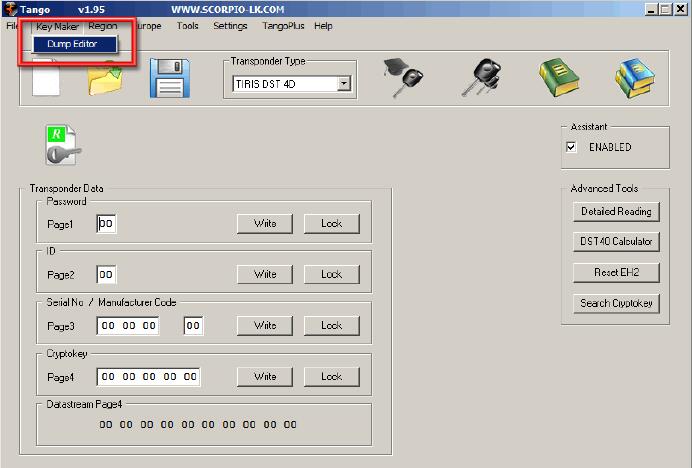
After that select Europe -> Volvo- > CEM+ECU
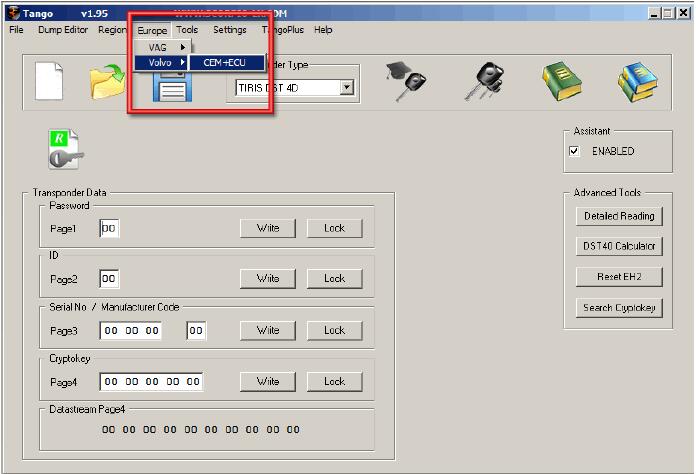
When loaded the software window looks like this:
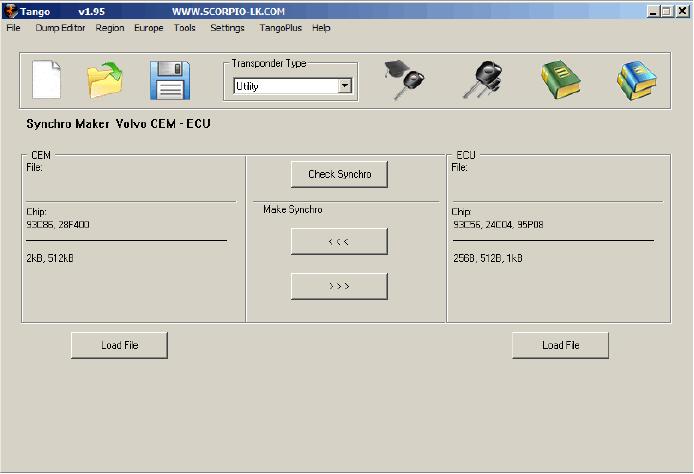
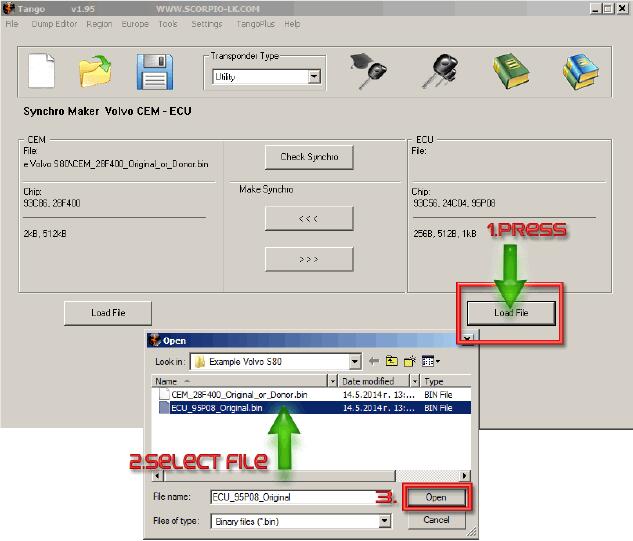
The Synchronization of the modules begins with loading their dump files in Tango software, in the example used in this document the sync between CEM with 28F400 and ECU with 95P08 will be displayed. It doesn’t matter which file is loaded first
In this guide it will be demonstrated how synchronize the CEM module with the ECU.As a result of the whole procedure a new file for the CEM module will be generated byTango Key Programmer and this file is synchronized and compatible with the originally loaded ECU file. The reverse operation – creating a new ECU file compatible with the original CEM file can be used instead, the procedure is basically the same.
Synchronization is started with loading the dump file from the CEM module:
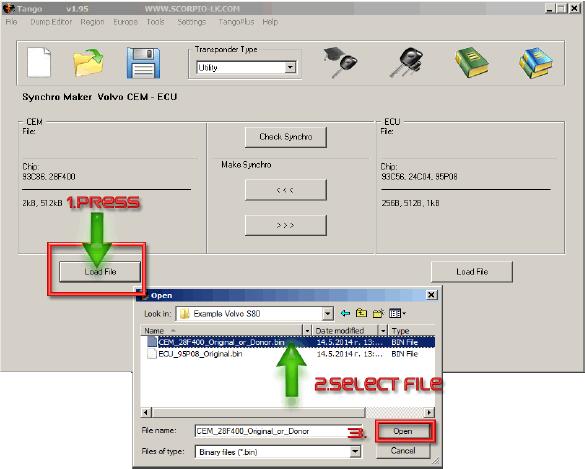
Using similar procedure load next the ECU file:
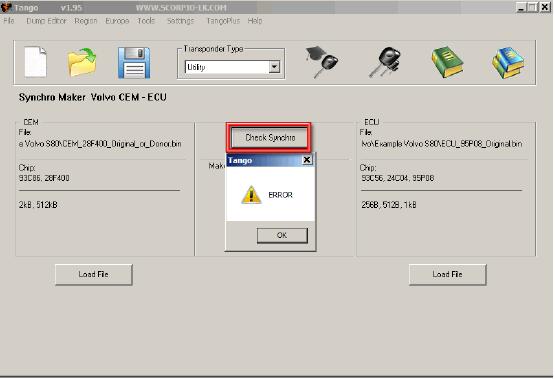
If you press the Check Synchro button now, it will display the following error, because at this point the files of the ECU and CEM are not synchronized. NB: If the files are taken from a working car the error will not appear and will write "SUCCESS†instead.
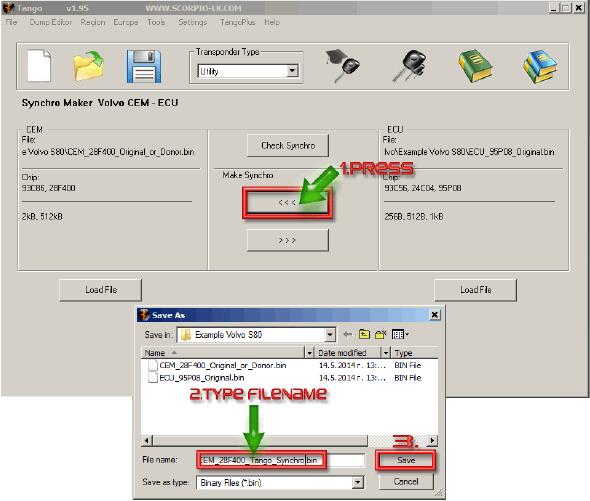
To actually synchronize the files press the arrows beneath "Make Synchroâ€. The upper arrow that points left will prompt saving a new CEM dump file that is synchronized with the ECU. The second button which points right may be used to create a new ECU dump file instead. Choosing which function to use (create new CEM file or create new ECU file) is up to users’ personal preferences and basically there is no difference. It may be a good idea to base your decision, which module to synchronize, on the unit where it is easier for you to reprogram. As to our example, rewriting FLASH 28F400 is more difficult than 95P08. Therefore it may be a good choice to generate file for the ECU module and write it back. Click the bottom button "Make Synchro†and save the new ECU file. In any case the newly generated file has to be written back in its corresponding module, which will allow both modules to work together once again.
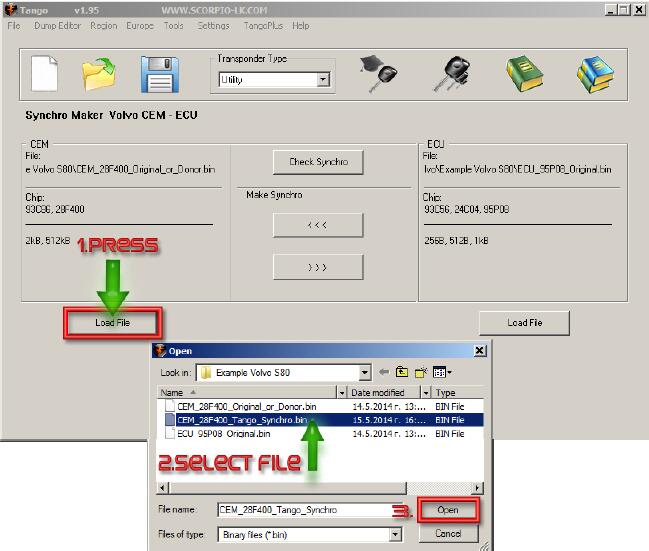
After the new file is generated it is advised to check the synchronization before applying it to the module. Following the example, Press "Load File†under CEM section within the software and select the newly generated by Tango file, which was created in the step above:
After that press Check Synchro:
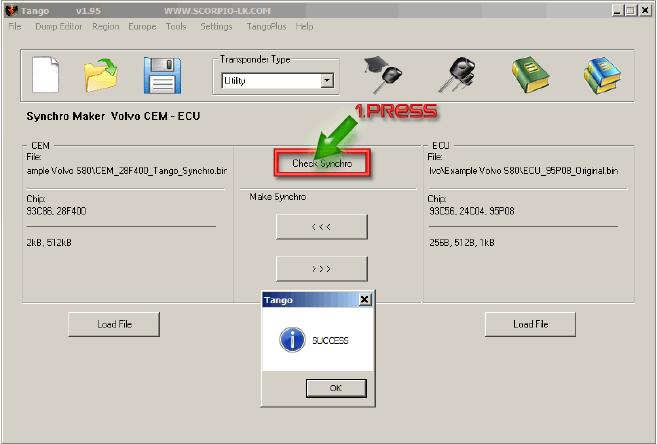
After this step just write back the new file in the corresponding module.
Posted by: Emily white at
09:15 AM
| No Comments
| Add Comment
Post contains 576 words, total size 7 kb.

2. Choose "Read security codeâ€

3. Switch ignition off and click "OK†to continue.

4. Follow the tips, click "OK†and switch ignition on immediately.

5. After several times turn ignition off and on, XTOOL X-100 PAD Tabletkey programmer successfully read out the pin code for Citroen Berlingo!

Posted by: Emily white at
09:05 AM
| No Comments
| Add Comment
Post contains 104 words, total size 2 kb.
32 queries taking 0.0345 seconds, 164 records returned.
Powered by Minx 1.1.6c-pink.

