



June 30, 2018
Good questions and answers of GM diagnostic test. Just share some i think good to share with you all. Hope it helps.
Question: That screen does look exactly like my Car Diagnostic Tool Tech II menus. Some sort of emulator I’m guessing. Nice find.
Edit: Curious how you connected the laptop to your obd 2 port?
Answer: you plug the device into the OBD2 port, and then you either use Wifi back to the laptop to connect that way ($129), or you can use a usb cable instead ($119).
Even through the device is using GDS2,GM MDI Scan Tool and Tech2win software on the laptop side, the only thing that I have to question is if you can drive firmware upgrades through it to reprogram modules if needed as well?
Now the bad news that maybe the op can bring us up to speed, did you mange to get the tech2 win to install on a 64 bit machine with 64 bit windows, or did you install tech2win and the rest of the software a 32windows machine only isntead.
Question: First GDS2 works with the included software as a virtual machine with VMWare running in a decent hardware, no low end Pentiums or Celeron, please Core2Duos and up, Minimum 4GB Ram, etc..
Second and thanks for the seller assistance, Tech2Win works ONLY in a physical system with Windows Xp or Windows 7 x86 (32Bit) installation. It does not work any other way. It DOES NOT WORK in a x64 (64Bit) environment. Did I say only 32Bit?
Answer: Truth is, for $119, would just about cover what most are using the tech II for on the vet anyways, but still back to the question if you have to have a X86 machine (32 bit machine with 32 bit windows software) to load the needed tech2 win software to, since it does look its a no-go on a X64 machine with window 64 bit windows install , and even a no go of trying to VM a X86 shell to run tech2 win that way on a X64 loaded version of windows on a 64 bit machine instead.
So the real question since most of the newer laptops are 64 bit, and running windows 10 64 bit, is this what you loaded the software to, and had no problems running it? Or did you have a 32 bit machine laying around to load the software to instead.
Note, there is a work around to get a 32 bit program to run on 64 bit software, but it no joy, and not sure how its going to reach to GDS2 running in a VM shell at the same time.
Question: I am no IT smart but still have to ask, how do you make the connection between the GM VXDIAG VCX Nano and the computer?
Answer: it connects via a usb cable that comes with the device and then the device itself connects to your cars OBD2. Yes you can even reprogram modules. Its basically the same you would do it with the clone Tech 2. You use the GDS2 software. It comes with the device, but i’m not sure if its a cracked version and would still require one to obtain a subscription from the ACdelco website (some one will correct me if im wrong). I’m not sure if there is some kind of test i could do to verify that without actually reprogramming a module???
Question: Now that I do have the tool, and living in a high humidity area, how to turn the HVAC after blow on.
Answer: Connect the scan tool.
Turn ON the ignition, with the engine OFF.
Select HVAC Module.
Select HVAC Systems Automatic.
Select Special Functions.
Select HVAC.
Select Afterblow Option.
Select ENTER to enable the afterblow.
When done, use the soft key to save changes.
When afterblow has been enabled by the scan tool the blower motor will operate between medium and high speed for 4 minutes after the engine has been turned off.
Good deal. Not gonna lie, wish i had more stuff to do with my car so i could play with mine further. But i will look at the HVAC option.
I fired up the GDS2 software and that indeed runs off Windows XP. But it does come with the VM software. So far everything works under my Windows 10, but like i said the GDS2 is running in the VM software.
Posted by: Emily white at
01:31 PM
| No Comments
| Add Comment
Post contains 746 words, total size 5 kb.
June 22, 2018
Some important tips of Mercedes Benz W212 7G M Mode Variant Coding using Vediamo.
Purpose:
W212 7G M Mode Variant Coding
You need:
Vediamo running with Sd connect C4
SCN coding database
Variant code:
Y2KY
BetaMar
I want to have M-mode in W212 E500 4matic 2010 model 212.090 SA801 – YOM 10/1, at the moment my variant code is Y2KX, does anyone help me to know the right code for M-mode ?
StarRacer
That’s interesting. I’ve got nearly the same car (W212 from 2009) and I’m also looking for the manual mode. My variant code is Y2KY.
Someone recommended to try three codings before and after the current one but I’m a bit hesitant with this.
The coding contains several properties of the car including 4Matic or RWD. In contrast to the RWD ones, the MB Star have a torque limitation to protect the gearbox etc. when starting with
full throttle. Therefore, a genuine 4Matic variant code would be
preferable.
I think in the 7G coding collection there was no W212 E500 with M-mode. The next "match†could be an S500 4Matic (221.086). From the thread mentioned its variant code is YE25. Not sure if this one has M-mode, though.
BetaMar
I want to confirm that in 212.090 with MY2010 SA801 M-mode work very well
with Y2KZ ?? Imidietly after coding there was error showed in KI display "presafe function is unavaiable†but after ignition off/on everything works!
For 212.090 MY2009 SA800 correct coding is Y2AR
StarRacer
SUCCESS! Now with working M-mode! Y2KZ also works for me. Same error as above after first start which went away with the 2nd start.
Test drive was successful. One drawback, however: The gear switching times in M are not better than in C or S. Some years ago, I read from an S211 (E500 M273 with 7g) which was given M-mode and the owner claimed significantly faster gear switching. He did it the official way: Changing VeDoc and MB Star C4 online SCN coding. Maybe there’s more to it than just the VGS variant coding.
Good luck
Related posts:
Posted by: Emily white at
09:44 AM
| No Comments
| Add Comment
Post contains 353 words, total size 3 kb.
June 18, 2018
After surfing the net looking for some goodies for my ’06 C4 I cam across Porsche Piwis Tester II. This company Obd2tool.com is selling the PIWIS II system, it has offline and online functions, to support ONLINE function, valid certificate must be available for Porsche Piwis Tester II.
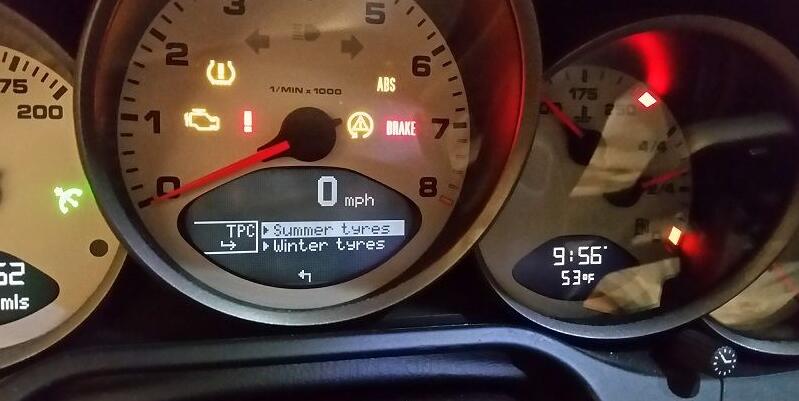
Additional settings enabled for TPMS system with a borrowed gray market PIWIS. My 2006 C2S did not come with the TPM option. The hardest part of the retrofit was manually running wires as the wires were not in the front and rear main harnesses in my car. Then it needed programming with PIWIS to activate.
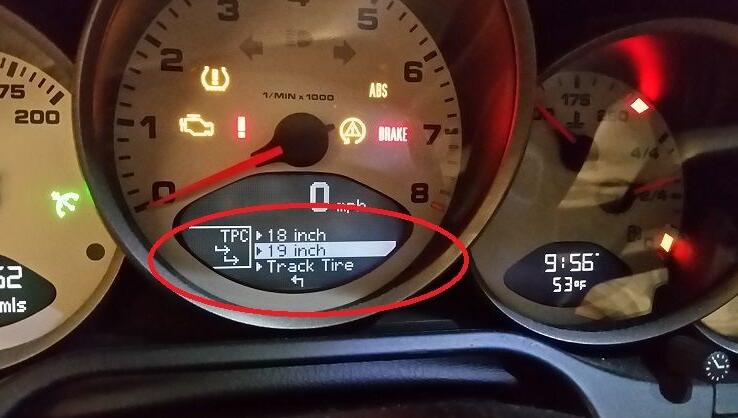
The biggest difference with the track tire settings is you define the target pressures. The other settings are predefined base on summer vs winter, 18 vs 19, partial vs full load. Not positive but I think the size option was also enabled.
The "Track Tire†is the special setting. There is an option in car diagnostic scanner PIWIS to rename it to whatever you want. My OCD struggled with "Track Tyre†to match the other settings or "Track Tire†as it’s properly spelled where I live. I settled on the latter
Posted by: Emily white at
01:56 PM
| No Comments
| Add Comment
Post contains 200 words, total size 2 kb.
June 12, 2018
Error message:
"OBDII
License exception!â€

Engineer solution:
Delete XTOOL file and run an upgrade. Do as following:
Step 1: Connect X-100 Pad to PC and power on X100 PAD
Step 2: Activate X-100 Pad
Press Login account and login with email address
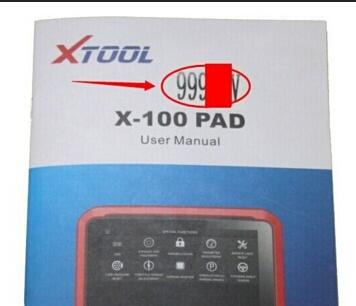
Enter "Activation Code†which you can find on the user manual
Complete all information and click on the "ACTIVATE†button
Atcivation complete. Go to x100 pad main menu.
Then open resource Manager and delete the XTOOL file there.
Step 3: Run an upgrade
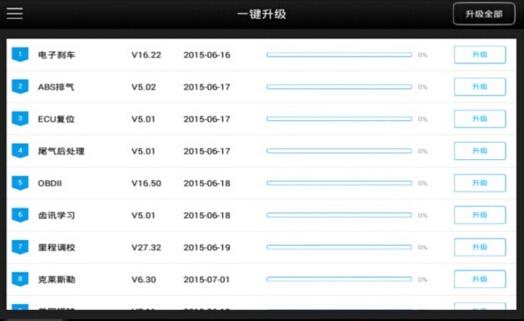
X100 Pad updated directly online using WiFi or USB connection.
To access the update application, open the Xtool X-100 pad application and click "UPDATEâ€
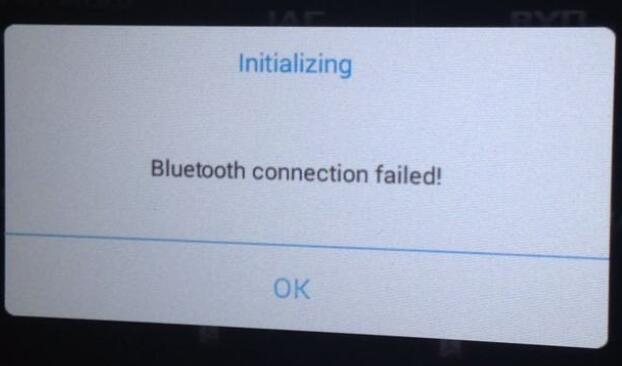
Note: If you cannot connect X100 Pad to Bluetooth after upgrade, it shows error message:
"Initializing Bluetooth connection failed!â€
Solution:
Connect Car Diagnostic Tool X100 PAD to vehicle via Bluetooth, search Bluetooth device in setting again.
Posted by: Emily white at
10:57 AM
| No Comments
| Add Comment
Post contains 170 words, total size 3 kb.
June 10, 2018
1.Will there be a Mac or Linux version?
There will be no "native†Mac or Linux versions. The time and effort required to "port†VAG-COM to these platforms would never be worthwhile. One person has gotten VAG-COM running under Linux using WINE — click here for details. Another person has managed to get VAG-COM working on a MAC with Virtual PC – click here. Neither of those examples are supported by Ross-Tech.
2.Will there be a Windows-CE/PocketPC/WindowsMobile or Palm-OS version?
Possibly at some point in the future, but we don’t have a timetable yet. We conducted a poll of current and potential VAG-COM users about where we should concentrate development efforts. The results:
(1)75 % Improving and adding features to the Windows version
(2)11 % Porting VAG-COM to Windows CE / PocketPC
(3)9 % Porting VAG-COM to Palm
(4)3 % Porting VAG-COM to LINUX
(5)2 % Porting VAG-COM to Macintosh
Some of our customers use VAG 18.2 on a tablet PC such as a Fujitsu Stylistic or on an ultra-portable PC such as a Toshiba Libretto. These can be purchased inexpensively on auction sites. These REAL PC’s work wonderfully and have very small form factors (the Libretto is about the size of a VHS video cassette).
What’s the difference between VAG-COM and an OBD-II Scan-Tool?
OBD-II is a government mandated diagnostic protocol that is primarily
aimed at diagnosing emissions-related problems. An OBD-II scan tool
will work in many different brands of cars. VAG-COM uses VW’s
proprietary diagnostic protocol and will only work in VW/Audi vehicles.
Although you can use an OBD-II Scan Tool in an OBD-II compliant (1996 or
newer) VW or Audi, an OBD-II Scan Tool can only talk to the engine, not the numerous other "intelligentâ€
systems in the car. Want to reprogram your central locks or your Radio?
Diagnose a problem with your ABS, Airbags, or Automatic Transmission?
Re-align your Immobilizer after swapping ECU’s? Reset your Service
Reminder Indicators? Communicate with a pre-1996 model (not OBD-II
compliant) car? An OBD-II Scan-Tool can’t do any of these things. Please
see our OBD-II Page for information on using third party generic OBD-II
software through our Interface. Want some reasons to choose VAG-COM
over a generic OBD-II scan tool? See this Real World Comparison.
Our latest version of VAG-COM adds Generic OBD-II functionality, see the Download Page for more info.
Posted by: Emily white at
11:55 AM
| No Comments
| Add Comment
Post contains 399 words, total size 3 kb.
June 03, 2018
Tech2Win is a Windows application which can be loaded onto a service PC or laptop via TIS2Web. It provides much convenience to the operation of GM MDI diagnostic scanner. But improper operation may leads to system errors. Here provides the MDI Tech2Win no communication error and solution.
Problem:
After install Tech2Win software
application, connect the GM MDI interface with Opel Zafira-B 2008 to
reset ABS light. The software program was allowed to access to Chassis
control module, but soon the Tech2Win system display error message: "no
communication with the vehicleâ€.
image: http://www.obd2tool.com/blog/wp-content/uploads/2018/05/31.jpg

Possible reason:
The right bottom (0) icon indicates that MDI Tech2Win software has not need well installed and activated.
Solution:
Re-install and activate the GM MDI Scan Tool GlobalTIS MDI Tech2Win GDS2 software again.
If there is (1) icon displayed on the right bottom of the Tech2Win
program, the software has been successfully installed and there is good
communication between vehicle and GM MDI scan tool.
image: http://www.obd2tool.com/blog/wp-content/uploads/2018/05/41.jpg

Sometimes when you use theGM MDI, you will meet some problems and here we will share the reasons and the solutions of those problems. In many conditions, when there occurs some troubles when you are using the MDI, you should first reboot the MDI software and do the Self Test.
image: http://www.obd2tool.com/blog/wp-content/uploads/2018/05/11.jpg

- "MDI DOES NOT PASS SELF TESTâ€
If you meet this problem, it indicates that there is an internal problem in the MDI, you need to connect the MDI to a PC by using the USB and do the software recovery procedure.
- "MDI ERROR LED LIGHTS AFTER POWER ONâ€
This condition indicates that during power on, there has detected a problem. And the solution is to power down the MDI and verify that it has the same problem after you power up again, then connect the MDI to a PC by using the USB and do the software recovery process.
- "MDI FAILS TO POWER UPâ€
Normally speaking, Once the external power is applied,the MDI should power up. If the MDI does not turn on, the first thing you need to do is to check the wall plug or power cable connections. Then try to supply power to the MDI from the two different power sources, the vehicle DLC connector and the AC 12-volt Adapter.
To solve this problem, you need to check and make sure that the cables are all attached to the MDI securely and the connector pins are all clean. If you are going to connect to the vehicle DLC connector, try to power from the AC 12-volt Adapter. And if you are going to connect to the AC 12-volt Adapter, you should try to power from the vehicle DLC connector.
- "MDI TURNS OFF IMMEDIATELY WHEN DISCONNECTED FROM THE VEHICLEâ€
Actually, after it is disconnected form the vehicle, the MDI should stay on for a factory set time unless you press the power button. If theAuto diagnostic tool MDI turns off immediately once you disconnected it from the vehicle, you should power up the MDI and verify that it has the same problem when the power is removed, then replace the batteries and make sure they are properly installed. After these operation, if it still fails to be off correctly, your MDI may be damaged.
image: http://www.obd2tool.com/blog/wp-content/uploads/2018/05/21.jpg

http://www.obd2tool.com/blog/2018/05/23/how-to-slove-the-problem-for-gm-mdi-no-communication-with-the-vehicle-and-solutions-about-gm-mdi-scan-tool-for-some-problems/
Posted by: Emily white at
06:56 AM
| No Comments
| Add Comment
Post contains 564 words, total size 6 kb.
32 queries taking 0.0387 seconds, 168 records returned.
Powered by Minx 1.1.6c-pink.

