



January 29, 2019
Discussion: DRB3 compatibility with Micropod II and VCI Pod.
Car: 2004 Chrysler 300M
Software: DRB3
Firmware: wiTech MicroPOD 2 and VCI Pod
It is said that the MicroPOD II can run the enhanced DRB III emulator with WiTech App v16.04.12. However this app version might require to run online, connected to TechAuthority. If it does you’re screwed because it will be banned based on its ID.
I have a Micropod II V17.04.27 Type C…. But I can not use it, because
it can not find the ECU. can only display battery voltage. I can only
select cars between 2017 and 2004. I have a 2004 300M, but no chance. I
think only real CANbus can be used.
the extended DRBIII Emulator can not work, it needs an update, but this would make the adapter useless I think.
So, I think, only witech VCI Pod can help.
This is what I’ve tested:
Alarm: tried to force activation but I’m missing a sensor in the trunk, so it won’t activate.
EVIC/ATC: screens autodiagnostics
Memory seats: enabled the glide feature (easy exit) on a 1999 and 2000 Ms!
ECU tests: Fuel injector #1 (it fires the fuel pump and opens the
injector, I guess you need to have the injector off the car to really
see what’s going on).
BCM tests: Lights tests (it flashes all lights or a specific one you choose so you can see if the bulb/wiring/bcm are ok).
TCM tests: I don’t remember but I think the engine has to be running for
the tests to complete (you are supposed to look at the RPMs while the
TCM triggers the solenoids).
RKE: tested the keys (it tells you which button is pressed on the fob)
And there are so much values you can read… Basically you can read all sensors of course, but you can get the interior light dimmer switch output, sun sensor value, heated seats temperature IIRC… It’s a great tool but IMO it doesn’t worth that much considering you cannot flash modules.
Flashing was a failure for the TCM. However it looks like I could flash the EVIC if a flash was available. I used a flash for another model, made some changes to the flash file descriptor (basically it’s an XML file describing the flash, what part number it replaces, what old part numbers are flashable, etc…) but I didn’t press the button as it would have break the EVIC.
Fyi, flash files are available from TechAuthority website but you
need a subscription. A 1 or 3 days subscription is enough. The flash
application packaged with WiTech software 13.x is old, so you should use
the one from TechAuthority. The thing is, it also downloads a newer
driver and WiTech server program, and they won’t work with WiTech 13.x
or 14.x. For this reason I used my corporate laptop and/or a virtual
machine, dedicated to the flashing app.
Once you have selected a flash on TechAuthority website, it downloads a
few files in your computer temporary folder. You can save these files
(basically I copy-pasted the files in a new folder named after the flash
part number) and reuse them latter. That way, you don’t need the
TechAuthority subscription anymore. It should also work for real DRBIII
devices. Simply copy-paste the files from where you saved them to your
temp folder. IIRC you have to start the flash application once to get
the required subfolders created in the temp folder.
With the 13.x software version, from the DRBIII emulator, you can run the non-powertrain flash application. And this flash app was able to read the part number from the EVIC on the car, while the powertrain flash app (and also the flash app from TechAuthority) could not read the part number from the TCM. That’s why I’m guessing I should be able to flash the EVIC. Also I talked with a guy on YouTube who was able to flash the EVIC on his Jeep (2002 IIRC).
For most tests, I had the engine not running, key in RUN position.
Want a good reason? lol!
That’s exactly why I waited so long… Well you can talk to the ABS module
and read the codes, which is not possible on the 300M with a cheap
ELM327! You can run the ABS bleeding procedure (not tested yet), read
the Clutch Volume Indexes from the transmission, pair a new
PCM/BCM/SKIMM module (not tested)…
I wouldn’t get the newer dongles, they run a bit cheaper on AliExpress
but I’ve read they don’t work with the TechAuthority web components,
which is the all point of having the new device over the VCI Pod. So
don’t buy one!
Posted by: Emily white at
10:25 AM
| No Comments
| Add Comment
Post contains 785 words, total size 5 kb.
January 24, 2019
This article show a guide on ways to carry out self test for GM Tehc 2 CANdi,hope it aids!
The energy light on the CANdi module doesn’t come on when connected to the Tech two? If that is what you imply mine will not light up either. I think they really should flash when linked to the car’s pc as that indicates the CANdi module is communicating. Bosch guidelines:
Tech two CANdi User’s Guide:

P/N 08002749 03/07 ?2007 Robert Bosch LLC, U.S.A. All rights reserved.
The Controller Region Network Diagnostic Interface (CANdi) is an in-cable module that operates with all the current Tech 2 components which includes the VCI, cables, and adapters.
Installed, the CANdi module is fully backward compatible with current tester functionality. The module powers up inside a way that makes it transparent for the user. Which is, unless the Tech 2 enables characteristics certain towards the CANdi module, all signal lines function as they do without the need of the
CANdi module. This enables the current Tech 2 computer software to be utilized with no adjustments, no matter whether or not the CANdi module is installed.
The main function on the CANdi module is usually to add CAN capability towards the Tech 2 tester. The following list summarizes the fundamental traits on the CANdi module:
Supports simultaneous communications on three CAN buses
Offers higher speed UART communications together with the Tech 2
The Tech two commands the CANdi module operation.
When installed, the CANdi module doesn’t interfere with any diagnostic process at present performed utilizing the Tech 2. The usage of a CANdi module does not demand any physical alterations to the Tech two, its cables, or adapters. The module operates in transparent mode till awakened by the Tech 2. Upon initialization, the CANdi module operates below master control from the Tech two. All functionality is determined by the Tech two application software program which is loaded around the Tech 2’s system card. The CANdi module normally operates in slave mode towards the Tech two, responding in high speed SAE J1708 towards the tester.
Physical Interface and LED CANdi connects to the Tech two by way from the existing Information Hyperlink Connector (DLC) Burndy Connector. The car side connection remains unchanged working with the existing adapter to interface in between the Burndy connector plus the SAE J1962 connector. When functioning adequately, CANdi’s LED flashes. Inside the occasion of a problem, the LED is going to be continually illuminated.
Warranty and Technical Service
Included together with your program is really a Warranty Card that has to be submitted to Vetronix for activation from the two-year warranty. For technical assistance, please make contact with Vetronix Tech Assistance at (800) 321-4889 ext. two.
Very good to understand: The Candi Module need to not plugged into your Professional Diagnostic Tool Tech2 unless your working on a later car or truck ..commonly 2005 plus. Olders car or truck from 96 should really NOT possess the Candi Module attached.
Posted by: Emily white at
08:15 AM
| No Comments
| Add Comment
Post contains 506 words, total size 4 kb.
January 10, 2019
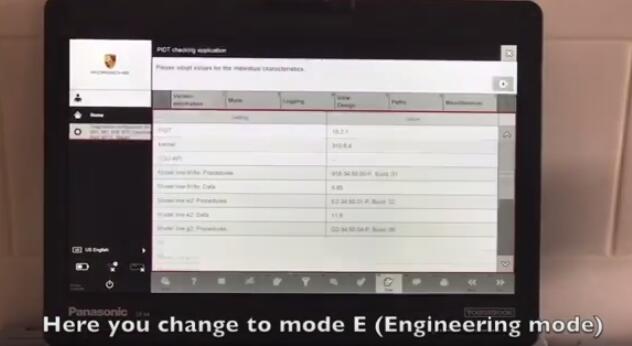
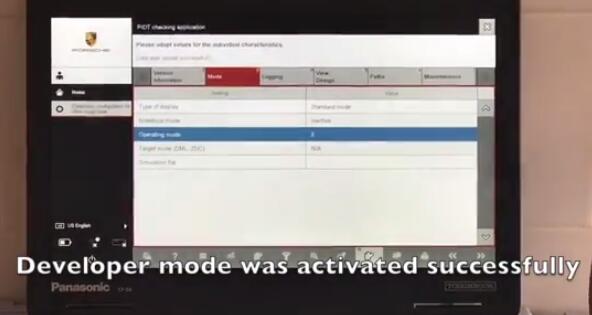
Piwis Tester lll is the latest professional tester for Porshe,the most poweful diagnose and offline programming tool for Porsche,with latest tester for Porsche,powerful functions,full access . We apply every effort to solve hard cases in automotive and we will try our best to deliver you really working solutions.
In This article obd2tool.com show you how to run Porsche PIWIS Tester 3 with developer rights.
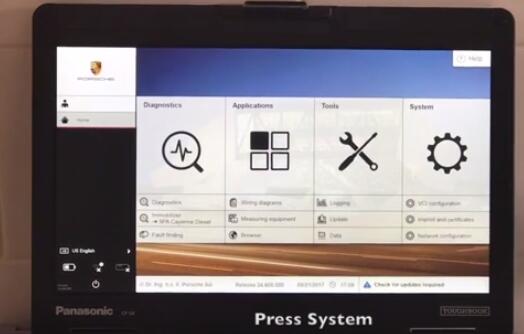
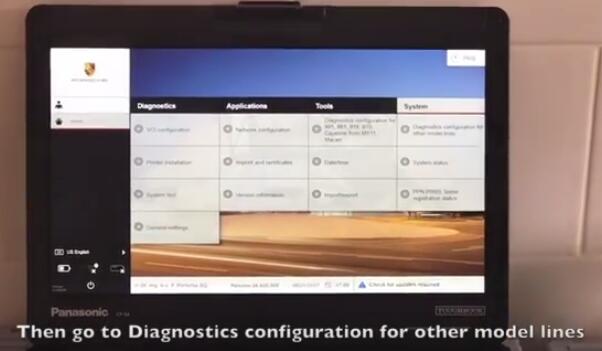
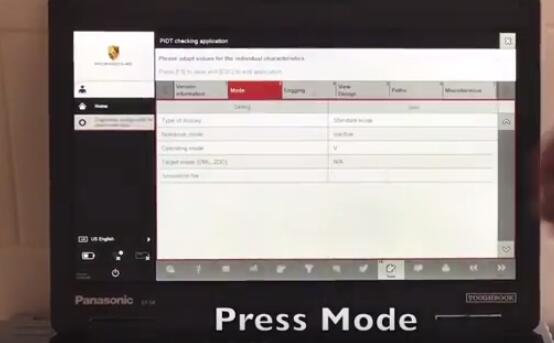
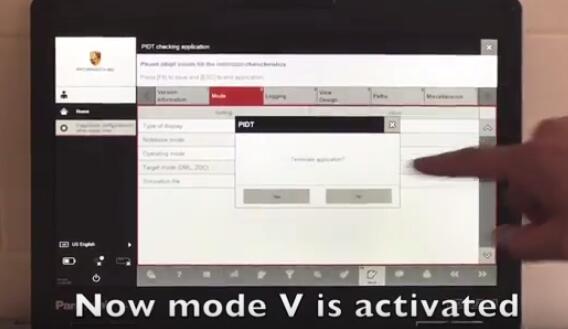

Posted by: Emily white at
02:20 PM
| No Comments
| Add Comment
Post contains 73 words, total size 2 kb.
32 queries taking 0.0386 seconds, 162 records returned.
Powered by Minx 1.1.6c-pink.

