



October 10, 2020
If you’re confused between the Autel MS906,MS906BT and MS906TS scan tools, then you’re in the right place. Next, we’ll highlight every important feature, the pros, and cons of every scanner to make your work easy.
Now, Reading this Autel MS906 VS MS906BT VS MS906TS post to decide on what’s best for you.
Comparison Table: Autel MS906 VS MS906BT VS MS906TS
Autel MS906 VS MS906BT VS MS906TS on hardware
The pros, and cons of Autel MS906, MS906BT and MS906TS
* Autel Maxisys MS906 Scanner review on pros and cons
* Autel Maxisys MS906BT OBD2 Scanner pros and cons
* Autel Maxisys MS906TS Diagnostic Scan Tool pros and cons
Similarities and Differences between the Autel MS906 VS MS906BT VS MS906TS scanners
* Similarities among Autel MS906 VS MS906BT VS MS906TS scanners
* Difference among Autel MS906 VS MS906BT VS MS906TS scanners
MS906, MS906BT and MS906TS, which one is best for you
Before start, Just know that the Autel MS906 is an initial version and Upgraded version Autel MS906BT, and Autel MS906TS has same types of features.
Comparison Table: Autel MS906 VS MS906BT VS MS906TS
Autel MS906 VS MS906BT VS MS906TS on hardware
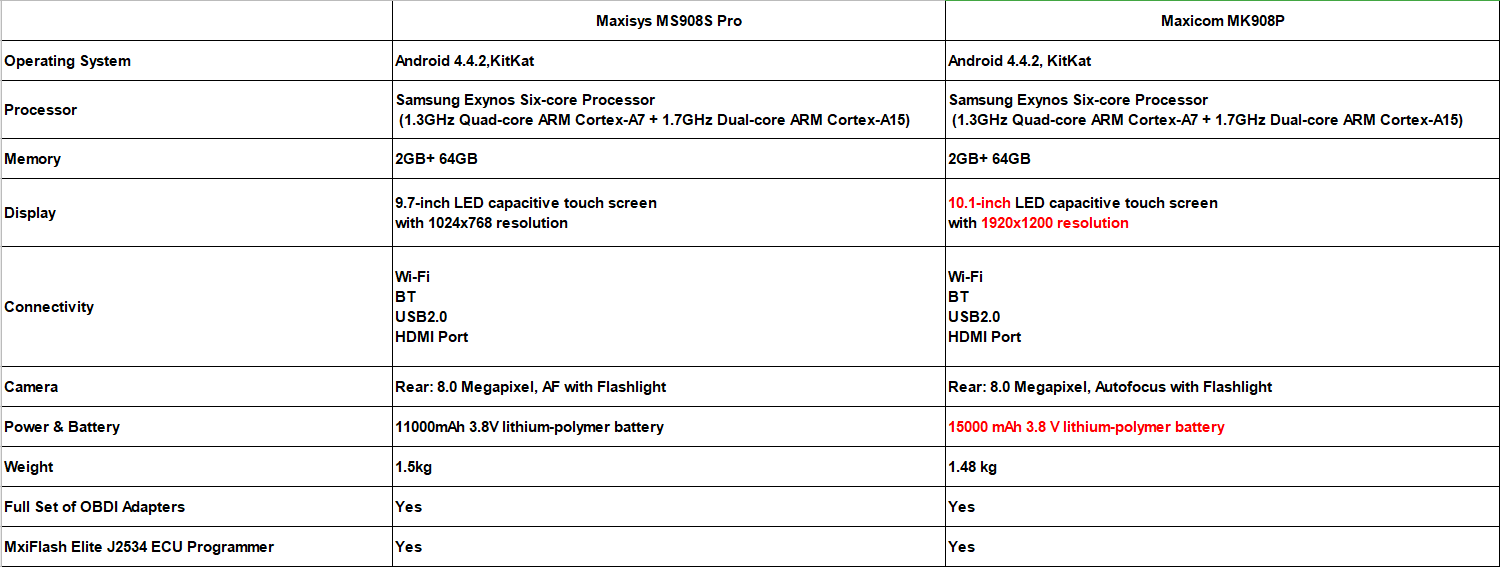
Autel MS906 VS MS906BT VS MS906TS on software
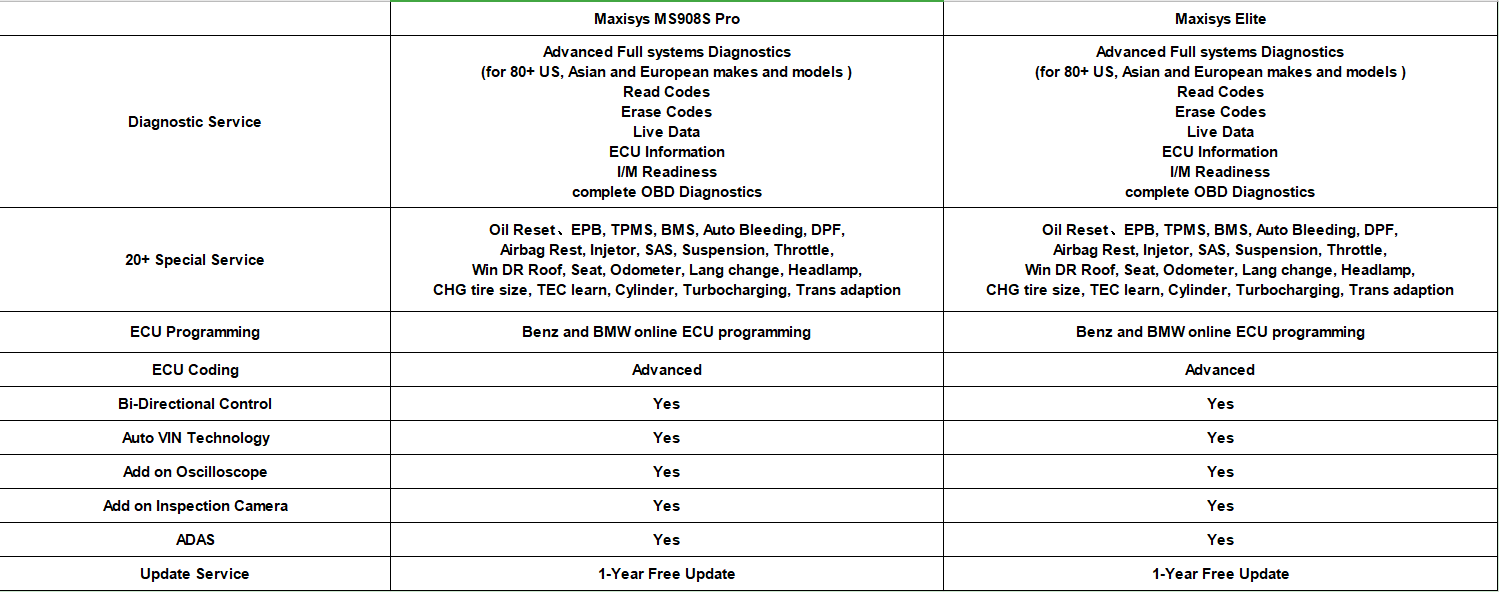
The pros, and cons of Autel MS906, MS906BT and MS906TS
Autel Maxisys MS906 Scanner review on pros and cons
The Autel Maxisys MS906 scan tool is an upgraded version of the DS708 and DS808 with OE-level vehicle coverage. It is a sleek and portable device that is easy to use just like your normal tablet. The Maxisys scan tool comes with the most recent AutoVin technology that helps to identify vehicles in one touch to scan ECUs, get vehicle info, and run diagnostics on particular systems. It covers more than 80 car manufacturers and has the same features as the MS906BT but without VCI.
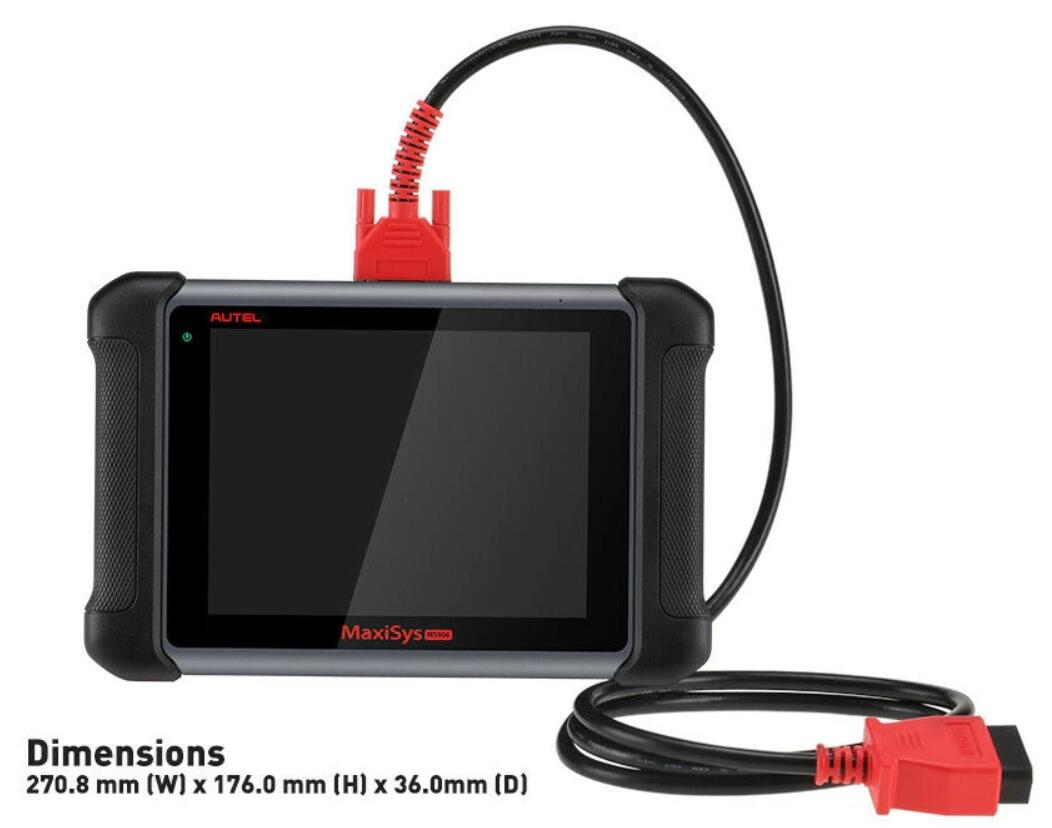
MS906 Pros:
* It is very easy to use
* It comes with automatic updates through the internet
* The tool is fast and allows the user to multitask due to its Android operating system
* It has a built camera for capturing images and sharing with other mechanics
* It has a one-year warranty
MS906 Cons:
* It has a very long recharging time
* No Ecu coding and connect to vehicle through OBDII Cable
* can’t add Oscilloscope or Inspection Camera
Similarities and Differences between the Autel MS906 VS MS906BT VS MS906TS scanners
Similarities among Autel MS906 VS MS906BT VS MS906TS scanners
Among the three scanners, the MS906 diagnostic scanner is the most basic, followed by the MS906BT and the most advanced scanner is the MS906TS. These scanners share a lot of features such as Samsung Exynos Hexa-core processor, Android 4.4.2 KitKat, 32 GB memory, 8 MP camera, AutoVin technology, and have MaxiFix Cloud-based information system.
Difference among Autel MS906 VS MS906BT VS MS906TS scanners
Besides having the same features, these scan tools also vary in many ways. First of all, the MS906BT and MS906TS feature Bluetooth connectivity while the MS906 doesn’t have one. Additionally, they have wireless VCI while MS906 doesn’t have one. Furthermore, the MS906TS provides comprehensive TPMS solution, while the MS906 and MS906BT just have basic tpms like tpms sensor id relearn but don’t programming sensor, which is the main difference between the Autel MS906BT and MS906TS.
Price wise, the MS906 is the cheapest amongst the three, followed by MS906BT and finally the MS906TS. Of course, you can choose MS906BT + TS501 to instead MS906TS, because this bundle has total same functions as MS906ts but cheaper. Make a wise choice and select a diagnostic scanner that meets your needs and demands.
MS906, MS906BT and MS906TS, which one is best for you
The Autel MS906 scan tool series is one of the best as it features different high-quality scanners that are built for professional use. But you have to choose one right. Different technicians and mechanics have different needs. So, depending on what you want the code reader to diagnose, you may find one of these tools to be the most ideal for your job.
If you want a professional scanner at a great price, then you should go for theAutel Scanner MS906BT scan tool. But if you want a more advanced scanner with complete TPMS service, then the Autel MS906TS is the device for you or choose MS906BT +TS501.
Autel Maxisys MS906BT OBD2 Scanner pros and cons
The Autel Maxisys MS906BT has the same functions as the MS906 but with slightly more features such as VCI, supports oscilloscope, and digital inspection camera add-ons. In addition, the MS906BT has double the battery size of the MS906 as it features built-in lithium-polymer 10, 000 mAh 3.7V lithium-polymer battery, while the latter has a 5000 mAh 3.7V lithium-polymer battery.
This scan tool also offers comprehensive vehicle coverage as it is compatible with more than 80 vehicle makes and models from the US domestic, Asia, and Europe. This diagnostic tablet scanner is very easy to use and very effective in performance. It is fast, thanks to its Android operating system and it enables the user to multitask. It also performs advanced ECU coding and complete OEM-specific scanner coverage.

MS906BT Pros:
* It is a multilingual gadget
* It provides a high-quality display for easy interpretation
* The ms906bt has automatic software updates over Wi-Fi wireless connection
* It supports up to 32 GB memory
* It has a durable battery
MS906BT Cons:
* It comes with limited updates for only one year and after that, you will have to pay for them
Autel Maxisys MS906TS Diagnostic Scan Tool pros and cons
Last but not least, the Autel MS906TS is another sturdy and professional diagnostic scanner that will perform basic, special and advanced functions without any problem. The device comes with both Bluetooth and Wi-Fi for easy roaming around the garage as you carry out different tests. It runs on the Android operating system that makes it have a fast boot-up time and enables the user to multitask. One of the huge differences between the MS906TS and the MS906 and MS906BT scan tools is that it offers comprehensive TPMS solution. Apart from that, these scan tools share features and functions and are extremely reliable.
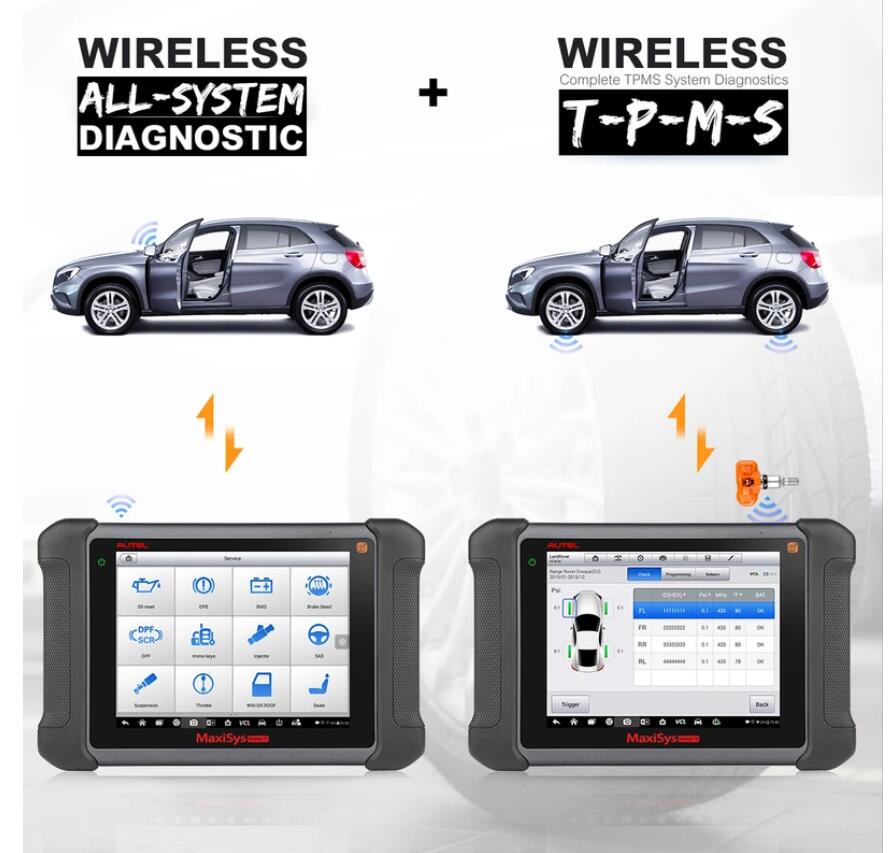
MS906TS Pros:
* It covers a wide range of vehicles
* It supports both basic, special, and advanced functions
* The ms906ts allows users to save, print, and playback live data
* It has MaxiFix feature that provides diagnostic tips and tricks to mechanics
* The tool comes with a one-year warranty
MS906TS Cons:
* It is quite expensive
* It comes with limited software updates for only one year
Posted by: Emily white at
08:30 AM
| No Comments
| Add Comment
Post contains 1108 words, total size 9 kb.
Car model and year:
2005 C6 Corvette z51 53,000 miles. 6speed manual.
Symptom:
Found out the hard way about the drain while not driving the car for a
while. Battery would not recharge, so I purchased a new one about 8
months ago. Found out the hard way the interior lights in the rearview
mirror are a little confusing? So dead battery, recharged , connected
battery to the car, started up fine and now I have;
Brake lights stay on
Service Active handling message with the yellow icon on
reads code C0561-71
Runs and drives fine.
Many hours of research I have checked the plug wires, battery voltage,
disconnected the battery, pulled the blue plugs in the passenger area
and reset.
What to do next?
C0161 Antilock Brake System (ABS)/Traction Control System (TCS) Brake Switch Circuit EBCM
C0561 System Disabled Information Stored EBCM
So the question is if the brake pedal sensor is bad, and the car thinks you are riding the brakes to throw the codes, or if something easy easy to fix, like a corroded pin on the EBCM that needs to be cleaned instead.
As for quick way to check which is really the problem,GM Tech2 on the car for a quick drive while someone monitors the BCM data for the brake pedal, and see if the signal is all over the mag without you touching the brake pedal.
Used GM Tech 2 alternative – VXDIAG VCX NANO
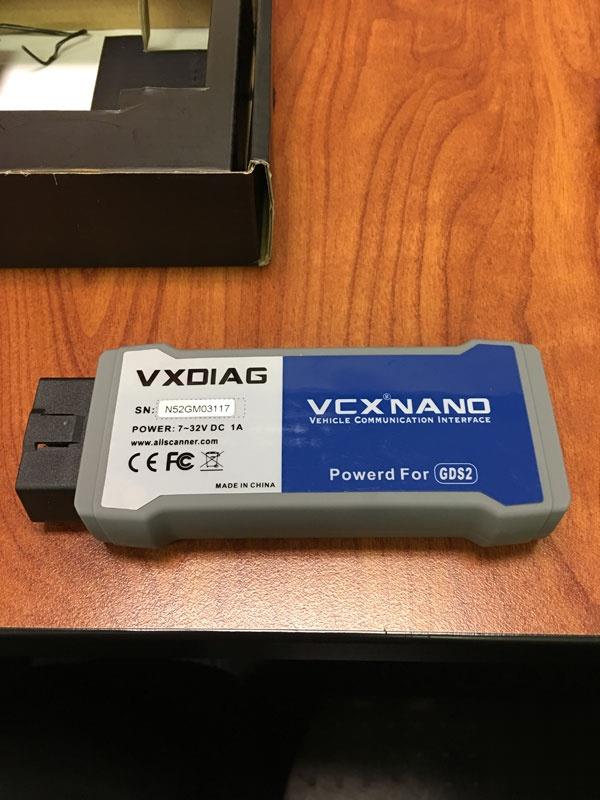
For 99usd on Obd2tool.com, I basically have the software version of a tech II device. I was able to unlock my radio in a matter of minutes. I can do anything a tech II GM can. the cool thing is that the tech2win software runs just fine on my Windows 10 64bit laptop. Would be even cooler with a surface pro or similar tablet.
And just make sure that you have a laptop with a multi-core
processor, since it will be needed to run cracked GDS2 and Cracked
Tis2000 via VM player.
Also, since nano is a MDI clone with step back to run Tech II win, works with TDS if you need that as well.
How to install GDS2 and Tech2Win successfully?
(virtualmachine)GDS2_2016-10: https://mega.nz/#!RRVi1YiR!Cux39gxtbGnzFhKA5LElEcVjjNNg5Eb2huNxlngEv1E
(virtual machine)GDS2_2018-01: https://mega.nz/#F!Q0Aj1BqI!iW1YeXoS9RjKTk9FEKkkAA
Tech2Win: https://mega.nz/#!tIFWUIxT!XBAFZWEFPhQ3A9MtyPYfT1wojVgB1sEmt2T62nrmQcM
Offered by VXDIAG engineer
Also you can try the following installation guide shared by @Dano523:
When you get the download complete, will be 1 .RAR Zipped file, so just download 7-zip to decompress the file.
Note, once decompressed to desk top, will be a single file called VX mdi driver, and a folder that is labled tech2 win.
As for install, load VX driver mdi first, and open VX mdi driver, plug the Nano in so VX manager (vx mdi driver) sees it, then click on the firmware and licenses icons to update them on the nano.
Once they are updated, leave VX manager open, and the Nano still connected to the machine (do not disconnect it when windows tell you to do so), then click on the auto.exe file in the Tech 2win folder, to load Tech2 win to your machine, Tech2 win quick start icon to your desktop. Its going to load tech2win, and a tech2win quick icon to your desk top. Delete the one that says tech2win quick start, since you never want to use that one.
https://www.7-zip.org/
As for when you go to use the tech2win on desktop icon, will start to
get the tech 2 win screen, then will get three pop up screens.
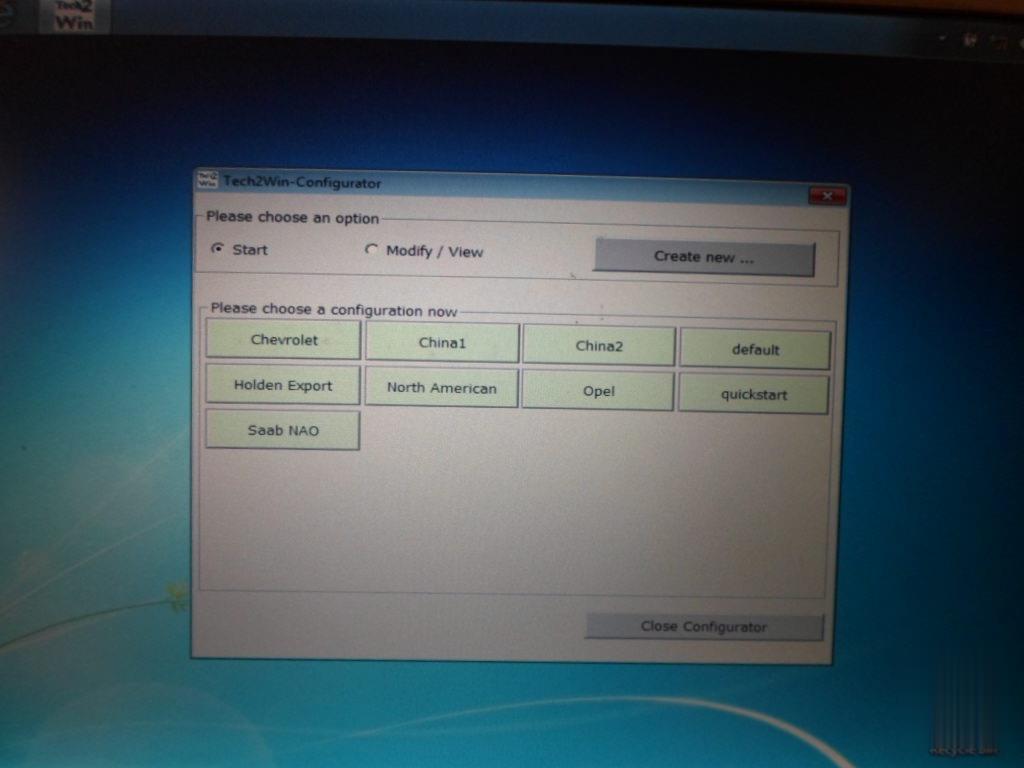
In the first screen, select north America.
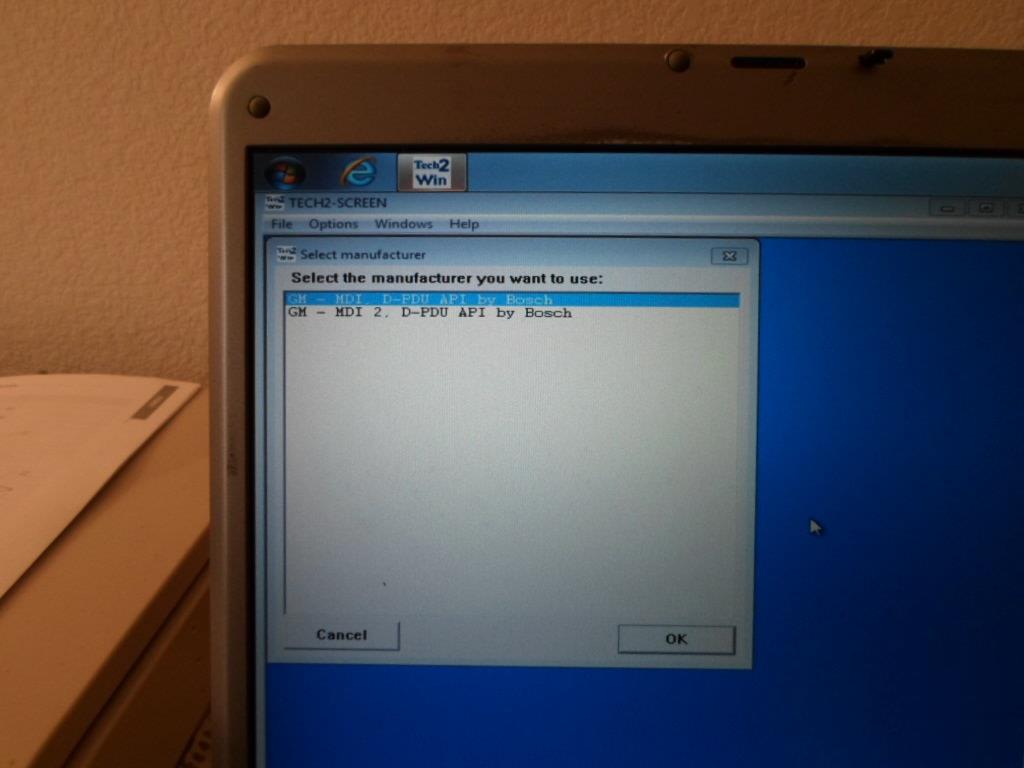
Next screen, select MDI 1,
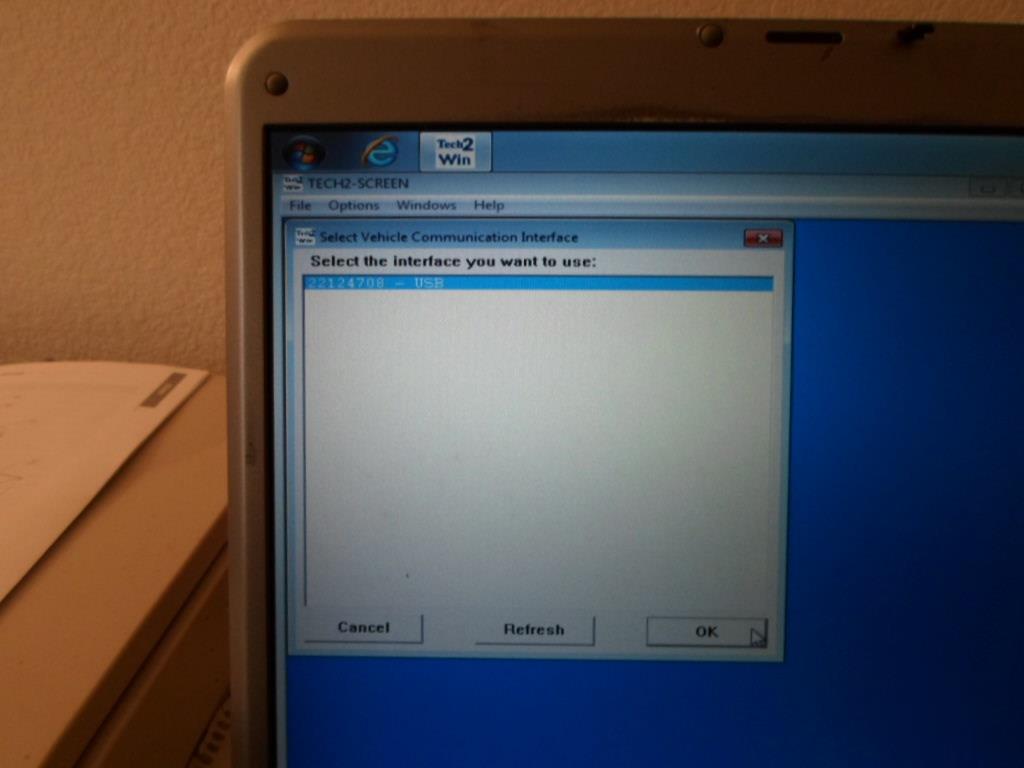
Last pop up screen, select USB device,
After that, it will take you to this screen. Hence if you get this screen only, and not the3 pop ups screen, then tech2 win did not load correctly/ you did not have vx mdi open, and the nano connected to the machine when you did installed the auto.exe program out of the tech2win folder.
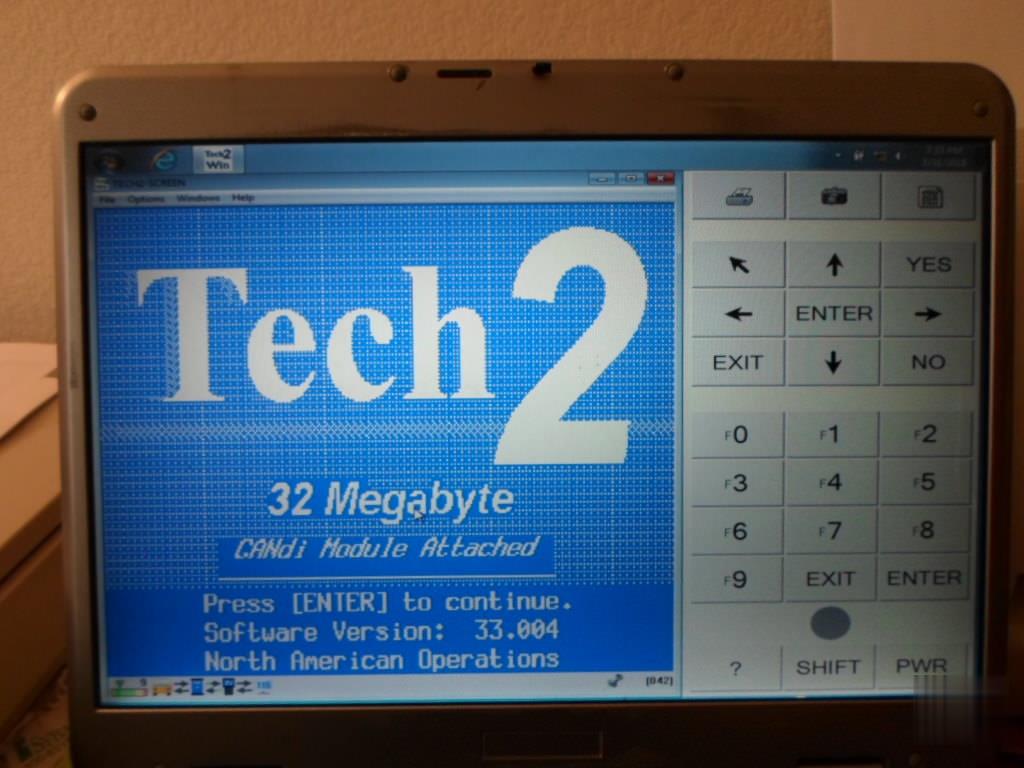
Finally!
have my Tech2 working. At this point it told me to recalibrate the position of the break pedal. All is good now.
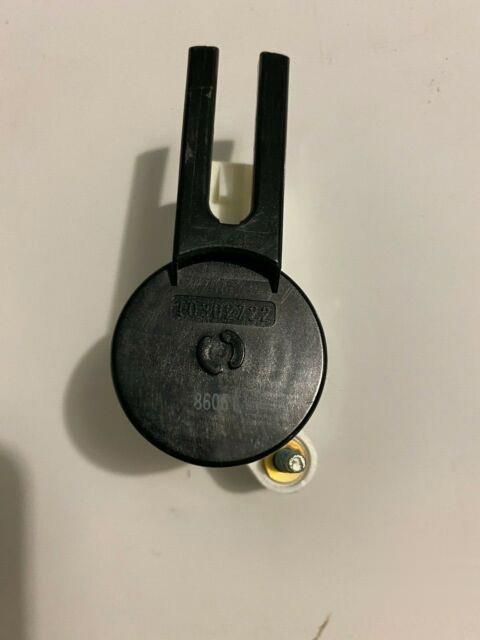
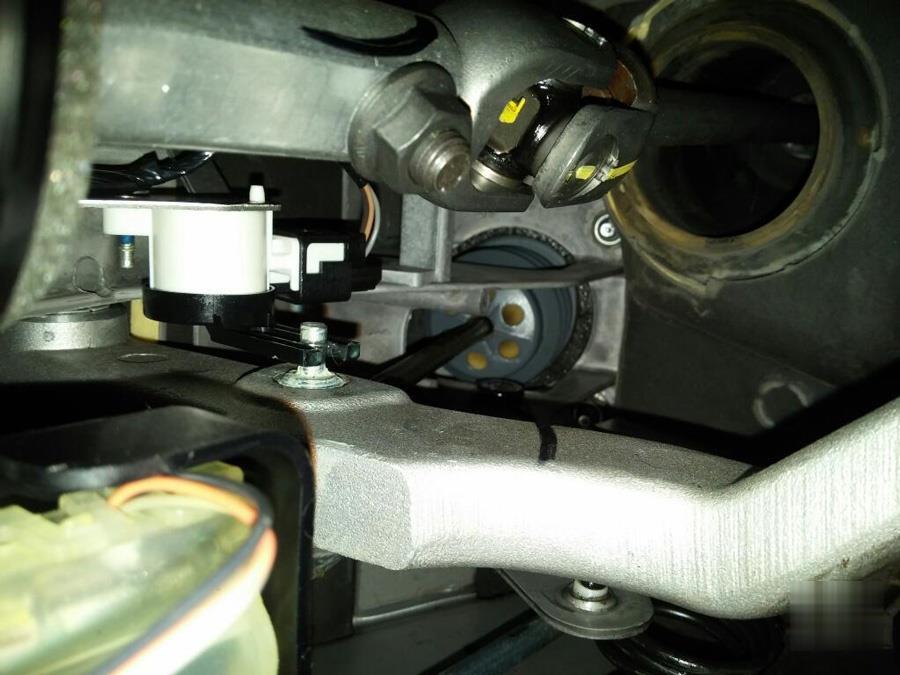
Just keep in mind that the brake pedal sensor forks ride against the pedal shaft post and this causes the fork inner surfaces to start wear.
So you want to keep the brake pedal shaft post to grease to start with, and once the forks do start to wear, or start to bend apart from each other (what is causing the changing ohm readings from the base line ones that the BCM did learn before), if not just the sensor mounting bolts loose instead), the plastic in the fingers bearing surfaces starts so wear more rapidly as well.
So with a new brake pedal sensor like $35, and not that hard to change out and relearn now that you do have a tech II, would pick a new BPS to swap out your old one while you are in there checking the sensor bolts to make sure they are tight, as well as greasing the pedal shaft as well. Hence the BPP relearn sounds like it solved the problem for now, but if the forks keep wearing more faster now that they have started to wear, will be back doing the BPP relearn again pretty soon again.
Posted by: Emily white at
08:20 AM
| No Comments
| Add Comment
Post contains 889 words, total size 9 kb.
32 queries taking 0.0524 seconds, 160 records returned.
Powered by Minx 1.1.6c-pink.

