



August 29, 2019
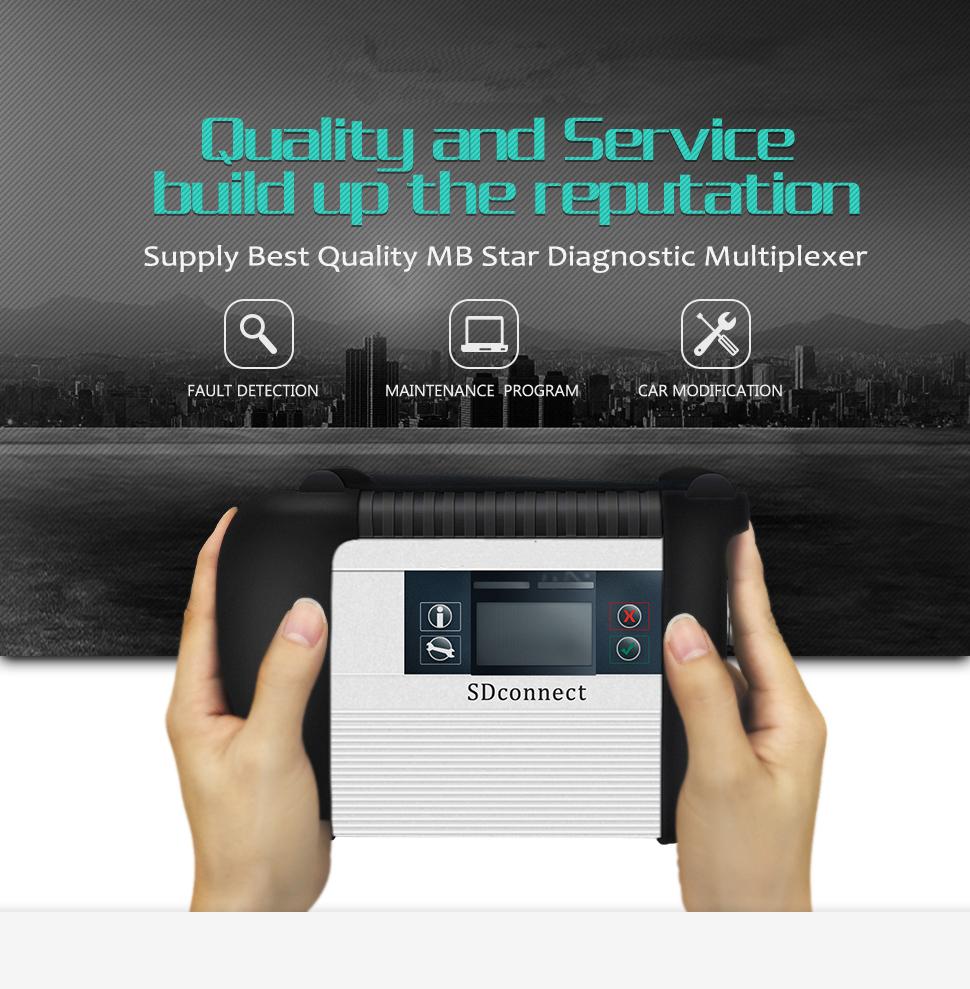
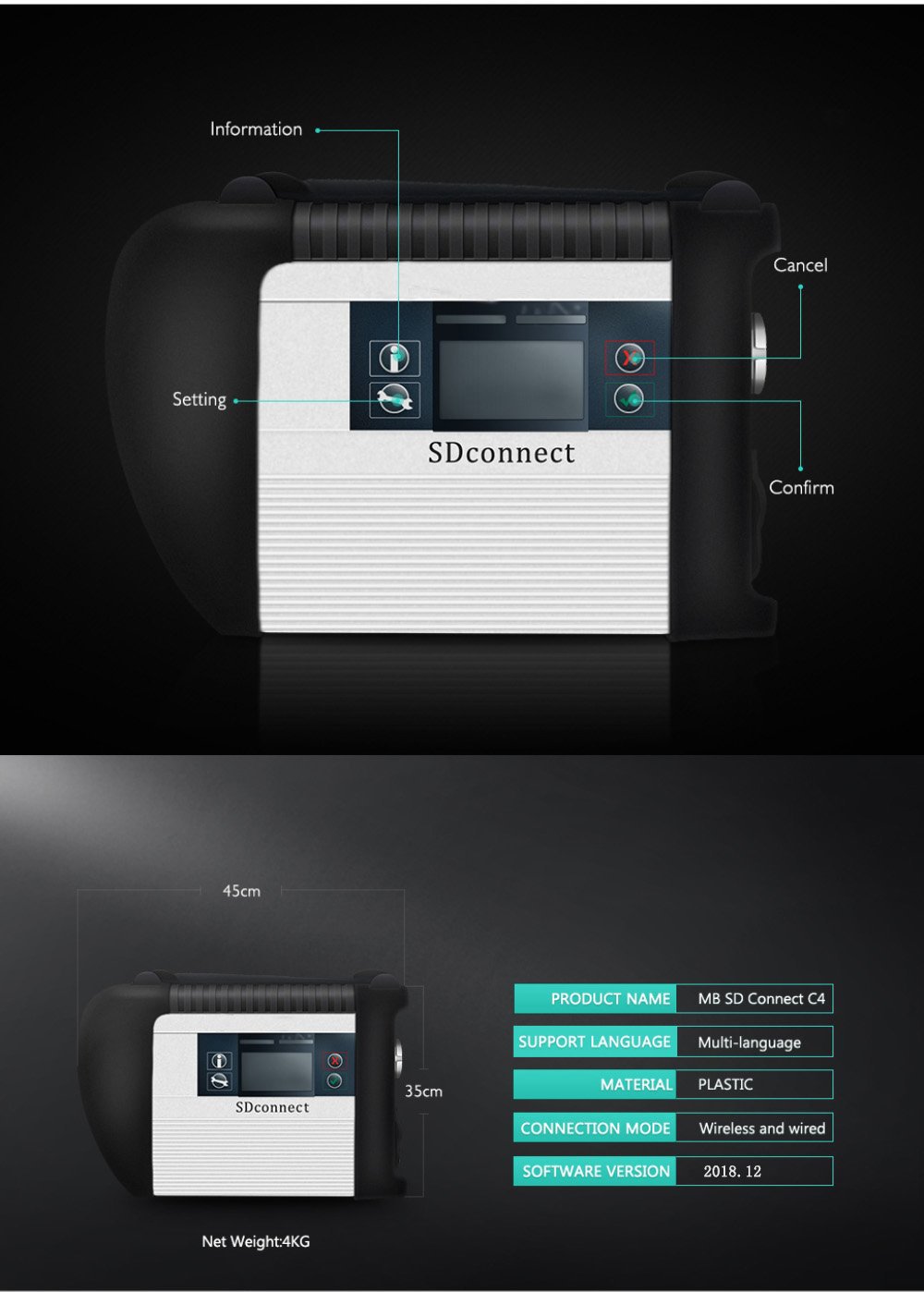
MB SD Connect C4 Profile:
1. Software Version: 2019.07
2. Hardware Verison: OS:2.3 CSD:2.11
3. Support Wireless/ Lan Cable Connection
4. Work for Benz Car & 24V Trucks
5. Supported Multi-Language: English, Bulgarian, Danish, Greek,
Spanish, French, Italian, Korean, Polish, Romanian, Serbo-Croatian,
Turkish, Czech, German, Finish, Hungarian, Japanese, Dutch, Portuguese,
Russian, Swedish, Chinese
Why Choose VXDAS MB Star C4 SD Connect Multiplexer?
* Serial No.is 100925, work with blacklist path Installed on MB Star C4 software, hardware never block
* Support put into AAA Battery to update the VXDAS SD C4 firmware
* Hardware PCB board with full new Samsung chip layout, work a long lifetime
* With 108Mbps wifi card running more stable & faster than ordinary 54Mbps wifi card inside
* All VXDAS SD Connect will be power on and aging than 12 hours, and
it will be tested 3 times with Ecus before shipping to ensure client get
product working
* VXDAS SD C4 with latest software support SCN online coding, the client need have MB subscription or contact our sales purchase login service
* VXDAS SD C4 offer user manual free, to help the client to use our device, just keep order number contact sale offer.
VXDAS SDConnect Testable systems:
ENGINE
AUTO-SPEED
AIRCONDITIONAL SYSTEM
SRS
ABS
ASR
MPL
GM
Bz ORIGINAL ANTI-THEFT
DASX SYSTEM
VXDAS SD Connect Software Functions:
1) DAS: the automatically Diagnosis Assistance System
2) Xentry: New software released by Benz Company after 04/2009 by diagnosisnew cars.
3) WIS.net: Workshop Information System
4) EPC.net: Electronic Parts Catalog
5) ST Finder: Part location finder
6) STARUTILITIES: the movement management system and self-test
7) SD Media: Video and PDF lessons
 PL72: Price List to find out how much price by input the partsnumber
9) Smart TAN Code: Opened special function in DAS program with Smart cars 450/451/452/454
10) Developer model: Mercedes-Benz engineer mode, remove limitations andopen more functions.
11) Benz Disassembly system: Video lessons to teach you how to remove each
12) part from Benz cars with details order steps.
DTS-monaco special feature:
1.Quick Test: Entire vehicle ECU quick test, and the test can choose to edit more
2.Variant Coding: Coding with variation add VO- delete VO function
3.ID identification: One click to read the whole car and save all modules programmed numbers
4.Complete Variant Coding: One time to read all the ECU coding vehicle
data, can be written to the vehicle again, completely off-line
operation
5.Diagnostic Services: Advanced features can see your choice of internal
and external data module, turn on the computer authorization
(not driving license), Activate ECU, reset ECU, modifying the original chassis number
6.Flash programming: Fully offline programming
7.Diagnostic Trouble Code: Diagnostic module DTC fault code
8.ECU Exchange: Two of the same ECU, by reading data import data exchange
9.Symbolic trace: Record and track the file, after repeated viewing, analysis of fault logic point
VXDAS SD Connect Basic Programming Set Code Function:
1.unit for off-line programming
2.a key to off-set code
3.W166, cancel the programmed number of calculation method of urea, one
perfect canceled all 166 urea system. The new c s-series to the factory
installed conversion:
4.222, 205 installing fragrance systems
5.2015, paragraph 212, changing traffic light permanently lit
6.212, 204, adding electric ear
7.222 205 HU5 traffic solution for DVD video
8.W164 closed recycling system
9.W205, retro atmosphere lamp
10.205, 222 adding electric ear electric trunk, the trunk kicking function
11.166, how to modify the gateway set up codes
12.166 meters finished degrees Fahrenheit to degrees Celsius
13.US standard maintenance mileage be set to the number of miles
14.164 disabled diesel particle filter regeneration system
15.166 canceled urea
16.205 added electric rear vision mirror
17.HU45 regional Chinese resolve lock
18.W204 W166 foldable rear-view mirror
19.change the 166 on board, display in Celsius
20.W212 disable ECO configurations
21.activate the HOLD function ABR2XT
22.open W22 looked up appears
23.the AMG sports package enabled W212
24.the air bag computer reset factory State W166
25.to increase the brightness of the color instrument cluster s W222
26.22.97g to install the steering wheel shift paddles
27.W221 AMG W216 dashboard style
28.airbag ECU unlock W204 212
29.disabled child seat recognition sensors W221
30.opening rear fog lamps as spare brake lights with W222 31.increasing engine power MED177″
Posted by: Emily white at
07:19 AM
| No Comments
| Add Comment
Post contains 715 words, total size 6 kb.
August 17, 2019
This isthe procedure on how to use CGDI Prog Benz Monster to reset/renew Benz ME9.7 ECU.

Procedures:
Build wire connection between ME9.7 ECU,CGDI MB programmer and computer


Open CGDI Benz software,click "Wiring Diagramâ€,then select "ECUâ€Ã â€ME9.7†to check the your connections are correctly.

Select "Auto Computerâ€,then click "Readâ€

After reading process completing,you can see vehicle information on the software.
Click "Get†to get erase password

Wait for process…

Erase password calculated successfully

After then click "Erase†button

Erase successfully

And now you can read the ECU information again to check ME9.7 status.

Done!
Posted by: Emily white at
09:52 AM
| No Comments
| Add Comment
Post contains 104 words, total size 3 kb.
August 01, 2019
This is a research result about "OBD 2 Chrysler Factory Scan Tools †from a fellow professional and what he shared with all on the web. Thanks to Brin who has taken the time to do this.
Here are several parts included:
Part 1: Chrysler and Post OBD 2 and DRB 3
Part 2: Star Scan
Part 3: VCI Pod
Part 4: micropod 2
Then a summary…
In detail…
Part 1: Chrysler and Post OBD 2 and DRB 3

Vehicles on the road today are mobile networks. Each vehicle system needs a computer or control module to manage and monitor that system. Often, these seemingly independent control modules depend on other control modules to function. They must be able to communicate with each other and they do so on a bus, otherwise known as a communication network. This is not a new concept, but every year more systems and modules are making their way onto vehicles. This is increasing the complexity of these vehicle networks. What does this mean for the general Independent, aftermarket, mechanical or collision repair business? It means that we should be considering factory scan tools (scan tools used in dealer franchise service departments) and service information if we truly want to be able to handle our vehicle mix in a thorough, efficient and profitable manner. I’m not suggesting that there isn’t a place for aftermarket scan tools or service information in our businesses. I’ve found that both are needed to increase the likelihood of knocking it out of the park on every job. I realize that there are a lot of different, successful business models out there. Not everyone of these business models can support a journey like this. When considering ROI, you might not think that it makes sense for you and your business. You might consider subletting some of those jobs out to other local businesses that have committed to making these Professional Diagnostic Tool. Often, this means a mobile diagnostics and programming company. In this series, we will cover the most popular vehicle manufacturers one at a time, providing the information that you’ll need to make an educated decision. So, sit back and relax. We’ve got this.
We have a lot of work cut out for us so where do we start first? I’ll give you a hint, this vehicle manufacturer has had 6 different factory scan tool interfaces and 5 different scan tool platforms in the past 14 years?
Yes, we’re going to start with Chrysler.
We’re going to start with Post OBD 2 and the DRB 3. The DRB 3 is a
hand-held Chrysler factory scan tool for non-CAN Chrysler vehicles but
also has non-CAN, Global, OBD 2 Scan Tool capabilities as well as an oscilloscope. Don’t expect much from the
oscilloscope. Compared to modern oscilloscopes, I’d consider the scope
in the DRB 3 more like a graphing voltmeter. The DRB 3 will never time
out meaning that it does not require a subscription to function. You
will, however need a Tech Authority Subscription to access and download
the calibration files needed to program Non-CAN, Chrysler Modules. Super
Cards were needed in early models (pre-9
and other special
applications like Chrysler branded Mercedes or Mitsubishi products like
the Mitsubishi based Stratus, the Mercedes based Chrysler Crossfire and
the Mercedes based Dodge Sprinters. There were different Super Cards for
each of these special applications. Super Cards were inserted into the
lower section of the tool. Special adapters called Multiplexers and
cables were needed for certain applications as well.
Part 2: Star Scan
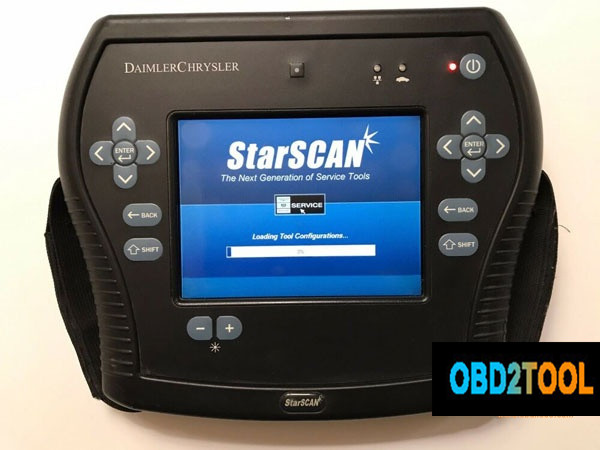
Next on the list is the Star Scan. The Star Scan is a hand-held Scan tool. It was the first Chrysler factory scan tool used for CAN only vehicles. None of the scan tools used for CAN vehicles were backward compatible, meaning that they would not function on non-CAN vehicles with exception of the DRB 3 Emulator that was included with the first wiTECH application (We will touch on this later). This tool was pretty much obsolete when it hit the Market. It was very slow. It didn’t take long before the Hardware couldn’t keep up with updates. A subscription was not needed for this tool to function, but a subscription was needed for tool updates and a Tech Authority subscription was needed to access and download calibrations needed to program Can Chrysler vehicle modules. The Star Scan is no longer sold or supported.
The Star Mobile was Chrysler’s first Scan Tool Interface that was designed to be used with a laptop. The interface was the hardware that connected to the vehicles DLC (Data Link Connector) but you would need a laptop with the downloaded Star Mobile Desk Top Client software for the scan tool to function. The installation and update software were downloaded from a disc. The Star Mobile could also be used as a functional Interface for the first wiTECH application that would be released later (Discussed later).
Star Mobile Desk Top Client was the software used with the Star Mobile. This software was quickly replaced with the wiTECH Application called the wiTECH Desk Top Client. As mentioned earlier, the Star Mobile Interface could be used for the wiTECH application for most of the existence of wiTECH.
Part 3: VCI Pod
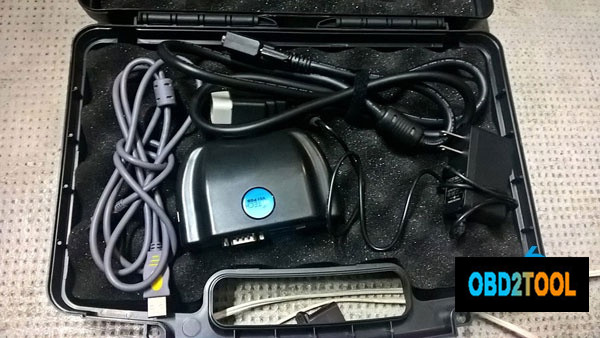
The wiTECH VCI Pod is an interface that came out at the same time as the wiTECH application. At one point, the only way to purchase the wiTECH was with a package that included with the special wiTECH gateway (Basically a router configured to be used with the VCI Pod and to link with Chrysler’s server, the mother ship). When Chrysler first launched the application, franchise new car dealers were told that there was a wiTECH install and support team that would have to set everything up. The franchise dealers were not to set anything up on their own. Often, those teams never came and finally, the franchise dealers installed the system themselves. This was about the time of the bail out and bankruptcy. For aftermarket service facilities, the wiTECH package was around $8,000.00 with a years’ worth of wiTECH licensing, support and programming capabilities. Sometime later, wiTECH decided to offer a more economical option that came with a less expensive router and support limited to email. This package was around $4000.00 and was called wiTech Lite. A DRB 3 emulator was included in the wiTECH application not long after wiTECH was released. This Emulator allowed the user to scan and program non-Can Chrysler’s through the wiTECH application. The DRB 3 Emulator was just that, an emulator and emulators are rarely as good as the real thing. Early on, the emulator was okay but did get better over time with updates.
Part 4: MicroPod 2
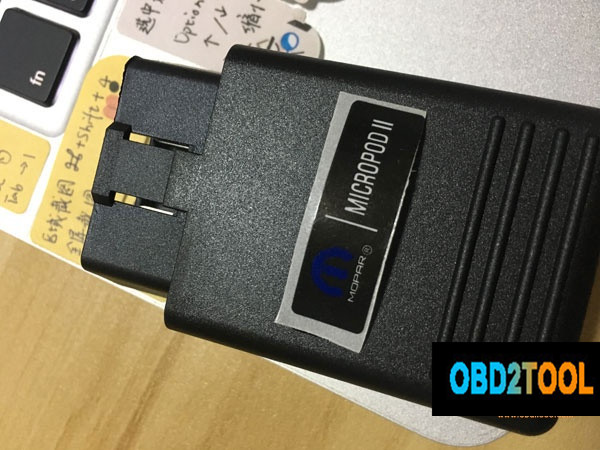
The wiTECH MicroPod II was the next generation in Chrysler factory scan tool interfaces. The MicroPod is a pocket-sized dongle that plugged into the vehicles DLC. A wiTECH subscriptions was needed to use the wiTECH application. This tool would time out and be unusable if the subscription lapses. If you had an original VCI Pod and the wiTech software from V13.03.38 or prior, and never updated it, the tool would never time out. You could use it as a stand-alone tool, meaning that you couldn’t get all the benefits from the application, and you couldn’t program. Before this update, the application could be used in an offline mode, allowing it to function without connecting to the wiTECH server and checking the pod for registration and account information. Again, this is stand-alone diagnostics only, you wouldn’t be able to program, you would be limited in application features and you would limit yourself to older models due to the older update.
Tech Authority is the aftermarket portal for accessing subscriptions needed to download Chrysler flash files for programming Chrysler’s modules regardless of what scan tool or programming device that you are using.
The MicroPod 2 was released for compatibility issues with certain models. A while later wiTECH 2 was released to reduce cybersecurity and theft issues with Chrysler vehicles. With the wiTECH 2 release there was news of a sundown or elimination of the original wiTECH application. The other fun fact, your MicroPod 2 had to have a serial number of WPS-31560 or above. Older MicroPods would not be compatible with wiTECH 2, meaning that some users had to buy, yet another scan tool interface for use with witech 2. If you had a Micropod with a serial number that would allow you to register the device for the witech 2 and you did, that device could never again be used with the original wiTech application. The sundowner mentioned above did take place late in 2017 but according to sources, the original wiTECH application is still available to dealer franchises due to wiTECH 2 not being 100% compatible with some older CAN platforms. The new wiTech 2 is a cloud-based application meaning that you will need access to the internet for the scan tool to function.
The DRB 3 emulator is not available in wiTECH 2, so as it stands, the aftermarket needs to buy the separate standalone DRB 3 emulator from Controller Technologies Corporation or find a used DRB 3 if they want Factory non-CAN Chrysler coverage.
DRB 3
* Non-CAN Chrysler vehicles.
* Full factory scan tool functions (Some special Super Cards, adapters
and cables needed for some Chrysler branded Mercedes and Mitsubishi
products).
* No longer sold, supported or serviced by formal vendors. There are
very small companies that offer repairs, but parts are limited to old
stock or parts used from non-functioning DRB 3 units.
* Chrysler module programming with a Tech Authority subscription
DRB 3 Emulator
* Controller Technologies Corporation DRB 3 is a stand-alone PC
based scan tool. We are not referring to the DRB 3 Emulator that was
included with wiTECh. This is the only legitimate option when looking
for Factory coverage on non-CAN Chrysler vehicles. Keep in mind, that
emulators are rarely 100% effective at emulating what they are designed
to emulate. The DRB 3 is no exception, although, according to AE Tools, a
distributor and support company for factory scan tools, the Controller
Technologies Corporation DRB 3 is more capable of handling some of the
oddball early CAN PCI Hybrid vehicles that were released during the
early stages of the CAN protocol. In this way, it might be superior to
the original DRB 3.
* Nearly full factory scan tool coverage. This emulator has the same
exceptions as the DRB 3 regarding Chrysler branded Mercedes and
Mitsubishi products but a PC Based DRB 3 Multiplexer is available for
Crossfire and Sprinter applications.
* The kit comes with non-powertrain ECU calibration files for
programming body and chassis modules without the need for a Tech
Authority Subscription.
* Powertrain programming available with a Tech Authority subscription.
wiTECH 2 and the MicroPod 2
* Full factory scan tool functions with full programming capabilities on CAN compliant Chryslers.
* A wiTECH 2 subscription will be needed for scan tool function.
* wiTECH 2 subscriptions are available in three different terms:
* Cloud/Internet based so an internet access is needed for the application to function.
* A Tech Authority subscription is needed for programming. You will need to have an active wiTECH 2 subscription as well.
* Tech Authority subscriptions are available in eight different terms.
1-day subscription is $24.95, a 3-day subscription is $35.00, a 7-day
subscription is $70.00, a 30 day subscription is $250.00, a 3 month
subscription is $600.00, a 6 month subscription is $1000.00, a 1 year
subscription is $1800.00.
See attached for vehicle to diagnostic tool reference chart
To recap,
If you find that you need Non-Can Chrysler coverage, you might consider buying a Controller Technologies Corporation DRB 3 Emulator. Normally I would say that it would be best to buy the Genuine DRB 3 but they’re only available used at this point and they are very expensive. You can expect to invest $2200-$3000 on a functional used DRB 3. A significant risk on a used tool that might not be repairable if needed.
For full factory diagnostic and programming capabilities on CAN Fiat/Chrysler automobiles, it’s very clear that you’ll need a MicroPod 2 with a serial number WSP-31560 or higher, a wiTECH subscription and a Tech Authority subscription for programming.
If you just look for a decent tool for Chrysler and don’t care it’s original or copy, the lowest cost is to get a decent Micropod 2 china clone with wiTECH 2 subscriptions (DO CONFIRM ITS FUNCTIONALITY!
On a side note, please let me know if I need to add or correct anything.
Posted by: Emily white at
08:24 AM
| No Comments
| Add Comment
Post contains 2114 words, total size 15 kb.
32 queries taking 0.0373 seconds, 162 records returned.
Powered by Minx 1.1.6c-pink.

