



April 29, 2019
This is how to decode & cut a key and program or add a new key to Nissan Altima year 2006.
If you have all remotes available:
Here, you must have all remotes on hand when performing this procedure. Any remotes not used during this procedure will become inactive.
1. Close and lock all doors with the driver’s side power lock switch located on drivers door panel.
2. Insert key into ignition (DON’T TURN) and remove it from the
ignition key cylinder at least 6 times within 10 seconds (this will need
to be done at approximately one second intervals). You may need to
insert and remove the key up to 10 or 12 times until your hazard lamps
flash. PLEASE NOTE: Withdraw key completely from ignition cylinder each
time. If this procedure is performed too fast or too slow the system
will not enter programming mode.
3. Insert key into ignition and turn to the ACC position.
4. Within 5 seconds, push the LOCK button on the keyless remote. Your
hazard lamps will flash. PLEASE NOTE: Do not press the button on the
remote more than one time or the programming will not be successful.
5. If there are any remaining remotes (including working ones), Unlock
then Lock all doors using the switch on drivers door panel. Within 5
seconds of locking and unlocking doors press LOCK button on the next
remote. Your hazard lamps will flash. Repeat this step for each remote
(including any working remotes).
6. When all remotes have been programmed turn the key to the OFF
position, remove keys from the ignition, unlock doors using the driver’s
side power lock/unlock switch and open the driver side door. Test all
remotes.
If you have a decent key only or lose all keys:
You need:
a Nissan NSPC001 pin code reader
a decent auto programming tool for the car: Nissan Consult 3 or Nissan Consult III Plus
a security immobilizer card used to make keys to Nissan
a good automatic key cutter, such as SEC-E9 Key Cutting Machine
and good new keys/remotes to add
The steps:
read pin – program key – decode and cut keys
in detail…
Step 1: NSPC001 reads pin codes
Connect the code reader into the OBD diagnostic socket
Read the 5-digit BCM code and transfer it to 4-digit pin code
Write down the pin code
Disconnect the pin code reader
Step 2: Nissan Consult 3 plus adds new keys
Connect Consult III plus to the computer and the vehicle
Connection method: via the USB cable or Bluetooth
Insert key into the key hole, turn ignition ON with engine OFF
Start Consult-III plus software
Click on "Connect†button on VIMI selection screen to connect with VI
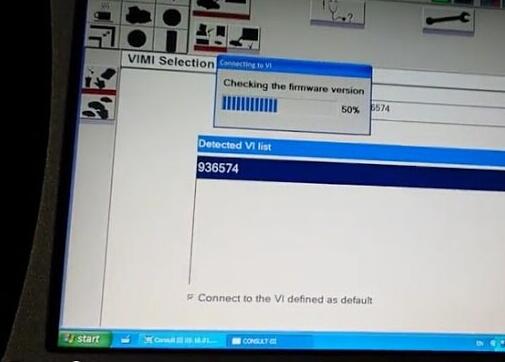
the computer and vehicle establish good communication
then Consult3 plus software will display VIN info
Choose Nissan model and year, and confirm vehicle information
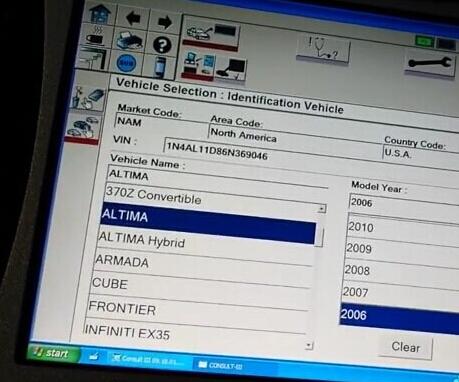
Wait until the Nissan Consult module to access all control modules, Engine, BCM, Transmission, Airbag etc.
The car dashboard will illuminate and the indicator lights on Consult 3 will flash
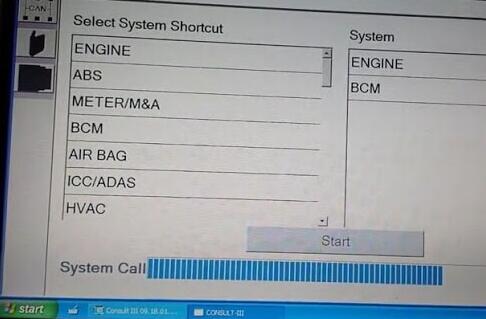
Diagnostic: Direct Diagnostic Mode program
Tick Key programming icon (NATS SELECT DIAG MODE) on the left menu, plug the security card and press START
(There are two options under NATS SELECT DIAG MODE. Select C/U INITIALIZATION.
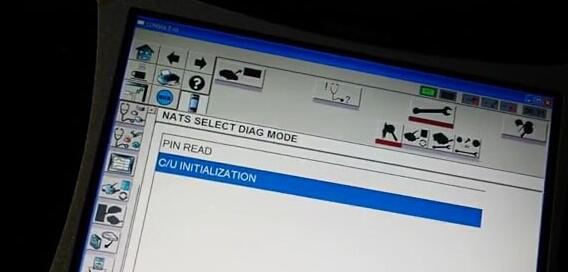
Push START BUTTON after enter password
Manually enter the pin code
Initialization completed
Follow the guide in the sw to finish key programming
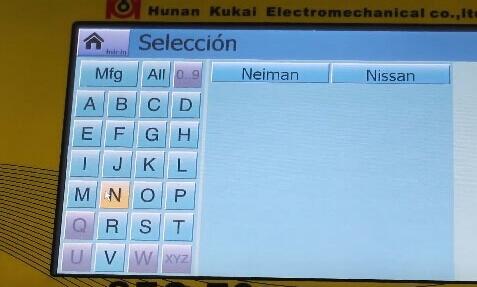
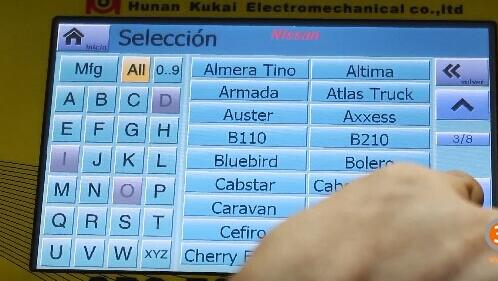
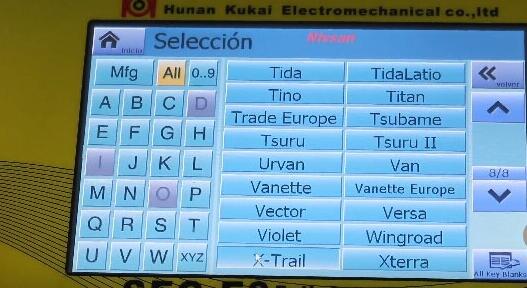
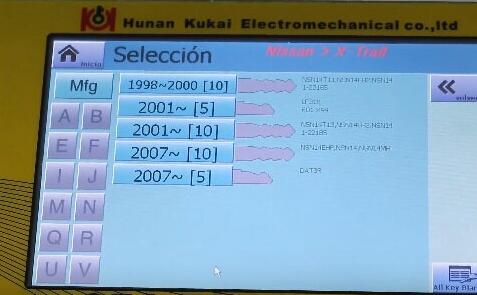
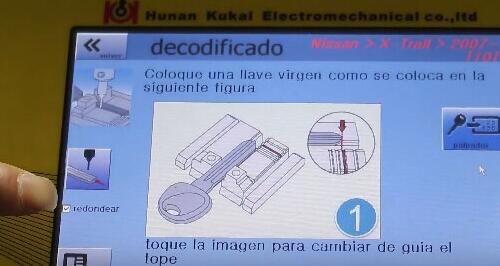
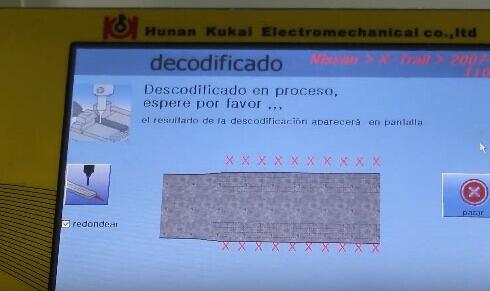
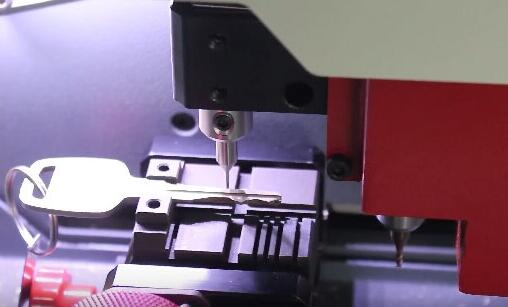
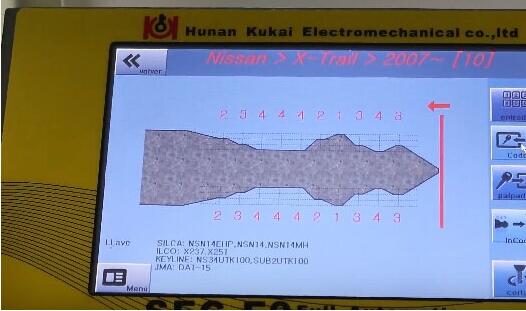
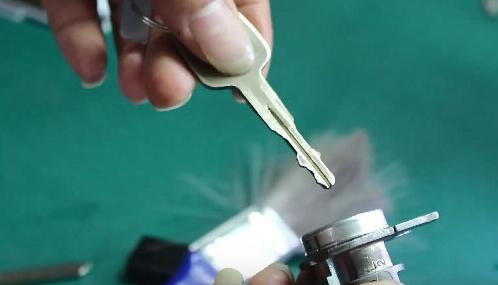
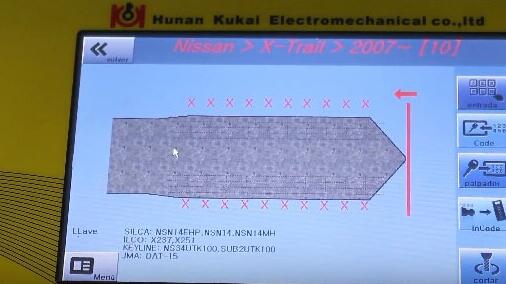
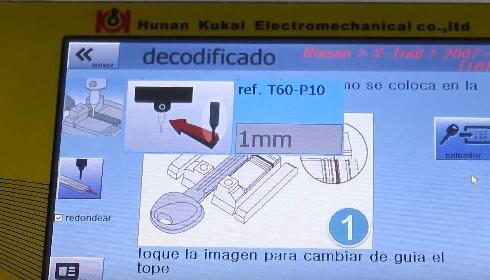
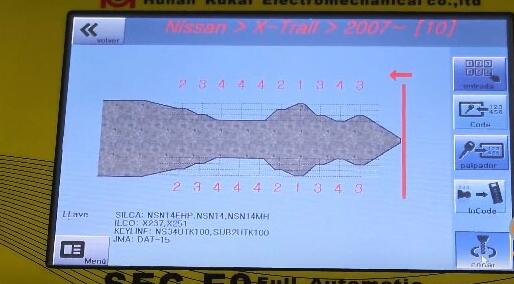
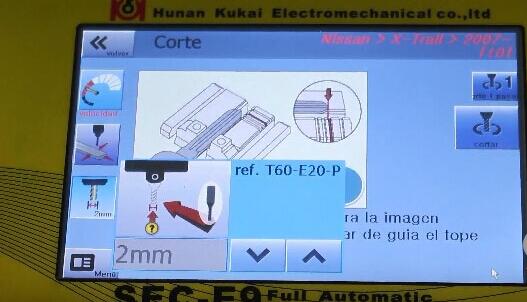
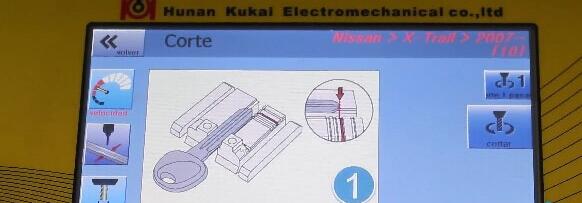
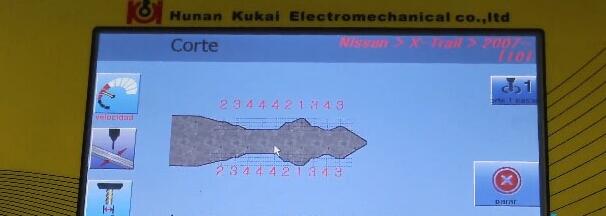
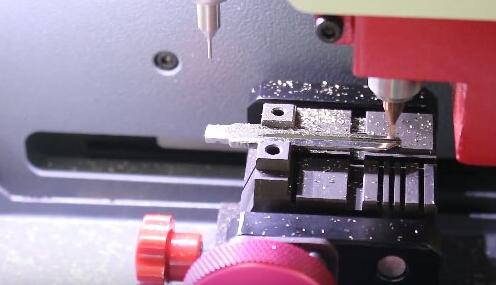
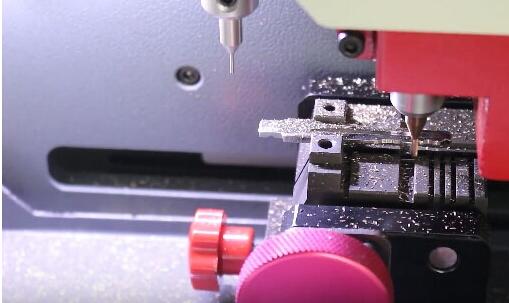
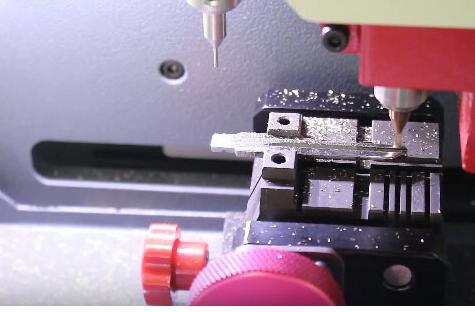
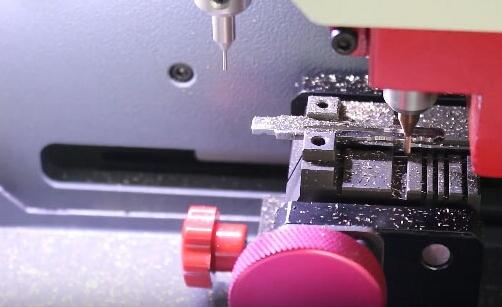
Step 3: SEC-E9 machine decodes and cuts Nissan keys
First decoding…then cutting….
SEC-E9 key cutting machine Nissan car list:
Car Brand Model Year IC Card
Nissan Juke 2010-0 9022
Nissan X-Trail 2007-0 6132
Nissan X-Trail 2007-0 6133
Nissan Versa 2007-0 6135
Nissan Versa 2007-0 6136
Nissan TidaLatio 2004-0 6137
Nissan Tida 2004-2012 6138
Nissan Skyline 1999-2006 6139
Nissan Sentra 2007-2009 6140
Nissan Sentra 2007-2009 6141
Nissan Rogue 2007-0 6142
Nissan Rogue 2007-0 6143
Nissan Qashqai 2007-0 6144
Nissan Qashqai 2007-0 6145
Nissan Pixo 2008-0 6146
Nissan Patrol 2007-0 6147
Nissan Pathfinder 2005-0 6148
Nissan Note 2006-0 6149
Nissan Note 2006-0 6150
Nissan Navara 2005-0 6151
Nissan Navara 2005-0 6152
Nissan Murano 2009-0 6153
Nissan Murano 2009-0 6154
Nissan Micra 2007-0 6155
Nissan Micra 2007-0 6156
Nissan Maxima 2007-0 6157
Nissan March 2003-2007 6158
Nissan March 2003-2007 6159
Nissan GTR 2007-0 6160
Nissan Elgrand 1997-2002 6161
Nissan Elgrand 2002-2010 6162
Nissan Cube 2002-2008 6163
Nissan Cube 2009-0 6164
Nissan Cabstar 2000-0 6165
Nissan Atlas Truck 2007-0 6166
Nissan Armada 2008-0 6167
Nissan Armada 2008-0 6168
Nissan 140Y 1973-1978 4770
Nissan 140Y 1973-1978 4771
Nissan 140Y 1978-1982 4772
Nissan 140Y 1978-1982 4773
Nissan 160J 1978-1982 4774
Nissan 160J 1978-1982 4775
Nissan 180B 1971-1976 4776
Nissan 180B 1971-1976 4777
Nissan 180SX 1989-1994 4778
Nissan 180SX 1995-1999 4779
Nissan 200B 1976-1980 4780
Nissan 200B 1976-1980 4781
Nissan 200SX 1984-1988 4782
Nissan 200SX 1995-1998 4783
Nissan 200SX (North America) 1984-1988 4784
Nissan 200SX (North America) 1995-1998 4785
Nissan 200ZR 1983-1989 4786
Nissan 210 1978-1982 4787
Nissan 210 1978-1982 4788
Nissan 240C 1975-1979 4789
Nissan 240C 1975-1979 4790
Nissan 240C 1979-1984 4791
Nissan 240C 1979-1984 4792
Nissan 240K 1977-1981 4793
Nissan 240K 1977-1981 4794
Nissan 240SX 1989-1994 4795
Nissan 240SX 1995-1998 4796
Nissan 240SX (North America) 1989-1994 4797
Nissan 240SX (North America) 1995-1998 4798
Nissan 240Z 1970-1976 4799
Nissan 240Z 1970-1976 4800
Nissan 260C 1975-1979 4801
Nissan 260C 1975-1979 4802
Nissan 260C 1979-1984 4803
Nissan 260C 1979-1984 4804
Nissan 260Z 1970-1976 4805
Nissan 260Z 1970-1976 4806
Nissan 280C 1975-1979 4807
Nissan 280C 1975-1979 4808
Nissan 280C 1979-1984 4809
Nissan 280C 1979-1984 4810
Nissan 280Z 1976-1978 4811
Nissan 280Z 1976-1978 4812
Nissan 280ZX 1979-1983 4813
Nissan 280ZX 1984-1996 4814
Nissan 300C 1983-1987 4815
Nissan 300ZX 1979-1983 4816
Nissan 300ZX 1983-1989 4817
Nissan 300ZX 1990-1996 4818
Nissan 300ZX 1997-1999 4819
Nissan 310 1979-1983 4820
Nissan 310 1979-1983 4821
Nissan 350Z 2003-0 4822
Nissan 510 1970-1973 4823
Nissan 510 1970-1973 4824
Nissan 510 1978-1982 4825
Nissan 510 1978-1982 4826
Nissan 610 1971-1976 4827
Nissan 610 1971-1976 4828
Nissan 620 1970-1979 4829
Nissan 710 1973-1977 4830
Nissan 710 1973-1977 4831
Nissan 720 1980-1982 4832
Nissan 720 1983-1986 4833
Nissan 810 1976-1980 4834
Nissan 810 1976-1980 4835
Nissan 810 1980-1982 4836
Nissan 810 1980-1982 4837
Nissan 810 1982-1984 4838
Nissan 810 1999-2003 4839
Nissan AD Resort 0-0 4840
Nissan AD Wagon 0-0 4841
Nissan Almera 2000-2004 4842
Nissan Almera Tino 2000-2006 4843
Nissan Altima 1992-1997 4844
Nissan Altima 1998-2000 4845
Nissan Altima 2000-2004 4846
Nissan Altima 2005-0 4847
Nissan Armada 2004-0 4848
Nissan Auster 1986-1989 4849
Nissan Auster 1989-1992 4850
Nissan Axxess 1990-1995 4851
Nissan B110 1970-1973 4852
Nissan B110 1970-1973 4853
Nissan B210 1973-1978 4854
Nissan B210 1973-1978 4855
Nissan Bluebird 1971-1976 4856
Nissan Bluebird 1971-1976 4857
Nissan Bluebird 1976-1980 4858
Nissan Bluebird 1976-1980 4859
Nissan Bluebird 1980-1982 4860
Nissan Bluebird 1980-1982 4861
Nissan Bluebird 1982-1984 4862
Nissan Bluebird 1985-1988 4863
Nissan Bluebird 1989-1992 4864
Nissan Bluebird 1992-1997 4865
Nissan Bolero 1997-0 4866
Nissan Cabstar 0-1982 4867
Nissan Cabstar 0-1982 4868
Nissan Cabstar Truck 0-1982 4869
Nissan Cabstar Truck 0-1982 4870
Nissan Caravan 0-0 4871
Nissan Caravan 0-0 4872
Nissan Caravan 0-0 4873
Nissan Caravan 0-0 4874
Nissan Cedric 1975-1979 4875
Nissan Cedric 1975-1979 4876
Nissan Cedric 1979-1984 4877
Nissan Cedric 1979-1984 4878
Nissan Cedric 1983-1987 4879
Nissan Cefiro 1990-1993 4880
Nissan Cefiro 1995-1999 4881
Nissan Cherry 0-0 4882
Nissan Cherry Europe 0-0 4883
Nissan Cima 1997-2000 4884
Nissan Cube 1998-2001 4885
Nissan EXA 1987-1990 4886
Nissan F10 1976-1978 4887
Nissan F10 1976-1978 4888
Nissan Fairlady Z 1970-1976 4889
Nissan Fairlady Z 1970-1976 4890
Nissan Fairlady Z 1976-1978 4891
Nissan Fairlady Z 1976-1978 4892
Nissan Fairlady Z 1979-1983 4893
Nissan Florida 1989-1991 4894
Nissan Frontier 1998-2004 4895
Nissan Frontier 2004-0 4896
Nissan Gazelle 1975-1979 4897
Nissan Gazelle 1975-1979 4898
Nissan Gazelle 1980-1983 4899
Nissan Gazelle 1980-1983 4900
Nissan Gazelle 1984-1988 4901
Nissan Gazelle 1989-1994 4902
Nissan Gazelle 1995-1999 4903
Nissan Gloria 1975-1979 4904
Nissan Gloria 1975-1979 4905
Nissan Gloria 1979-1984 4906
Nissan Gloria 1979-1984 4907
Nissan Gloria 1983-1987 4908
Nissan Hardbody 1985-1997 4909
Nissan Hardbody 1997-2000 4910
Nissan Homy 0-0 4911
Nissan Homy 0-0 4912
Nissan Homy 0-0 4913
Nissan King Cab 1985-1997 4914
Nissan King Cab 1997-2000 4915
Nissan Langley 1976-1978 4916
Nissan Langley 1976-1978 4917
Nissan Langley 1979-1983 4918
Nissan Langley 1979-1983 4919
Nissan Langley 1983-1986 4920
Nissan Langley 1987-1991 4921
Nissan Largo 1993-1994 4922
Nissan Largo 1996-2002 4923
Nissan Laurel 1983-1986 4924
Nissan Laurel Spirit 1983-1986 4925
Nissan Leopard Coupe 1984-1993 4926
Nissan Lucino 1995-1998 4927
Nissan March 1983-1992 4928
Nissan March 1992-1999 4929
Nissan March 2000-2003 4930
Nissan Maxima 1980-1982 4931
Nissan Maxima 1980-1982 4932
Nissan Maxima 1982-1984 4933
Nissan Maxima 1985-1988 4934
Nissan Maxima 1989-1992 4935
Nissan Maxima 1993-1995 4936
Nissan Maxima 1995-1999 4937
Nissan Maxima 1999-2000 4938
Nissan Maxima 2000-2003 4939
Nissan Maxima 2004-0 4940
Nissan Maxima (North America) 1980-1982 4941
Nissan Maxima (North America) 1980-1982 4942
Nissan Maxima (North America) 1982-1984 4943
Nissan Maxima (North America) 1985-1988 4944
Nissan Maxima (North America) 1989-1992 4945
Nissan Maxima (North America) 1993-1995 4946
Nissan Maxima (North America) 1995-1999 4947
Nissan Maxima (North America) 1999-2000 4948
Nissan Maxima (North America) 2000-2003 4949
Nissan Maxima (North America) 2004-0 4950
Nissan Micra 2000-2003 4951
Nissan Micra 2003-0 4952
Nissan Micra Van 2000-2003 4953
Nissan Micra Van 2003-0 4954
Nissan Mistral 1992-1995 4955
Nissan Mistral 1995-1996 4956
Nissan Mistral 1997-1998 4957
Nissan Multi 1986-1990 4958
Nissan Murano 2003-2005 4959
Nissan Murano 2005-0 4960
Nissan Navara 1985-1991 4961
Nissan Navara 1992-1997 4962
Nissan Navara 1997-2002 4963
Nissan Navara 2002-2003 4964
Nissan Navara 2003-0 4965
Nissan Nomad 1986-1989 4966
Nissan NX 1991-1993 4967
Nissan NX (North America) 1991-1993 4968
Nissan Pathfinder 1987-1995 4969
Nissan Pathfinder 1996-1999 4970
Nissan Pathfinder 2000-0 4971
Nissan Patrol 1981-1997 4972
Nissan Patrol 1997-1999 4973
Nissan Patrol 2000-2003 4974
Nissan Patrol 2004-0 4975
Nissan Pickup 1974-1980 4976
Nissan Pickup 1982-1986 4977
Nissan Pickup 1986-1997 4978
Nissan Pickup 1998-2003 4979
Nissan Pickup (North American) 1974-1980 4980
Nissan Pickup (North American) 1982-1986 4981
Nissan Pickup (North American) 1986-1997 4982
Nissan Pickup (North American) 1998-2003 4983
Nissan Pickup 620 1970-1979 4984
Nissan Pickup 720 1980-1982 4985
Nissan Pickup 720 1983-1986 4986
Nissan Pickup Roadstar 1978-1984 4987
Nissan Pickup Roadstar 1978-1984 4988
Nissan Pintara 1986-1989 4989
Nissan Pintara 1989-1991 4990
Nissan Pintara 1992-1999 4991
Nissan Prairie 1982-1990 4992
Nissan Prairie 1990-1995 4993
Nissan President 1990-1996 4994
Nissan President 1997-2001 4995
Nissan Primera 1990-1994 4996
Nissan Primera 1995-1996 4997
Nissan Primera 1997-1998 4998
Nissan Primera 1998-2000 4999
Nissan Primera 2000-2002 5000
Nissan Primera 2003-0 5001
Nissan Pulsar 1983-1986 5002
Nissan Pulsar 1987-1990 5003
Nissan Pulsar (North America) 1983-1986 5004
Nissan Pulsar (North America) 1987-1990 5005
Nissan Pulsar LX 2005-0 5006
Nissan Pulsar NX 1987-1990 5007
Nissan Quest 1993-1995 5008
Nissan Quest 1996-2002 5009
Nissan Quest 2004-0 5010
Nissan Roadstar 1978-1984 5011
Nissan Roadstar 1978-1984 5012
Nissan Rumba 1998-0 5013
Nissan Safari 1997-2000 5014
Nissan Sakura 1980-1983 5015
Nissan Sakura 1980-1983 5016
Nissan Samurai 1980-1983 5017
Nissan Samurai 1980-1983 5018
Nissan S-Cargo 0-0 5019
Nissan Sentra 1982-1986 5020
Nissan Sentra 1987-1990 5021
Nissan Sentra 1991-1994 5022
Nissan Sentra 1995-1999 5023
Nissan Sentra 2000-2003 5024
Nissan Sentra 2004-0 5025
Nissan Sentra (North America) 1982-1986 5026
Nissan Sentra (North America) 1987-1990 5027
Nissan Sentra (North America) 1991-1994 5028
Nissan Sentra (North America) 1995-1999 5029
Nissan Sentra (North America) 2000-2003 5030
Nissan Sentra (North America) 2004-0 5031
Nissan Sentra (Sedan & Hatch) 1987-1991 5032
Nissan Serena 1993-1994 5033
Nissan Serena 1996-0 5034
Nissan Silvia 1975-1979 5035
Nissan Silvia 1975-1979 5036
Nissan Silvia 1980-1983 5037
Nissan Silvia 1980-1983 5038
Nissan Silvia 1984-1988 5039
Nissan Silvia 1989-1994 5040
Nissan Silvia 1995-1999 5041
Nissan Skyline 1977-1981 5042
Nissan Skyline 1977-1981 5043
Nissan Skyline 1982-1986 5044
Nissan Skyline 1986-1991 5045
Nissan Sportstar 1978-1984 5046
Nissan Sportstar 1978-1984 5047
Nissan Stanza 1982-1986 5048
Nissan Stanza 1987-1989 5049
Nissan Stanza 1990-1992 5050
Nissan Stanza (North America) 1982-1986 5051
Nissan Stanza (North America) 1987-1989 5052
Nissan Stanza (North America) 1990-1992 5053
Nissan Stanza Wagon (North America) 1986-1990 5054
Nissan Sunny 1978-1984 5055
Nissan Sunny 1978-1984 5056
Nissan Sunny Pickup 1978-1984 5057
Nissan Sunny Pickup 1978-1984 5058
Nissan Terrano 1992-1995 5059
Nissan Terrano 1995-1996 5060
Nissan Terrano 1997-1998 5061
Nissan Terrano 1998-1999 5062
Nissan Terrano 2000-2001 5063
Nissan Terrano 2002-2003 5064
Nissan Terrano 2004-0 5065
Nissan Terrano II 1992-1995 5066
Nissan Terrano II 1995-1996 5067
Nissan Terrano II 1997-1998 5068
Nissan Terrano II 1998-1999 5069
Nissan Terrano II 2000-2001 5070
Nissan Terrano II 2002-2003 5071
Nissan Terrano II 2004-0 5072
Nissan Tino 2000-2004 5073
Nissan Titan 2004-0 5074
Nissan Trade Europe 0-0 5075
Nissan Tsubame 0-0 5076
Nissan Tsuru 1986-1990 5077
Nissan Tsuru II 1986-1990 5078
Nissan Urvan 0-0 5079
Nissan Urvan 0-0 5080
Nissan Urvan 0-0 5081
Nissan Van 1986-1989 5082
Nissan Vanette 0-0 5083
Nissan Vanette Europe 0-0 5084
Nissan Vector 1987-1991 5085
Nissan Violet 1973-1977 5086
Nissan Violet 1973-1977 5087
Nissan Violet 1978-1982 5088
Nissan Violet 1978-1982 5089
Nissan Xterra 1998-2003 5090
Nissan Xterra 2004-0 5091
Nissan X-Trail 1998-2000 5092
Nissan X-Trail 2001-0 5093
Nissan X-Trail 2001-0 5094
Nissan 100NX 1991-1999 4757
Nissan 1200 1970-1973 4758
Nissan 1200 1970-1973 4759
Nissan 120Y 1973-1978 4760
Nissan 120Y 1973-1978 4761
Nissan 120Y 1978-1982 4762
Nissan 120Y 1978-1982 4763
Nissan 140J 1978-1982 4764
Nissan 140J 1978-1982 4765





Posted by: Emily white at
10:17 AM
| No Comments
| Add Comment
Post contains 2188 words, total size 30 kb.
April 18, 2019
1. Super Capable Diagnostics and Very Ruggedly Built
I did a lot of research on high end scanners/code readers/diagnostic
computers before actually settling on this make/model for the shop. Glad
I did. This unit does everything any auto service shop could ask for
(except tire pressure sensor replacement). Super easy to use as most
functions are intuitive. I have two mechanics that work for me and we
get some really problematic vehicles that have proven very hard to
diagnose the problem (sometimes intermittent). With some smart use of
this tool, it locates the problem quickly and more importantly, you have
complete confidence that you have corrected the issue using the data
logging capability. The blue tooth connected OBDII interface is
absolutely super. Being able to walk around the car/shop while connected
to the car, or just sit in the passenger seat watching live data during
a test drive is awesome.
I know I made the right selection when the mechanics compete over who
gets to use this tool vs the other computer. May have to buy another one
of these to keep these guys happy. One last thing is that this thing
seems pretty tough. It has fallen off of the car onto the floor at least
twice that I’ve witnessed and it hasn’t skipped a beat. If you’re
buying this for a business, rugged toughness is a big reason to buy
whatever you select.
2.A worth while purchase
I have used the scanner for only a short time but I find it easy to use, and a scanner with many options to include many bidirectional controls. The automatic updates (for a year) will keep my tool current for modern cars.
3. Excellent scan tool for the BIG BOYS
This unit works great. The battery life and specs are incredible. It saves me tons of diagnostic time, I tried the 905mini but, the battery life was just not where I needed it to be. This is the best scan tool I’ve ever worked with. The seller ODBPRICE had the best price on this tool I could find.
4. The AUTEL MaxiSYS MS906BT is a POWERFUL tool and was a nice upgrade to my outdated SnapOn Solus Pro
The tool came as described. The seller even contacted me to make sure I had a smooth transaction. I have not had any problems and everything is working perfectly so far. The MS906BT is a POWERFUL tool and was a nice upgrade to my outdated SnapOn Solus Pro.
5. Better then the Honda HDS
Great product and great seller. Good communication. I use this product daily and it never lets me down. This scanner can do everything a factory scanner can do and do it quicker. I worked 25 years for Acura using the Honda scanner and this scanner is way simpler to use and can do every function the factory scanner does. 5 stars!
6. Best tool for price/function
This is an exceptional tool when compared to price and function. I’ve used several big name scanners from Snapon and Mac as well as oem such as Witech. This tool has numerous vehicle coverage and functions. You’re able to perform many bidirectional test as well as reset maintenance options. Also, it reads the majority of PIDS on the vehicle. That in itself is worth the price. Overall I’m very pleased and impressed with this product so far. Autel has done an exceptional job.
Posted by: Emily white at
12:46 PM
| No Comments
| Add Comment
Post contains 574 words, total size 4 kb.
April 14, 2019
What you can find here:
1. SCN coding compatible hardware MB SD Connect C4
2. How to use SCN connect c4 to do SCN coding
3. SCN coding importance
1. Question: can clone MB SD C4 support Mercedes online SCN coding?
The answer is yes. Newest MB SD C4 2019.03V / 2018.12 can perform online
SCN coding perfectly as long as you have online software account or buy
one-time SCN coding service.
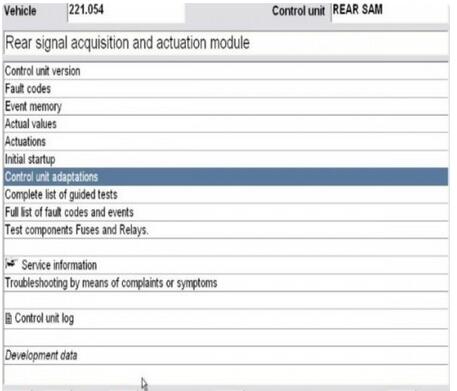
Image: MB SD C4
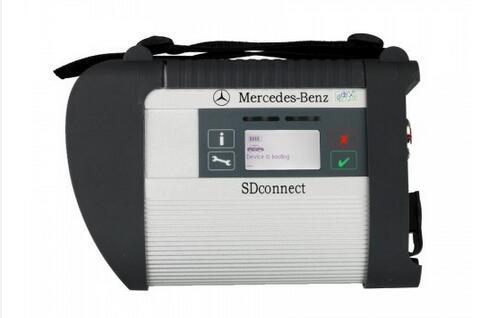
Image:Xentry 2019.03V
Source of SCN coding account:
Source 1: MB Online SCN Coding / Online programming 1 Year Account
Source 2:
1.) After ordering this service, prepare mb sd c4, car, laptop and teamviewer.
2.) Send Teamviewer ID and Password to customer service
3.) The engineer will access to your laptop to authorize SCN coding function.
4.) After finish, the system will display "The SCN coding sequence has been completed successfullyâ€.
2. SCN coding importance
The move to SCN coding was *very* important. There are too many
configuration items in every ECU now to have someone set options by hand
whenever an ECU is changed, or to understand how changes on one device
have to be done on other devices. These cars are really very very
complex, and unlike your laptop, if something goes wrong can result in
fatalities.
There are software dependancies between different ECUs, and actually loading software into ECUs is now needed regularly – and thus so is up-to-date diagnosis equipment and up-to-date firmware disks too. A simple example is the Audio system. If you update the firmware in the COMAND unit the firmware in every other MOST device needs also to be compatible (if you want it to work reliably) and thus they all need firmware updates. If you change one component then all components need to be updated to be properly compatible.
The latest equipment even now uses ethernet to load firmware into some ECUs (so it takes 20 minutes not 20 hours).
Without SCN coding it would take considerably longer to change any control unit, would result in mistaken configurations, and thus the cost of repair (or re-repair) would go up and up as systems got more complicated. SCN coding basically allows the correct configuration to be loaded into the car.
Imagine what could/would happen if you had to "hand code†the airbag controller after replacing it ? Would you trust all of your airbags to work after the local mechanic had to set all the options correctly ? I certainly would not.
Your comment that "The capital cost of the latest version, plus the monthly subscription, means it is beyond the reach of many smaller independent garages†is just wrong.
If your garage has the skills to deal with the technology (and i’d argue that if they don’t they shouldn’t be doing complex things with the newest vehicles), then it is completely affordable.
If you want to work on older cars, then most independents seem to use a clone machine and use it for limited things.
The EU competition commissioner has previously taken a good look at this market and enforced rules that mean diagnosis equipment (for newer vehicles) is available at sensible prices. This is not true in the rest of the world. Mercedes diagnosis systems in USA are more expensive, and in the far east (and I think Australia) are not available at all to independents.
Sorry to be so contradictory, and in summary, but without SCN coding there would be mis-configurations and un-reliability – possibly dangerous to life – occurring quite regularly. And if you are going to need to work on newer cars, there are very affordable Xentry diagnostics systems – you just need to talk to Mercedes.
Posted by: Emily white at
01:17 PM
| No Comments
| Add Comment
Post contains 624 words, total size 5 kb.
April 08, 2019
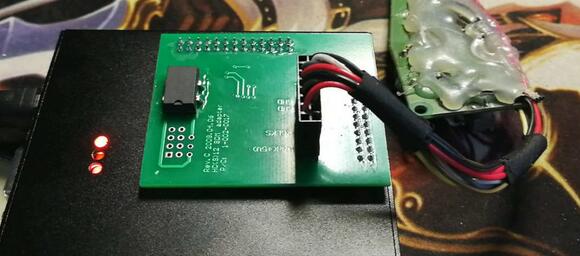
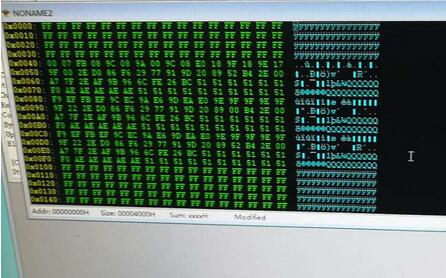
Here Obd2tool.com share the procedures to read Freescale MC68HC908GR16(0M76Z) by XPROG-M.
Preparations:
XPROG-Mv5.84 Programmer Interface4
How to Install XProg-M V5.84 Software on Win7
Procedures:
Open Xprog software (5.70, 5.74, 5.84) , click on "Read Security Bytesâ€.
You can see the indicator flashes during the process.
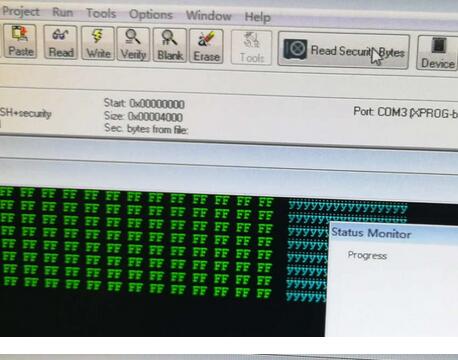
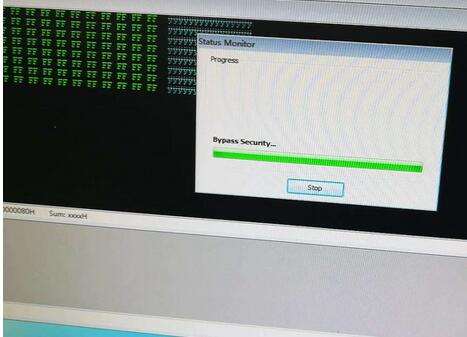
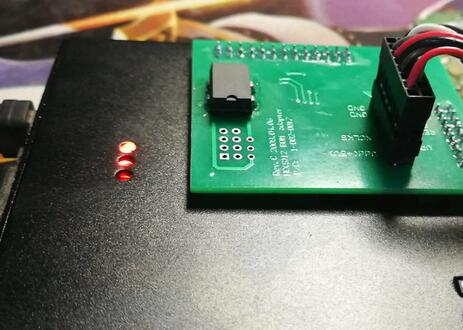
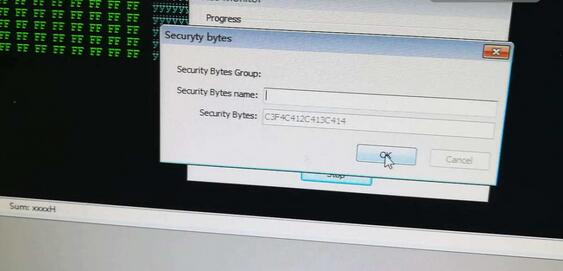
No need to enter any "Security Bytes Nameâ€, just click on "OKâ€.
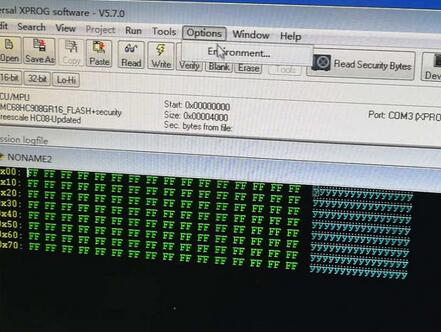
Click on "Optionsâ€, then "Environmentâ€.
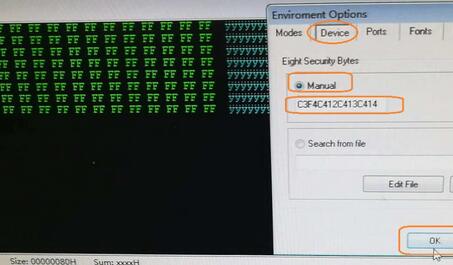
Select "Deviceâ€, then "Manual†and then input "C3F4C412C413C414â€, then "OKâ€.
Click on "Readâ€.
Brand: Freescale.
Type: MCU
Device: MC68HC908GR16(0M76Z)
Security bytes: C3G4C412C413C414 – ok

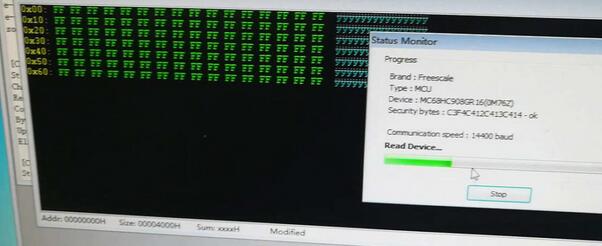

Done.
Posted by: Emily white at
06:33 AM
| No Comments
| Add Comment
Post contains 95 words, total size 4 kb.
April 06, 2019
Here Obd2tool.com share the procedures to read Freescale MC68HC908GR16(0M76Z) by XPROG-M.
Preparations:
XPROG-Mv5.84 Programmer Interface4
How to Install XProg-M V5.84 Software on Win7
Procedures:
Open Xprog software (5.70, 5.74, 5.84) , click on "Read Security Bytesâ€.
You can see the indicator flashes during the process.
No need to enter any "Security Bytes Nameâ€, just click on "OKâ€.
Click on "Optionsâ€, then "Environmentâ€.
Select "Deviceâ€, then "Manual†and then input "C3F4C412C413C414â€, then "OKâ€.
Click on "Readâ€.
Brand: Freescale.
Type: MCU
Device: MC68HC908GR16(0M76Z)
Security bytes: C3G4C412C413C414 – ok
Done.
Posted by: Emily white at
12:00 PM
| No Comments
| Add Comment
Post contains 95 words, total size 4 kb.
April 01, 2019
Look here: what you should know if you have a Micropod II for Chrysler diagnostics and programming?
wiTECH installation tips:
1.Install AdobeAIRInstaller.exe
2. Install jre-6u45-windows-i586.exe
3. Install wiTECH_Install_17.04.27.exe
4. Restart the computer
Warning:
1.The computer on the day of the date.
2. The computer must be connected to the Internet.
3.Connect the interface with laptop via USB Cable (Automatically install the USB Driver), open the software.
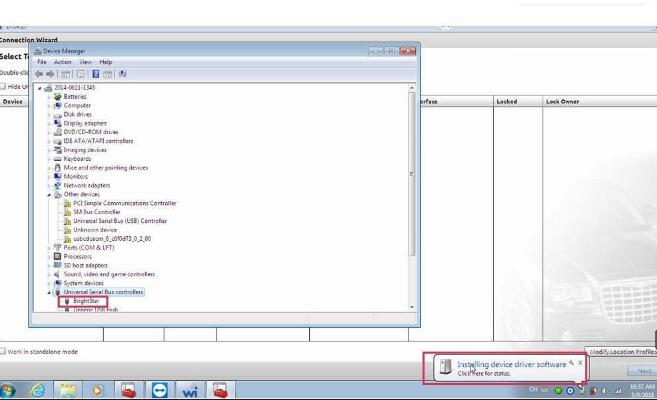
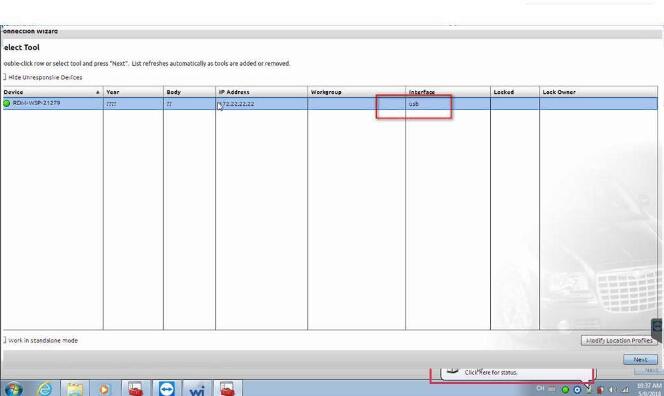
4.Tip registration, Turn off the software and turn it on Repeat several times , then you can use it normally .
?5.If the software shows †Security Alert †like the follow picture, please click "x†to close it .
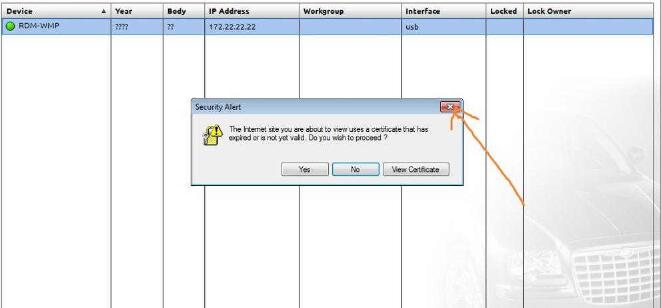
6.On the following interface, please choose †work offlineâ€
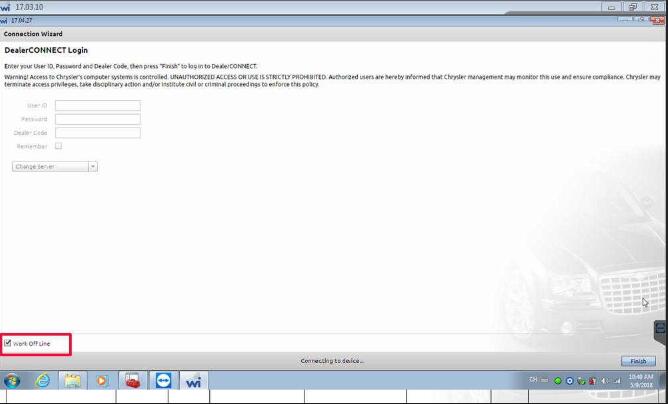
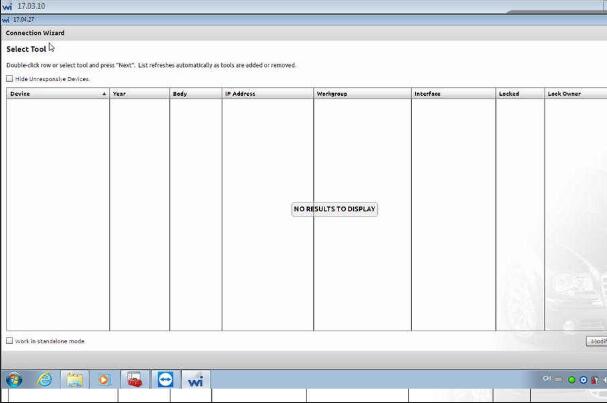
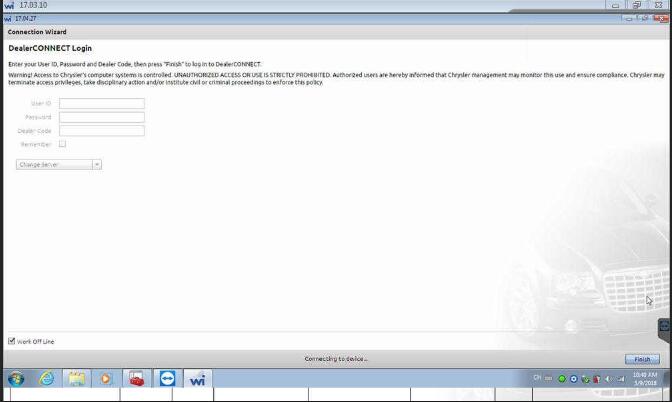
Good to know: wiTECH software confirmed to work without any issue on Windows 7 32bit with Micropod 2 for Chrysler diagnostics and programming
Posted by: Emily white at
03:46 AM
| No Comments
| Add Comment
Post contains 148 words, total size 3 kb.
32 queries taking 0.0393 seconds, 168 records returned.
Powered by Minx 1.1.6c-pink.

