



December 31, 2018
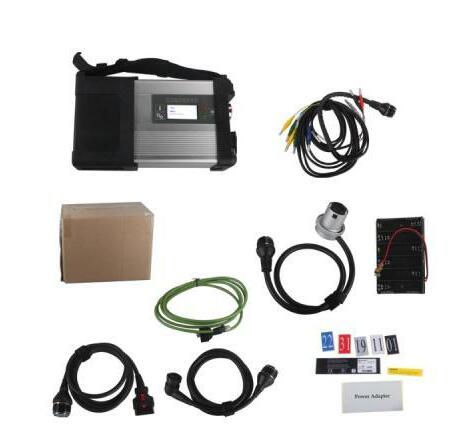
Xentry Connect C5provides complete diagnosis for newest hybrid W222,with a qualitative improvement in hardware and software by authorization of diagnostic interface to control the software,it will allow you to work on windows xp, win7/8/10 system.
Customer’s problem:
We had purchased one set MB SD connect C5 with internal HDD from obd2tool.com,
We really appreciate the faster shipment, all is well packed dhl week
quickly received. But when we install the HDD to our computer, we have
blue screen and doesn’t access to computer windows. We are wondering if
we get the broken HDD……
Our Answers:
The BMW ICOM ICOM A2 A3 or MB Star C4 C5 drives we assign to our customers are generally AHCI-mode hard drives with SATA port.
If your laptop BIOS is not set to the same hard drive mode (AHCI mode), if you connected to our hard drive to your computer, there will be a blue screen or can not find the hard drive.Please make sure your HDD is set to AHCI in the BIOS.
To check this you turn the laptop on and press F2, it will enter the BIOS. Now go to "ONBOARD DEVICES†or "SYSTEM CONFIGURATION†then go to "SATA OPERATION†press enter and make sure its set to AHCI not ATA or any other option.
Please have a minimum of 2GB of ram/memory in your laptop, a lot of people only have 512mb or 1gb, it is OK but the new system may run slow and its recommend to really have 4GB ram, but 2GB also can be enough.
– We can supply Laptop + Software all ready for you.
– We can supply FULL package C4 SD + Laptop + Software for you. MB Star Diagnostic Tools
– We can carry out some C4 SD repairs.
– Remote installations available (if you supply the correct HDD size and install the correct Windows OS).
– Teamviewer remote support available.
Posted by: Emily white at
01:22 PM
| No Comments
| Add Comment
Post contains 328 words, total size 3 kb.
December 23, 2018
My new gm techii device bought from
https://www.obd2tool.com/goods-1568-GM+Tech2+GM+Scanner+-CANdi++TIS+(Works+for+GMSAABOPELSUZUKIISUZUHolden).html
US$224.00
Here has a lot of folks give 5star,I believe folk’s choice.
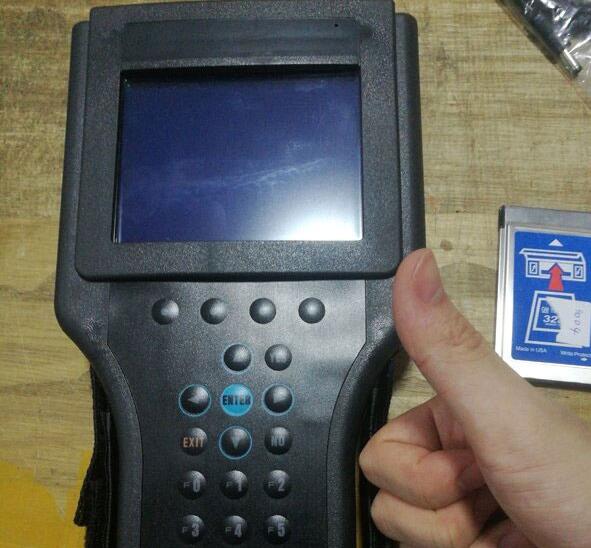
It is in perfect working order and has the screen cover.
Also included is the TIS2000 software which you will need to access the security to program keys.
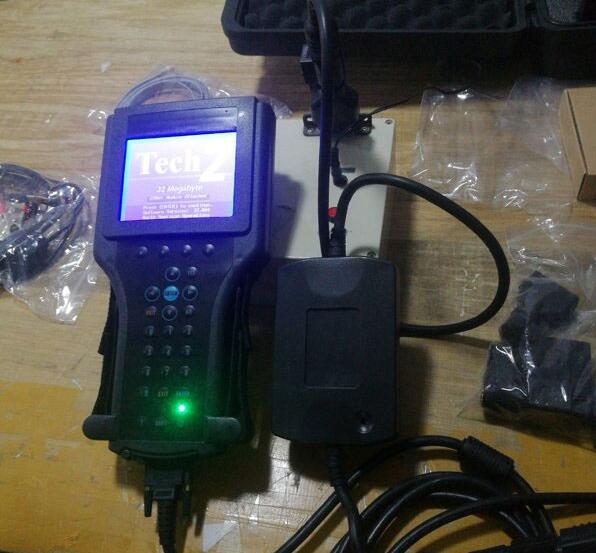
My Tech 2 (clone, works great) for my C5 (99) just for the Automated Bleed so I
could completely flush the brakesystem particularly for the EBCM !!!
Have since used the crap out of it, ECM/PCM re-learn, crank sensor
re-learn etc !!!!
Also use it to exercise my ABS motor every 3 months.
C5 has the built in ability to pull vehicle specific DTC’s right in the
DIC and those can be exceptionally helful in diagnosing and correcting
common C5 issues.
There are a number of functions in addition to diagnostic trouble shooting that can be accomplished with theProfessional Diagnostic Tool Tech II.
and another is the ability to program out unwanted features such as F45 or F55 RPO’s ar program RPO’s into a replacement BCM.
Do recognize that the tool have extremely limited ability to change
settings in either the PCM or BCM. To accomplish change you need a
programming tool such as HP Tuners or EFI Live and they can change only
PCM settings.
they’re very easy to use,just follow the display,and look around till
you get tired,,and try reading â€live data†as much as you can,it speeds
up the learning curve,,and try it on as many GM cars/trucks as you can
too.
Posted by: Emily white at
09:49 AM
| No Comments
| Add Comment
Post contains 261 words, total size 2 kb.
December 16, 2018
This is the Star Diagnostic tutorial on lower Benz cars, with MB SD Connect C4 diagnostic tool. Here takes W211 as an example.
Model:
MB W211
Tools used:
MB SD C4
Dell d630 with Windows XP system
Tutorial on lowering the car via picture:
Model series selection: 211
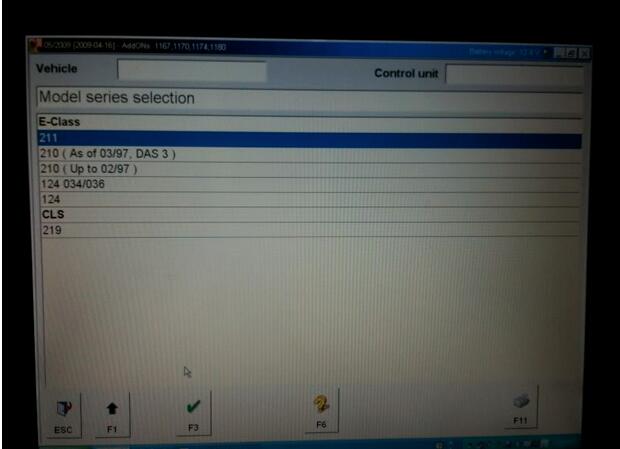
This is the main menu
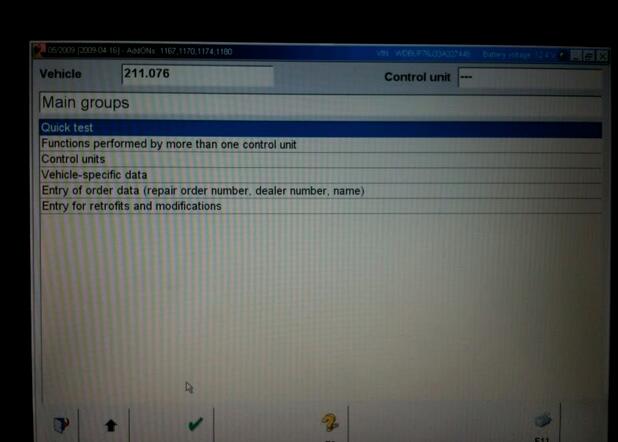
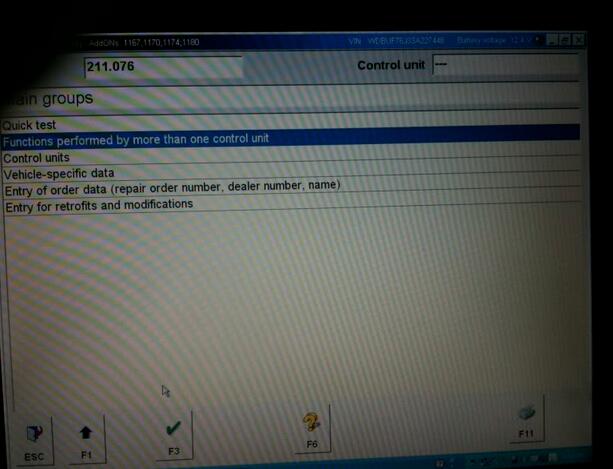
Then go to Functions performed by more than one control unit
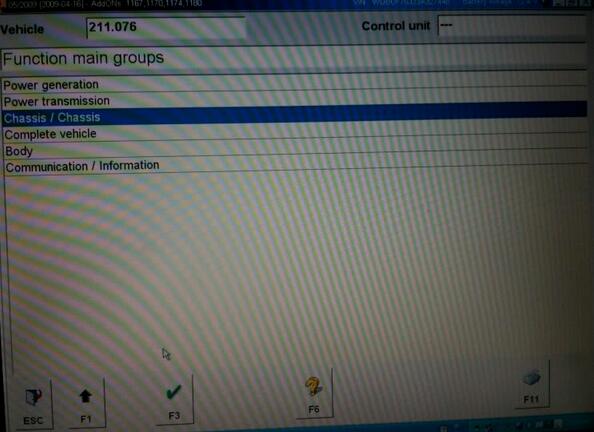
Then Chassis / Chassis
Then Level adjustment
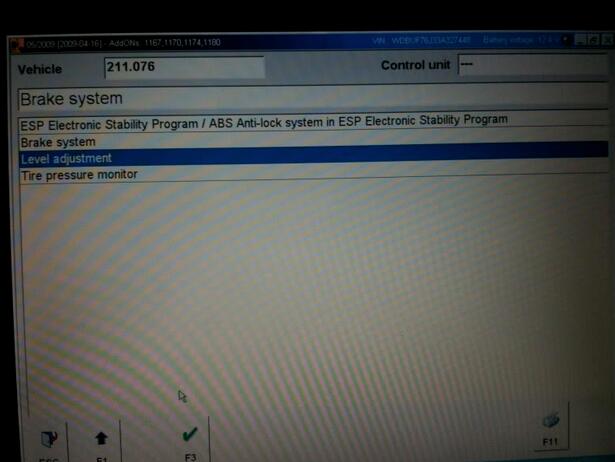
Then Suspension
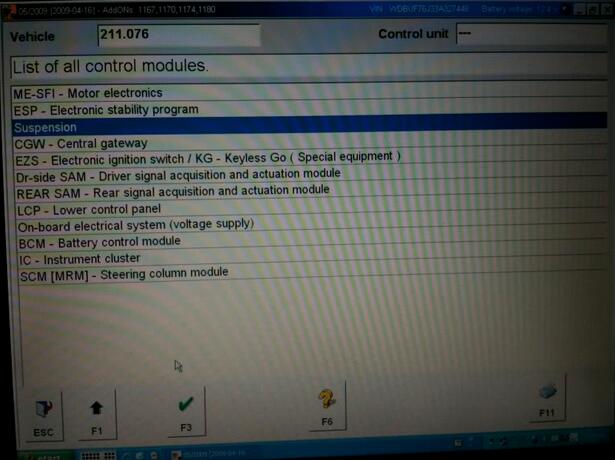
ATTENTION:
Here is where people have problems, they just go to actuations and then lower it, IT WILL NOT STAY LOWERED this way, you have to go to initial startup
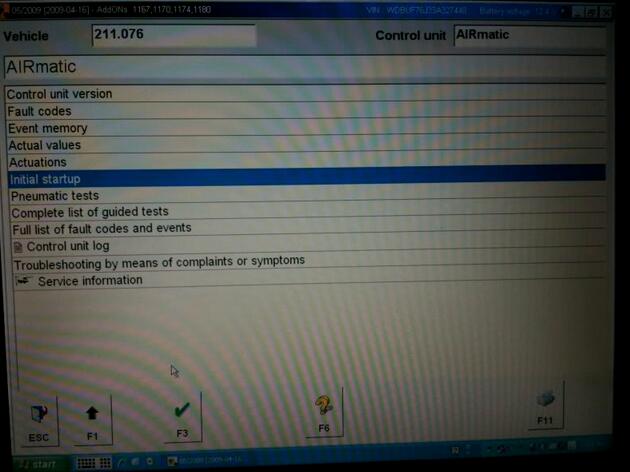
Then Initial startup with manual settings input for new control unit/ Level Calibration
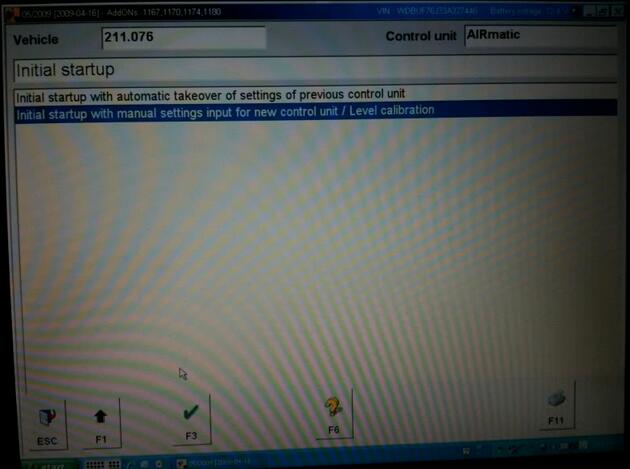
Then F2
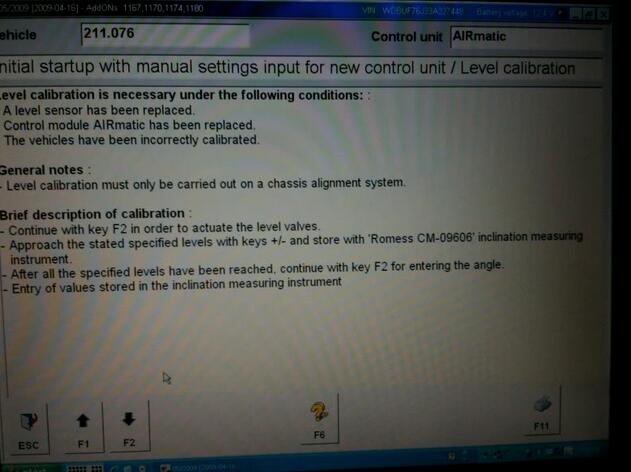
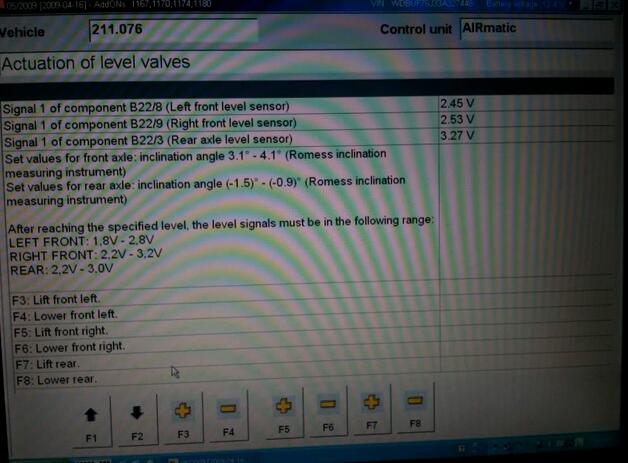
Here you will see a screen that shows the voltages which correspond to the height of the vehicle. they must be within the given ranges in the left hand column. use the + and – buttons to lower the car (In the screenshot I am in the car with a friend in the back seat, so that is why it is at 3.27, it should not exceed 3) Then hit F2
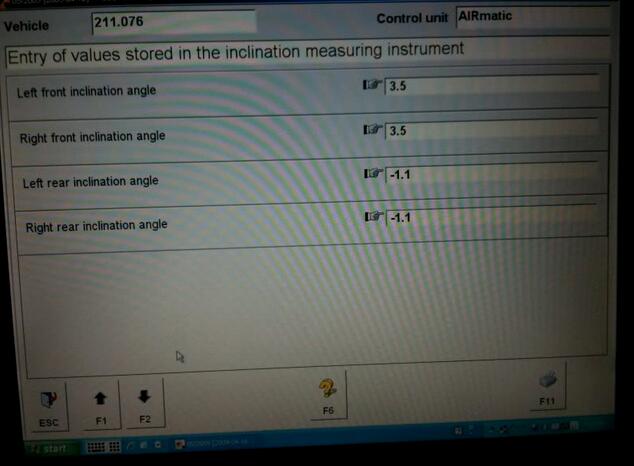
Enter in these inclination angles and if the car is within the voltages supplied in the page before, the car will accept the new lowered setting, if not it will reject it.
Done!
Posted by: Emily white at
07:39 AM
| No Comments
| Add Comment
Post contains 231 words, total size 5 kb.
December 09, 2018

MS908S Pro is an ideal tool for a truly trouble-free diagnosis of a maintenance plant by quickly, efficiently and effectively diagnosing automotive faults, managing customer data, and standardizing business processes.
One of theMaxisys series devices, the MS908SP Diagnostic Platform bases on the revolutionary Android multitasking operating system, utilizes the powerful Cortex A7+A15 six-core processor, and equips with 9.7-inch LED capacitive touch screen. Supporting J2534 ECU Programming Device is capable of replacing the existing software/firmware in the Electronic Control Units (ECU), programming new ECUs and fixing software-controlled drivability issues and emission issues. MS908S Pro is an ideal tool for a truly trouble-free diagnosis of a maintenance plant by quickly, efficiently and effectively diagnosing automotive faults, managing customer data, and standardizing business processes.
Autel MS908S Pro fromwww.obd2tool.com Specification:
Operating System AndroidTM 4.4.2, KitKat
Processor Samsung Exynos Six-core Processor (1.3GHz Quad-core ARM Cortex-A7 + 1.7GHz Dual-core ARM Cortex-A15)
Memory 2GB RAM & 64GB On-board Memory
Display 9.7 inch LED capacitive touch screen with 1024×768 resolution
Connectivity Wi-Fi (802.11 a/b/g/n/ac)
USB: 2.0
BT v.2.1 + EDR
SD Card (Support up to 32GB)
HDMI
Camera (rear) 8.0 Megapixel, AF with Flashlight
Sensors Gravity Accelerometer, Ambient Light Sensor (ALS)
Audio Input/Output Microphone
Dual Speakers
3-Band 3.5 mm stereo/standard headset jack
Power and Battery 11000 mAh 3.7 V lithium-polymer battery
Charging via 12 V AC/DC power supply with the temperature between 0°C and 45°C
Input Voltage 12 V (9-24 V)
Power Consumption 6.5 W
Operating Temp. 0 to 50°C (32 to 122°F)
Storage Temp. -20 to 60°C (-4 to 140°F)
Dimensions (WxHxD) 300 mm (11.81â€) x 220 mm (8.66â€) x 50 mm (1.97â€)
Weight NW: 1.42 kg (3.13 lb.) GW: 8.052 kg (17.75 lb.)
Protocols ISO 9142-2, ISO 14230-2, ISO 15765-4, K/L-Line, Flashing Code, SAE-J1850 VPW,
SAE-J1850 PWM, CAN ISO 11898, Highspeed, Middlespeed, Lowspeed and Singlewire CAN,
GM UART, UART Echo Byte Protocol, Honda Diag-H Protocol, TP 2.0, TP 1.6, SAE J1939,
SAE J1708, Fault-Tolerant CAN
The Autel universe of tools
The Maxisys MS908SP is compatible with Autel add-ons (sold separately): ADAS, MaxiScope, MaxiVideo MV105/MV108
Autel MS908S Pro Accessaries:
USB Ethernet Adapter
Standard 2.0 USB Cable
BMW Ethernet Cable
Main Cable – 1.5 m in length
Adapter for Chrysler-16 (America Only)
Lighter Fuse
Adapter for GM/Daewoo-12
Adapter for PSA-2
Adapter for Fiat-3
Adapter for BMW-20
Adapter for Benz-38
Adapter for Kia-20
Adapter for Mitsubishi/Hyundai-12+16
Adapter for Nissan-14
Adapter for Honda-3
Cigarette Lighter
AC/DC External Power Adapter
Clipper Cable
Adapter for Benz-14 (for EU only)
Adapter for VW/AUDI-2+2
Mini USB Cable
Ethernet Serial Cable
Posted by: Emily white at
03:40 AM
| Comments (2)
| Add Comment
Post contains 425 words, total size 4 kb.
December 01, 2018
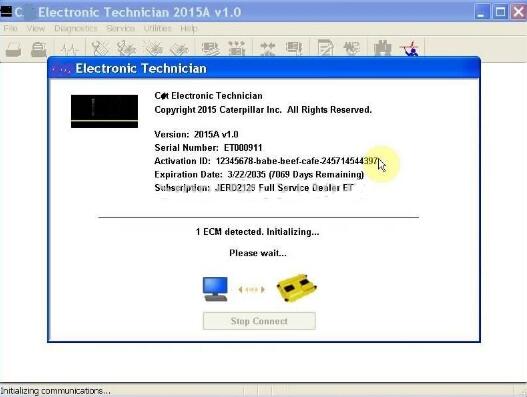
Newest CAT Caterpillar ET Wireless Adapter truck diagnostic tool
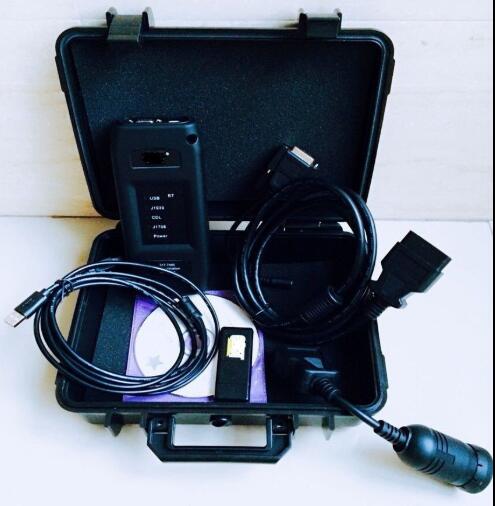
Product Details
Item specifics
Item Width: 15cm
Model Name: ET 3 wifi
Item Length: 20cm
Software Version: ET 3 wifi
Brand Name: Arsmundi
Special Features: wifi
Hardware Version: ET 3 wifi
Item Height: 8cm
Voltage: V
Item Type: Car Diagnostic Cables and Connectors
Power: W
External Testing Certification: CE
Item Weight: 1kg
Electronic: No
Item Type: Code Readers & Scan Tools
Language: Denish,English,French,German,Italian,Polish,Spanish
elm327 interface length: 10 cm
weight: 2kg
Hardware Version: new
Package Size: 10cm x 10cm x 5cm (3.94in x 3.94in x 1.97in
Item Name: ET Adaper 3 With wifi
Warranty: 3 year
Product Description
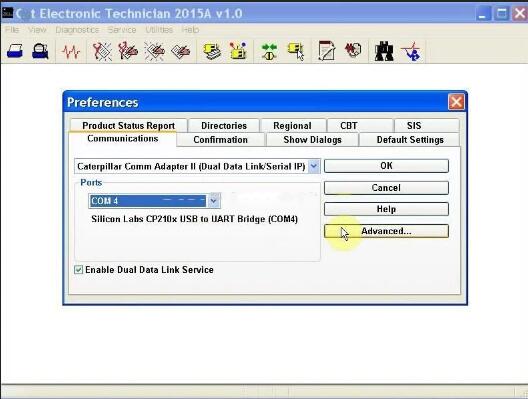
Communication:
1. Allows communication between service tools and engine controls using various data links such as J1939/11, DeviceNet (future release), CAT DataLink, and J1708 (ATA) vehicle networks
2. Flash program allows adapter firmware upgrades as additional features become available
3. Uses J1939/11, high-speed data link (part of ADEM III controls), substantially reducing flash times
4. Automatically selects J1939/11 when flashing the engine (reduces the flash time approximately 80%, from 14 minutes to 3 minutes).
Heavy Duty Truck diagnostic ScannerSpecification:
1.ECM Summary screen lists every control module on equipment
2.Being tested and gives information on these modules.
3.Fast hookup and real time display of systems status. Displays ,readings such as rpm, boost, pressures, temperatures, etc. for Easy troubleshooting.
4.Identifies faulty sensors, harness connectors, and system parameters which are out of specification. Allows customers
5.To help dealer identify problems without visiting machine.
6.Identifies intermittent sensors and wiring problems during Machine operation and keeps a record of each one. Showswhen problem occurred and how often it happened.
7.Added information to allow customer to assist dealer in diagnosing and repairing problems. (Troubeshooting Help is not built in with in the program, you will still need go back to books in order to follow a repair description and steps in each Fault Code display within the program).English and metric units of measure integrated help file to easy learn the "How To†around the software.
8.Operate System: windows XP/Windows7
Posted by: Emily white at
12:09 PM
| No Comments
| Add Comment
Post contains 352 words, total size 4 kb.
34 queries taking 0.2148 seconds, 169 records returned.
Powered by Minx 1.1.6c-pink.

