



November 06, 2018
how to update skp900
Download Update Tool and Update File
1.Register a member in www.superobd.com
2.Register your SKP-900 in your member centre in your member centre
3.Download the update file in your member centre, and unzip it to get the update bin file.
4.Download the update tool
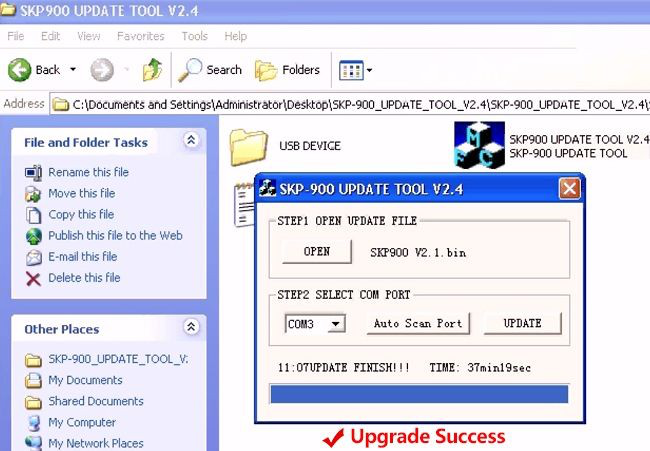
Perform the Update Steps
5.Connect OBD2 key Programmer SKP-900 to the computer using the USB cable
6.Run the update tool, click OPEN to open the update bin file
7.Click Auto Scan Port button to setup the COM port

8.Click UPDATE button to start update.
CAUTION: It takes about 37 minutes for a update. DO NOT DISCONNECT THE SKP-900 WHILE UPDATING!
Posted by: Emily white at
12:11 PM
| No Comments
| Add Comment
Post contains 107 words, total size 1 kb.
19kb generated in CPU 0.0968, elapsed 0.1333 seconds.
35 queries taking 0.1146 seconds, 162 records returned.
Powered by Minx 1.1.6c-pink.
35 queries taking 0.1146 seconds, 162 records returned.
Powered by Minx 1.1.6c-pink.

