



January 04, 2021
How to update MB SD Connect C4 C5
This post comes with the introduction to updateMB SD Connect Compact 5 /SD C4/ SD C4 PLUS.
Step 1: Change file name
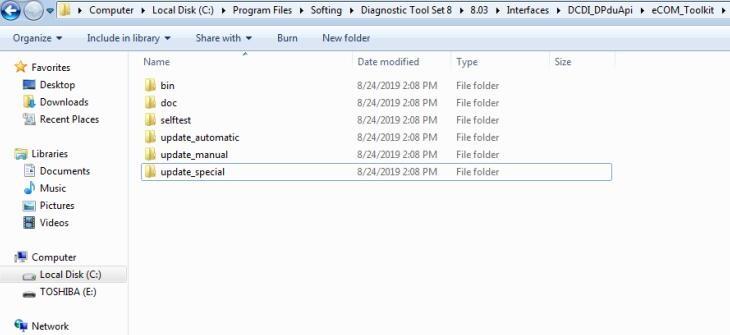
There are two storage path for MB SD Connect Compact 4/ new SD C4 plus/ SD C5.
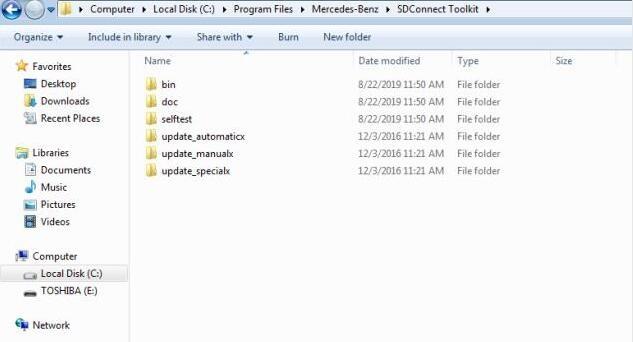
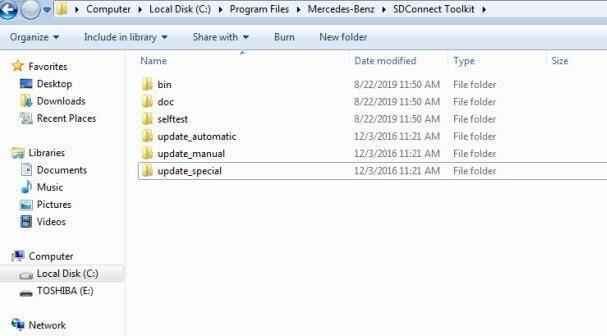
Path 1: C:\Program Files\Mercedes-Benz\SDConnect Toolkit
Path 2: C:\Program Files\Softing\Diagnostic Tool Set 8\8.03\Interfaces\DCDI_DPduApi\eCOM_Toolkit
Please modify the file name of "update_automaticxâ€, "update_manualx†and "update_specicalx†to "update_automaticâ€, "update_manual†and "update_specicalâ€, it means remove the last letter of all the three file names.


Posted by: Emily white at
12:12 PM
| No Comments
| Add Comment
Post contains 86 words, total size 2 kb.
19kb generated in CPU 0.0242, elapsed 0.0788 seconds.
35 queries taking 0.0633 seconds, 162 records returned.
Powered by Minx 1.1.6c-pink.
35 queries taking 0.0633 seconds, 162 records returned.
Powered by Minx 1.1.6c-pink.

