



December 12, 2017
Hardware Requirement:
1. A computer that can access the Internet.
2. A TF card reader/writer and a TF card that need to be updated.
Follow the steps described as below to proceed registration and update:
1. Go to http://mycar.x431.com and click the CReader CRP129 Premium (crp123 premium) once, then click updating icon.
http://blogs.rediff.com/obd2car/2017/12/12/crp-12x-premium-help/
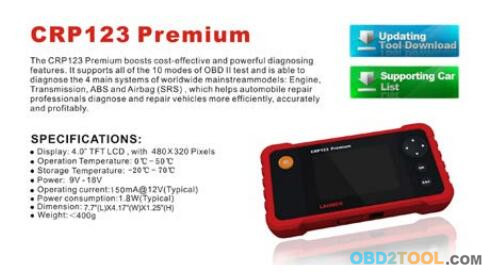
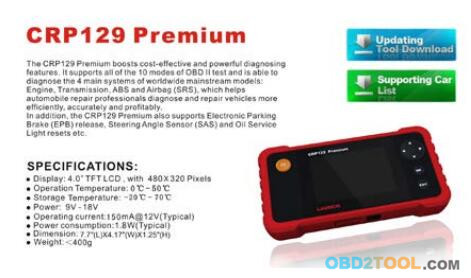
2. Download and install the update tool and launch the program when installed.
3. You will be prompted to type in the Serial Number (located at the back of the tool).
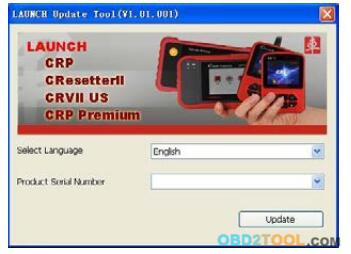
4. After the Serial Number is entered, click [Update] and enter the following information. Click [Submit].
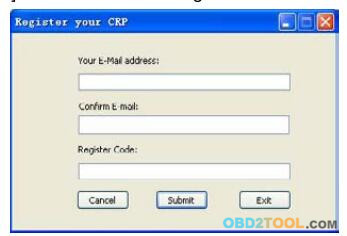
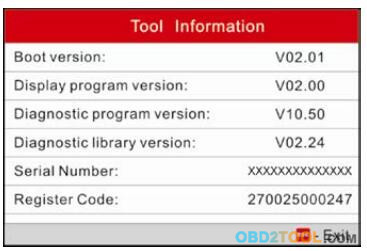
5. The Register Code can be found by connecting the supplied USB cable to the tool and inserted into the computer.
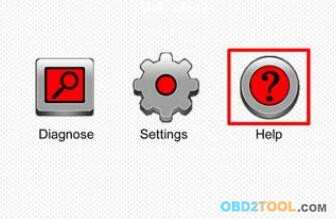
6. When the tool has powered up, place the cursor on the Help icon and press the [OK] button.
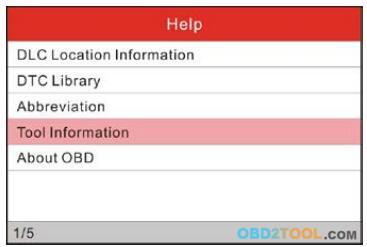
7. Select [Tool Information], press [OK].
8. This is the Register Code number for inputting into step 4
9. Install the TF card from the Launch CReader Professional CRP129 Pro into the supplied USB TF card adapter and insert into USB port of CPU.
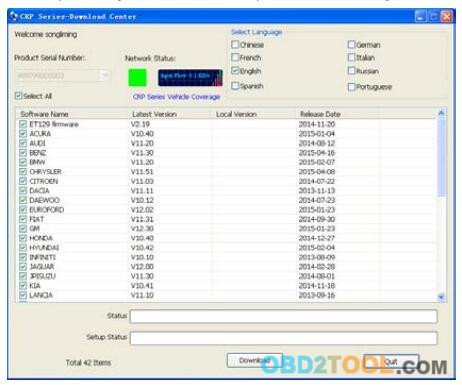
10.Reopen the CRP update Suite and select the updates you would like to perform or click [Select All] and click [Download].
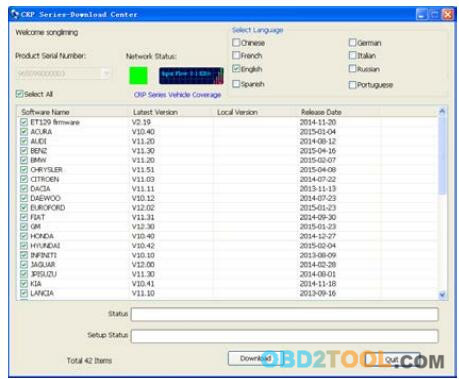
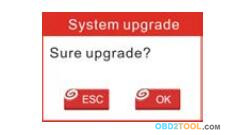
11. Once all steps are complete, reinsert the TF card into the tool and power the tool via USB in computer or via OBD2 port in vehicle. The tool will prompt you to upgrade, click [OK] to start updating and a progress bar will appear. It may take several minutes to finish update if your upgrade package file is too large, please wait.
12. The registration process is now complete!
Posted by: Emily white at
01:13 PM
| No Comments
| Add Comment
Post contains 275 words, total size 4 kb.
December 11, 2017
Xhorse VVDI2 or Flyobd FVDI2 (not FVDI 1st generation but 2nd)? I am gonna buy one of these, just don’t know which one would suite me best. I’ll use it for VAG group clusters changing g6/touran/tiguan etc., immo adaptation, making keys, millage correction. Any advice?

VVDI2 VAG vs FVDI2 VAG:
VVDI2 VAG supports VAG cars: VW, Audi, Seat, Skoda, 4th immobilizer Porsche, 4th immobilizer Bentley.
It works perfect in diagnostic, 4th immobilizer, 5th immobilizer, key learn, BCM remote control, Engine control unit, Kline instrument and immobox, adapt unit, component protection, dump tool etc
FVDI2 VAG supports VAG cars: VW, Audi, Seat, Skoda VAG-VW, Audi, Seat, Skoda 4th & 5th immobilizer,incl. 4th & 5th immobilizer AUDI A6/Q7, 4th immobilizer Porsche, 4th immobilizer Bentley.
Also, it works good in basic diagnostic, key programming/PIN codes reading, mileage correction, fault codes reading
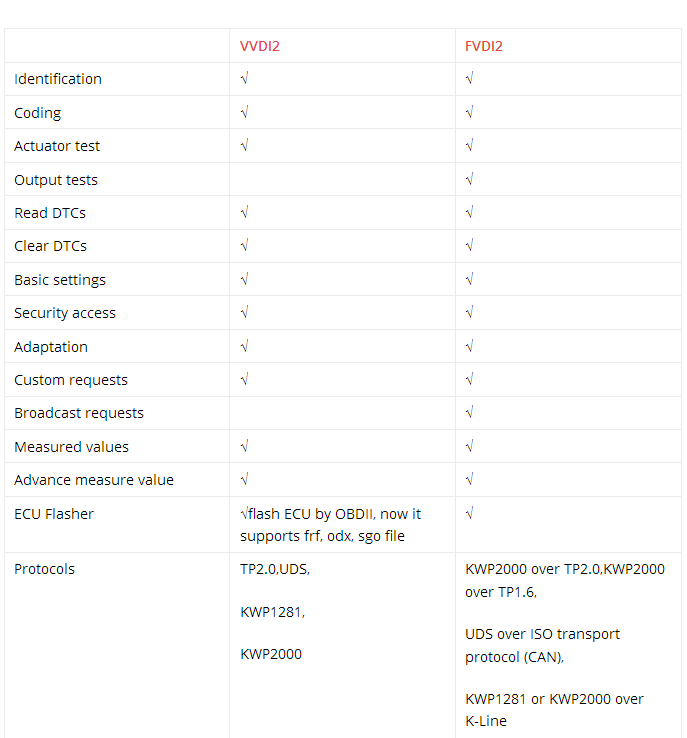
VAG diagnostic:
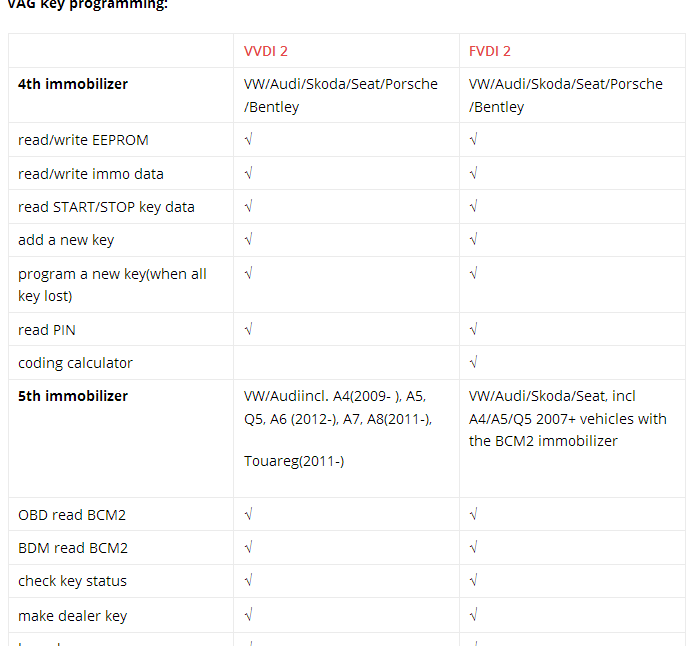
VAG key programming:
Special functions for VAG:

From the charts above, FVDI2 FLY and VVDI2 Xhorse almost share the same functions.
They mainly differ in these aspects:
1 OBD read CS/PIN of MED17
2 generate OEM remote control
3 software authorization
FVDI 2 Commanderfull kit includes software for VAG – VW, Audi, Seat, Skoda; Porsche; Mercedes/Smart/Maybach; OPEL/VAUXHALL; BMW; Peugeot/Citroen; Fiat/Alfa/Lancia; Renault; Toyota/Lexus; Hyundai/KIA; Nissan/Infiniti; TAG Key Tool; Ford; Volvo;Chrysler, Dodge and Jeep; Mitsubishi; DAF; Bikes, Snowmobiles and Water scooters.
VVDI2 full kit includes VK-01 Transponder Programmer, VJ-01 Passthru J2534 and software for VAG – VW, Audi, Seat, Skoda; BMW; PSA (Peugeot/Citroen); Porsche
So, If you looking only for VAG + BMW , then VVDI2 and VVDI Prog is way to go. No need any other tool. In VVDI2 you have also programmer similar to Tango that you can make keys buy dump, but 90% of VAG and BMW can be done by OBD in VVDI2.
VVDI programmer don’t have OBD it’s only for bench programming.
Good for CAS4, FRM, EZS, EWS4 and many more.
http://obd2tool88.blogspot.com/2017/12/fvdi2-abrites-commander-and-fly-obd.html
Posted by: Emily white at
10:44 AM
| No Comments
| Add Comment
Post contains 323 words, total size 4 kb.
December 06, 2017
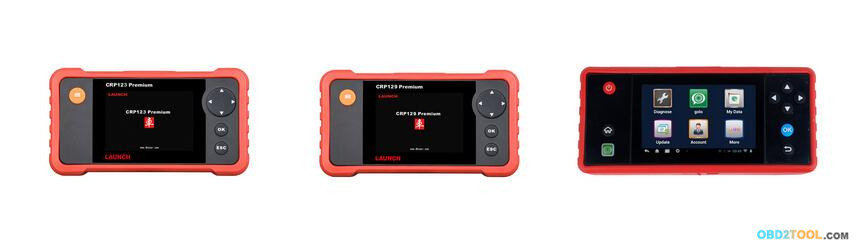
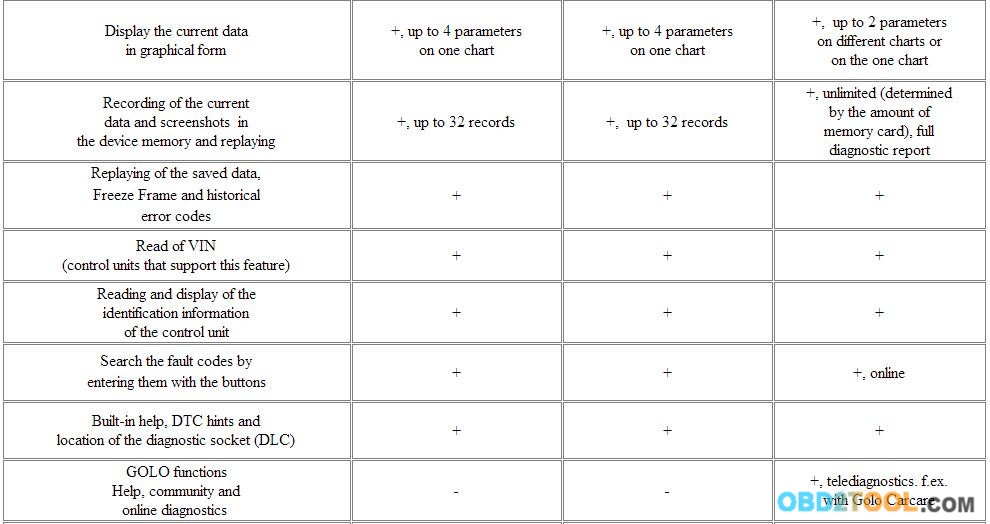
The LAUNCH CRP 229 ,Launch CRP123 Premium and Launch CRP129 Premium are the new solution for car owners and services for express-diagnostics, with the maximum possibilities at relatively low cost.
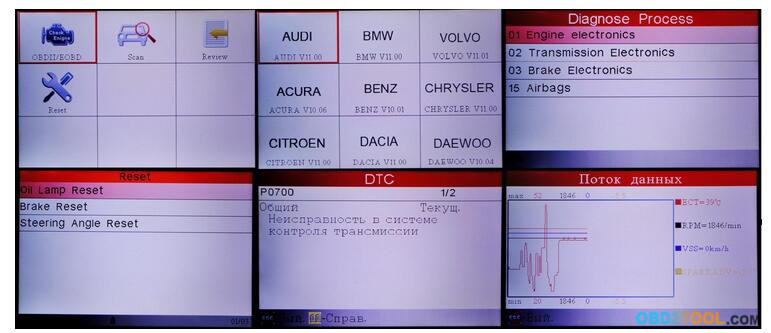
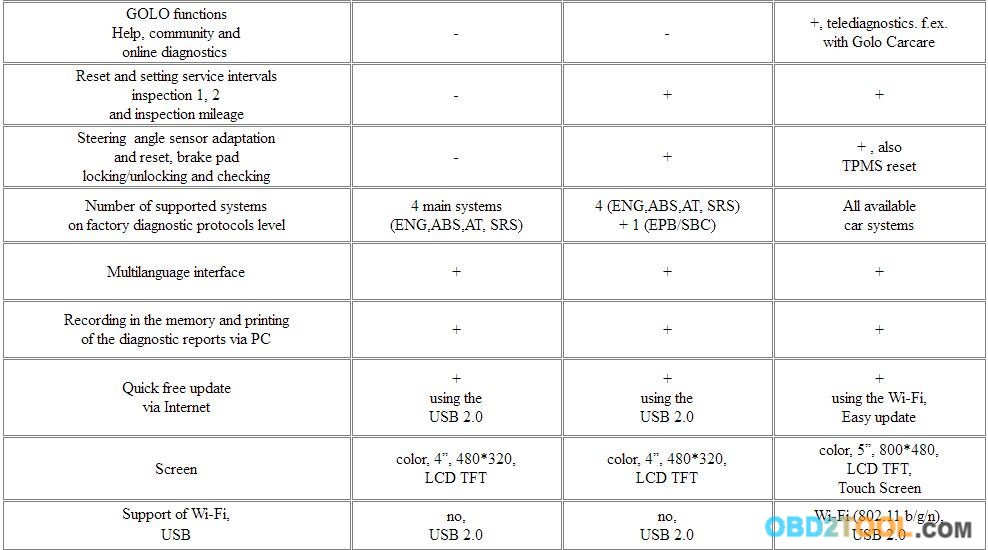
For models LAUNCH CRP 123 / 129 Premium device capabilities allows read and erase error codes with explanations, read the current data on the four basic systems of the car – engine, transmission, ABS (ESP, DSC), Airbag (SRS), and for CRP 129 Premium are offered additional features for programming and service intervals resetting, some basic adaptations for the main important functions and ability of diagnostic of the system EPB (electronic parking brake) / SBC (Sensotronic brake control module).
Sample of screens of LAUNCH CRP 123 / 129 Premium
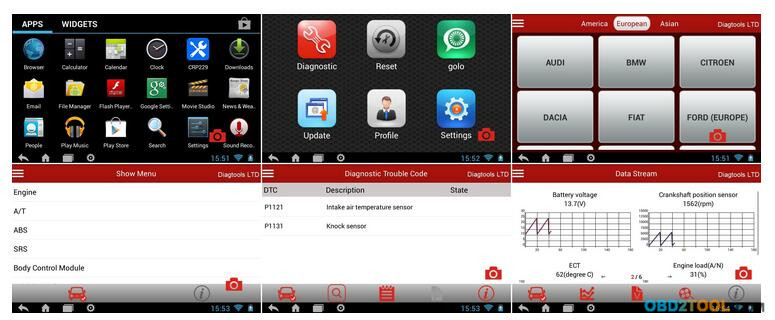
The ?mayor? scanner version CRP 229 some features coming near to diagnostic level of equipments of professional series, there are more capabilities of basic adaptations and functions in comparing with CRP 129 Premium – ability of ABS bleeding, adaptation of throttle valve and some other functions. The principal difference from junior series CRP 123 / 129 Premium is the support of diagnostics for all available vehicle electronic systems and vehicles with ?old? types of diagnostic sockets with optional adapters and ability to perform remonte diagnostics with optional accsessory Golo, for example with Golo Carcare. The device is equipped with the hardware buttons and touch screen, more powerfull hardware, Wi-Fi, built-in battery, OS Android, built-in software upgrade tool for easy update via Wi-Fi and other functions. The device is a simplified version of scanners of professional series, it is a successor of semiprofessional scanners of previous generations Launch X-431 Autobook and Quicheck.
Sample of screens of LAUNCH CRP 229
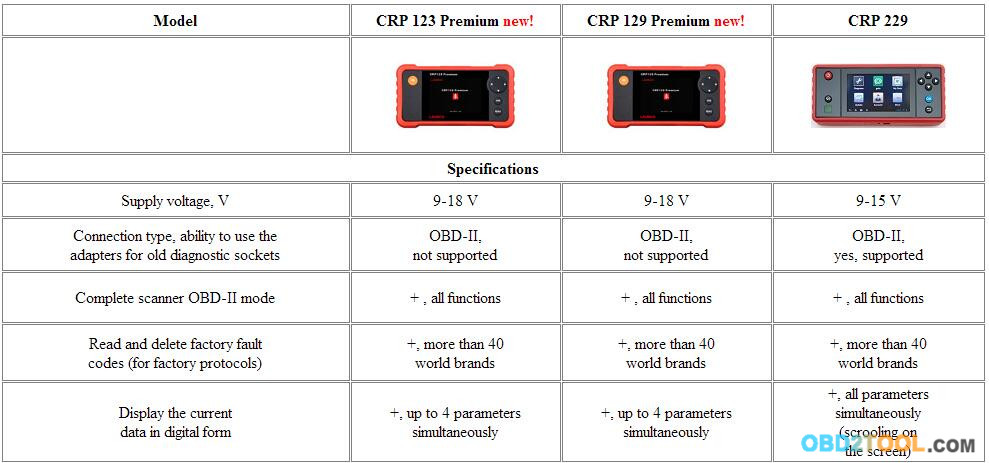
More functional and elegant CRP 229 would switch the professional device in the large service, when it will be busy on another car, when not needed very specific professional capabilities or for those, where there is no deep diagnostic level requirements. Solution CRP 129 Premium is especially useful for small services, service reception points and body/repair services for express-diagnostics depending on the requirements to the level of diagnostics, and low-cost CRP 123 Premium is suitable even for private use of individuals who have some of their own cars. Little size equipment allows to take it easily with you or express mechanic and make right on the road preliminary diagnosis. Easy and intuitive menu allows using it to anyone, even a service mechanic or private person.

Delivery set
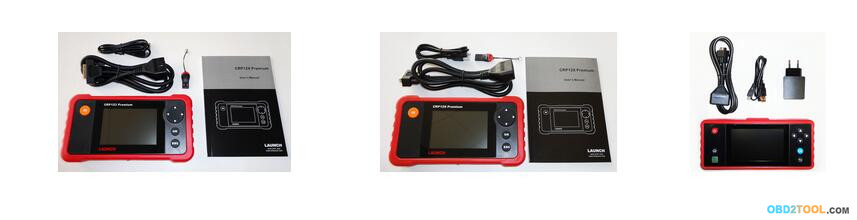
1. The main unit
2. Diagnostic cable with connector OBD-II
3. USB cable
4. Micro SD Card reader (only for CRP 123 / 129 Premium)
5. User’s manual (only for CRP 123 / 129 Premium, built-in memory for 229)
6. Charging unit (only for CRP 229)
7. Packaging
Video
http://obd2tools.zohosites.com/blogs/post/The-different-between-Launch-CRP129-Premium-and-LAUNCH-CRP123-Premium-OBD2-Code-Reader
Posted by: Emily white at
01:56 AM
| No Comments
| Add Comment
Post contains 460 words, total size 8 kb.
December 04, 2017
ATEQ has announced the new update for the ATEQ VT56 (DA1-18-11), vt55 obdii(CA2-18-05) and VT36 (HA1-08-05). The latest technical release includes new 2016-’17 car models for OE sensor recognition and improved programmable sensor coverage as well as new functions and corrections.

New features include:
1.VT36: Newest update allows users to save the last vehicle data information to the tool
2.VT36: A new menu is available to program a sensor from sensor selection as well as make, model, and year
3.Major update to all aftermarket sensors coverage and reference information: Schrader EZ-sensor, Alligator Sens-it, Napa QWIK, DILL, SMP and more
4.Corrected relearn procedures for Mitsubishi models, reflecting ability to use Mitsureset tool to relearn the vehicle
5.New VIN scan coverage added for 2015 and 2016 model years, including Buick, Cadillac, Lexus, Aston Martin, GMC, KIA, Jaguar, Subaru, Nissan and Infiniti.
6.Minor text adjustments to improve legibility
Corrections include:
1.VT56: Users are now prompted to select the type of programmable sensors before enabling the program functions
2.VT56: Settings now always display a region selected by default
3.All tools now display the first digit "0†in the sensor ID if available from the OE signalTPMS to support older OE sensors
Posted by: Emily white at
10:04 AM
| No Comments
| Add Comment
Post contains 207 words, total size 2 kb.
November 28, 2017
After test, Real MB STAR C5 with engineer software performed good and now is released.
Unlike the old clone C5 which uses C4 Internet Software, this Real MB C5 is 1:1 copy star C5. The newest hybrid W222 could still be diagnosed by this real Benz C5.
Following text shows the Real MB Star C5 features and some use tips. Move ahead.
First post picture of this real Benz diagnostic software MB Star C5:
Benz Xentry Connect C5
Real MB star C5 features:
1.It improves a lot in hardware and software.
2. With engineer software
3.Comes with one internal disc and one portable hard disk.
4.Comes with no computer.
5.No computer brand limit as long as the computer has 4GB storage at least and running Windows 7 – 32-bit or Windows 8 – 32-bit.
6.Update: for common update, dealer send update files to user for
update; for special update, the user is supposed to ship back the disk
to flash.
7.Real MB star C5 communication: Via Wlan (IEEE802.11 a/b/g/n2.4+5GHZ )
8.The licensing system is reworked – now licenses are stored on MB
servers – Any license changes are tracked by the multiplexer when
connected to the Internet network.
Why should buy Xentry connect?
After 2015, all Star Diagnosis equipment is no longer supported. That means there is no update diagnostic data for the newest cars and their systems. The lack of the possibility of coding and programming of electronic units due to the backlog of the software data level in the device, from data in the electronic control units of the car.
At the end of 2014, among dealerships, almost all of them who previously used Star Diagnosis Compact4 with SDConnect DoIP multiplexers were almost gone. Instead, dealerships choosed Xentry Kit kits which include the latest Xentry Connect multiplexers and Xentry Tab tablets from Panasonic. Tablets are custom-made, also they have a "civilian†version – the Panasonic Toughbook CF-D1, which has a more powerful configuration but shorter battery life than the original Xentry Tab.
Honestly, it seems exaggerated for non-dealer use Xentry Tab. While for dealers, that is necessary.
And what about workshop service?
Undoubtedly, the tablet from Panasonic is well while the price is too high. The cost of the Japanese tablet is realistic to buy pieces of eight new laptops or tablets from other manufacturers.
So , we suggest to buy Xentry connect from us , then buy a laptop yourself . the software from which Xentry Connect is managed can be installed without any problems on any computer that has a 32-bit version of Windows 7, Windows 8 or Windows 10. It’s clear with Xentry Connect itself – there’s no alternative .
After all, in this choice there are many reasons that encourage one to make a decision. The main thing is one: since 2015, the diagnostic multiplexer Xentry Connect C5 becomes the only one used at dealerships.
Thus, by purchasing this equipment, you do not lag behind the progress. You use in your work the best that is available today. Each your client, seeing with his own eyes that you in your work use the same device that he saw at the dealer’s service station, will understand that he made the right decision entrusting his car to your specialists.
Real MB star C5 price:
As for the price, real MB Star C5 will be sale 1095 EURO in www.obd2tool.com without shipping cost. The price is about 2 times higher than the old C5.
http://obd2tool.kinja.com/how-to-tell-it-s-a-real-xentry-connect-c5-not-fake-1820786639?
Posted by: Emily white at
03:39 AM
| No Comments
| Add Comment
Post contains 587 words, total size 4 kb.
November 25, 2017
Techs must know the underlying TPMS tasks: relearns, sensor failures and senor programming.
There are so many topics coming into play within the automotive industry that you would think every technician would be concentrating all their attention on. Topics like telematics, greenhouse gas reduction technologies and OBD hacking. Yet even with all of these game changers in front of us, a major buzzword still seems to be Tire Pressure Monitoring Systems (TPMS).
TPMS has been mandated by the Transportation Recall Enhancement,
Accountability and Documentation (TREAD) Act since 2007 and has actually
been in existence since the 1980s. Its purpose is just what its name
implies. So how does it work? Sensors inside the tires monitor the
pressure and tell an electronic control module (ECM). If a tire pressure
is low, a warning light comes on. Seems simple, right? Yet an idea so
simple, is a lot more intricate than one would think.
Q: What are the biggest issues a technician may experience with TPMS systems?
A: There are three TPMS issues that a technician will face if he works with tires: relearns, sensor failures, and sensor programming.
1) Relearns: You come across these when you do a tire rotation. Many manufacturers have each tire sensor position "learned†so when a sensor fails, the ECM knows which tire to alert you of. Every time you rotate the tires, you need to do the manufacturer specific relearn procedures in order for the vehicle to learn the new position of the tires.
Many times, technicians who skip this procedure end up having it catch up to them in the long term. For example, let’s say the technician does the tire rotation. There is no TPMS light on, so he sends it on his way. Later down the road, on a busy day (because every technician knows these things only happen on your busiest day), the customer comes in stating their right front tire is low and would like the technician to put air in it.
Guess what that technician gets to do? Check every tire, wondering which one is low. If the customer is observant, he may even ask, "why are you adding air to the right rear tire when it says the right front is low?†Now the technician has to explain that he got lazy on that customer’s prized possession the last time they were in.
So remember this every time you do a tire rotation. The vehicle may need a TPMS relearn. But remember on the plus side, it’s okay to charge extra for it
2) Failures: TPMS failures are when you have an issue with the Professional Diagnostic Tool TPMS system. This can be a mechanical failure or an electrical failure. Many failures lead to sensor replacement. Replacing sensors leads to the next issue, sensor programming.
3) Sensor Programming: Just like getting a new ECM in a car requires programming, so do TPMS sensors.
According to TPMS experts., there are two main types of aftermarket
replacement sensors for TPMS. One type comes blank and needs the vehicle
protocol programmed onto it, while another type comes with all
manufacturer protocols built into it, and your reset tool picks which
protocol you want it to use. Therefore, it is important to know what
your tool is capable of so that you know the type of sensor to order
from your parts supplier when replacing sensors.
Q: What would I need to be service ready for ATEQ VT55 OBDII TPMS Diagnostic Tool?
A: To be fully TPMS capable, you need to start at your parts supplier. They need to have sensors readily available for delivery. You also need to be aware of the types of sensors they have. Are they blank and in need of a protocol programmed into it? Or do they have every protocol already programmed and need selecting? The answer to this is critical for the next step.
Remember how the old adage goes, "You gotta have the right tools to do the job.†Something we technicians have had beaten into our brains since day one.
You need to have the tools to diagnose, repair, and program the TPMS
systems. Manufacturers for TPMS equipment include Bartec USA, ATEQ Corp.
and Bosch OTC. From the ATEQ Corp. VT55 to Bartec’s TPMS Mechanical
Tool Kit to Bosch OTC’s TPMS reset tool, these companies bring a wide
variety of user-friendly, yet technologically advanced tools to the
table, whether you are diagnosing faults, mechanically repairing sensor
parts, or programming the sensors.
Q: Why is TPMS service advantageous in California?
A: On Sept. 1, 2010, the California Air Resources Board’s Tire Pressure Regulation came into effect, declaring that all automotive service providers must set a vehicle’s tire pressure every time they touch a car, then record their findings on the invoice. The tire pressure gauge must also be accurate within 2 PSI above or below actual pressure.
This is a free rein to inspect tires and TPMS systems! Either way, you are going to have to approach tire pressure with the customer, so why not use it to your advantage? This is where customers will see that not only did you follow the law and record their set tire pressure, but you were also proactive enough to go above and beyond to let them know how to take care of their TPMS systems, even if everything checks out fine.
So as much as people try to avoid TPMS from www.obd2tool.com, its clearly here to stay. It’s as integral a part of our diagnostics as anything else. Therefore, with proper education and tooling, TPMS can be embraced instead of questioned and shunned.
http://blogs.rediff.com/obd2car/2017/11/25/ateq-vt55-obdii-tpms-diagnostic-tool/
Posted by: Emily white at
10:05 AM
| No Comments
| Add Comment
Post contains 945 words, total size 6 kb.
November 18, 2017
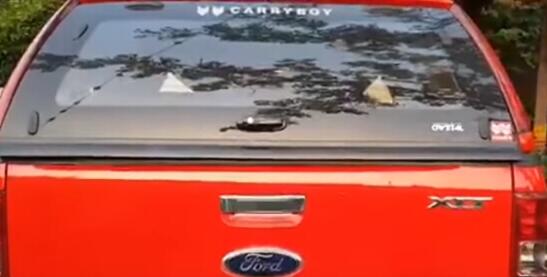
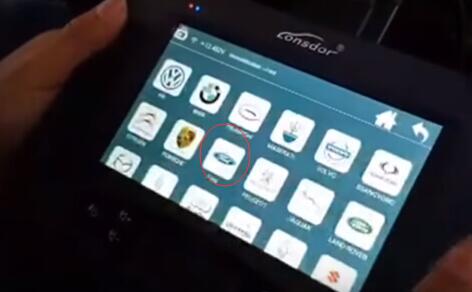
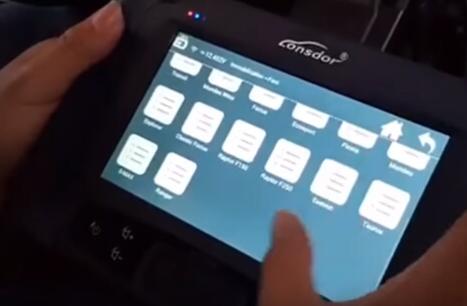
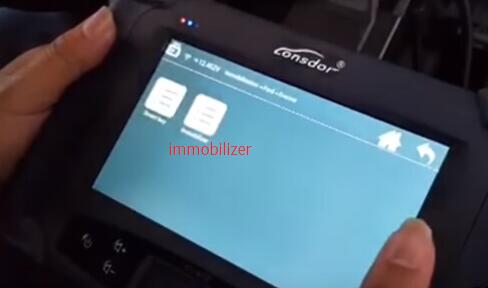
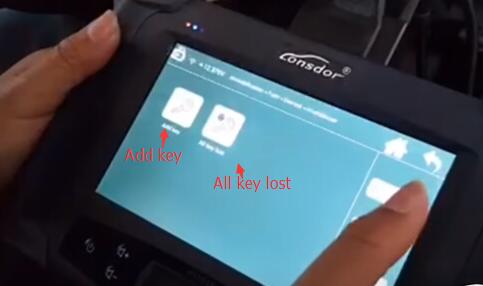
Lonsdor K518ISE key programmer has successfully programmed new remote keys on a Ford Ranger year 2016.
Procedure:
Connect K518 host with vehicle via OBD diagnostic socket
Turn ignition ON
Select Immobilizer->Ford->Ranger->Immobilizer->Add a key
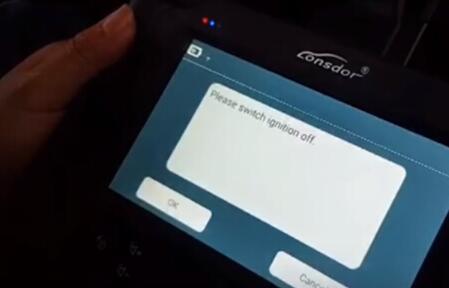
Turn ignition off
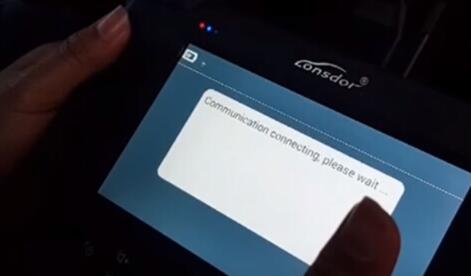
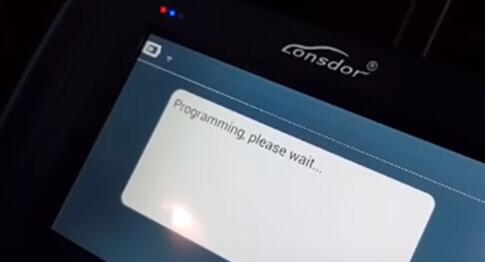
Communicating…
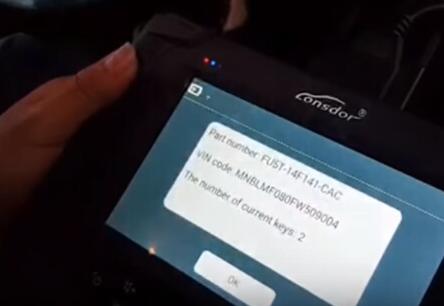
Automotive Key Programmer Lonsdor K518ISE read vehicle part number, VIN and current key numbers
Reading Pin code in progress

Read pin code success. write down the pin code.
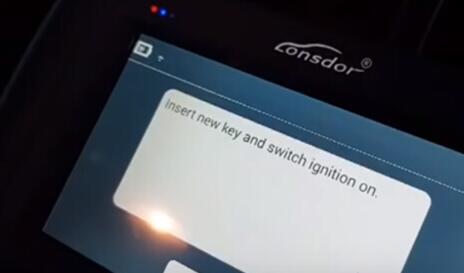
Insert new key and turn ignition on
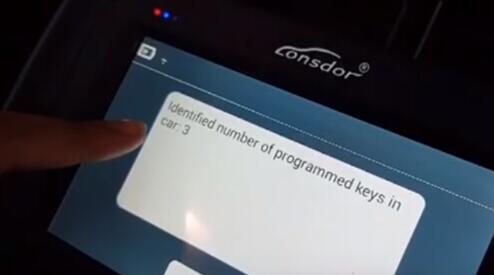
Lonsdor K518 on obd2tool.com identified number of keys programmed:3
Program success.
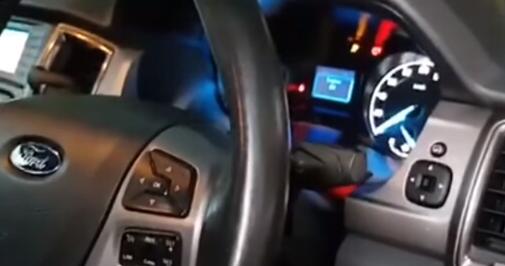
Test the remote key.

http://obd2-key-programmer.blogspot.com/2017/11/lonsdor-k518-program-mini-cooper-cas3.html
Posted by: Emily white at
02:08 PM
| No Comments
| Add Comment
Post contains 96 words, total size 5 kb.
November 12, 2017
The passage here explains the reasons forBMW Diagnostic Tool icom a (a2, a3), icom b, icom c and icom d for BMW diagnosis, coding and programming. And also, you will know what you should need for use in different repairing situations.
ICOM A (A2, A3) – OBD diagnostic supporting MOST, D-CAN and K-CAN protocols
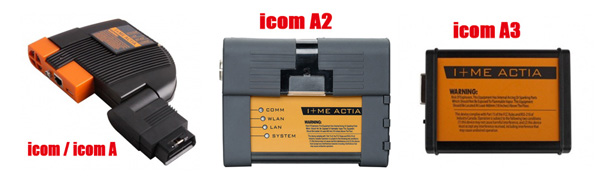
ICOM A is a basic component. Physically, on one hand, it supplies the interface that connects with car OBD II diagnosing interface; on the other hand, it can supply the interface that is self-adaptable intergraded into garage. As protocol converter, it is responsible for testing and data exchange in different controlling units, as well as signal processing through a high effective computer core. Electrical power pressure is supplied by vehicle interface. The lowest power pressure of Electrical operation of ICOM A is fixed to 8V. Only it exceeds the lowest value, can a stable function be guaranteed.
ICOM A vs ICOM A2 vs ICOM A3
ModifiedBMW ICOM A2 for vehicles with OBD access receives a significantly more powerful processor and more storage capacity. And robust aluminium case will help to avoid damage when using in harsh environments. It works better in cooling, runs faster and works more stable, not easier broken than older ICOM A.
ICOM A3 can program all units for all BMW series expect media system,
and work more stable and has stronger compatibility than ICOM A2, A1.
ICOM B – diagnosis via MOST bus, and possess link to A-interface through USB connection
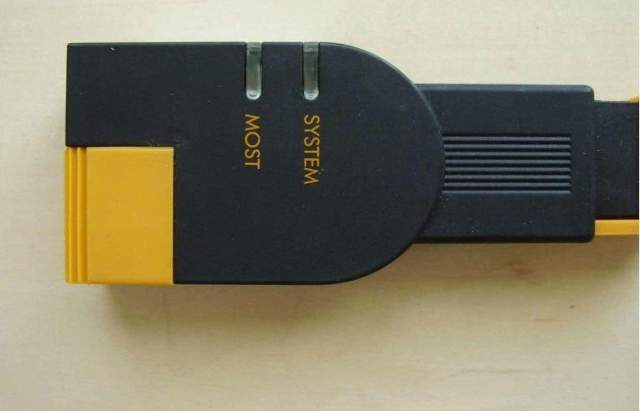
ICOM B for vehicles with optical MOST access will be equipped with a
soft cover made of rubber instead of the former plastic cap, to protect
the MOST connector
ICOM B is the external MOST interface of ICOM A, and it connect with
ICOM A by a usual USB or that within supplying. Power is supplied by USB
through ICOM A from OBD2TOOL.
Only when the power supplied to ICOM A lower to 8V, can electrical running of ICOM B be ready to connect with standard.
ICOM C–20-pin cable for previous types
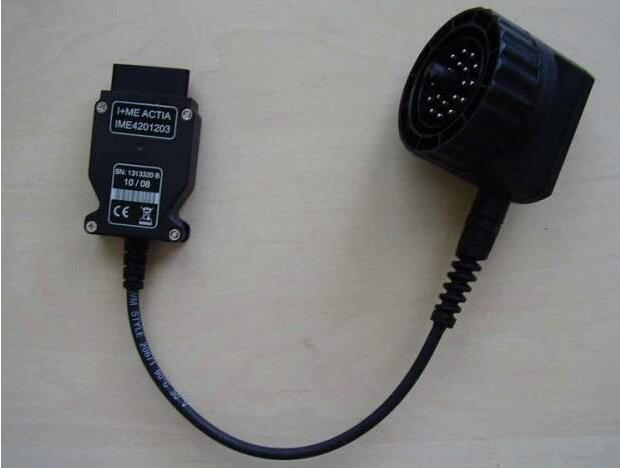
ICOM C for old series with a diagnostics socket will be additionally
equipped with an approx. 20 cm long cable, which facilitates the
connection of the ICOM A2 and makes storage in the engine compartment
easier.
ICOM C in an intelligent interface converter, which makes OBD II compatible with BMW round plug. As a lengthened auxiliary module, it makes ICOM A connects with non-OBD II vehicle module. Power is supplied by round plug through KL30.
The lowest pressure of ICOM C electrical running regulated to 8v. Electrical pressure on KL30 is conveyed to OBD II through internal equipment, and then to ICOM A. Only when vehicle battery voltage ICOM C exceeds to the lowest limitation, can it guarantee the stable interactivity of the two equipments.
ICOM A2, ICOM B, ICOM C connection:
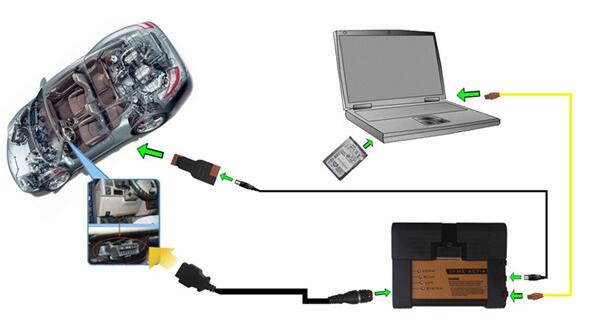
ICOM A B C and BMW E & F-series
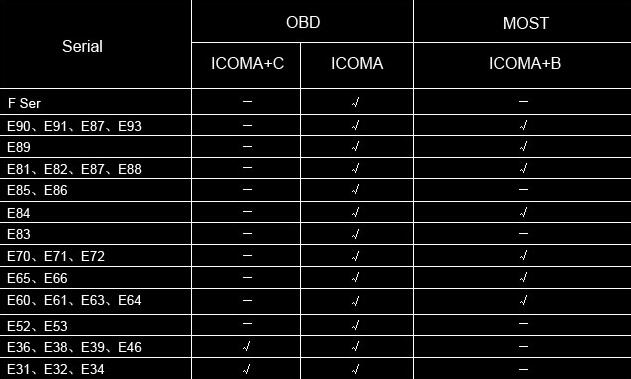
Save a lot for E and F series:
BMW E series: K+DCAN USB cable
BMW F series: ENET cable
ICOM D – for BMW motorcycles motobikes diagnostics
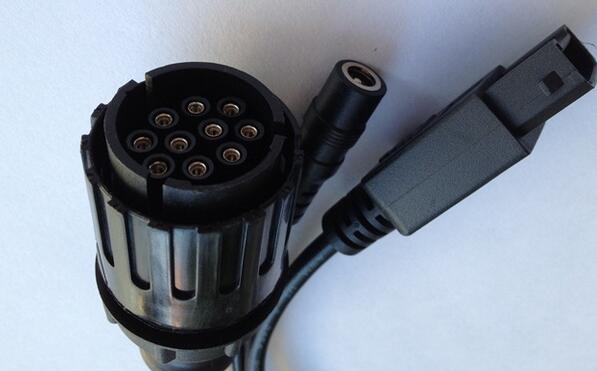
ICOM D is a 10-pin to 16-pin diagnostic cable for BMW motorcycles motobikes diagnostic and programming together with ICOM A2
It is the TOP 1 in the BMW motor diagnostics list, with the most powerful & stable function and the best reputation.
ICOM D connector location:
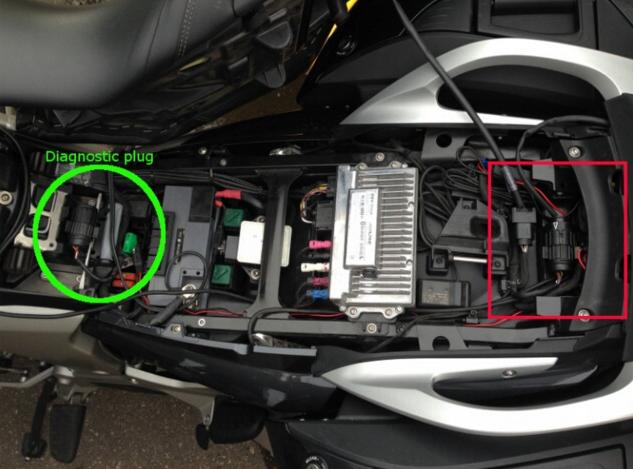
http://bmwicomscan.blogspot.com/2017/11/why-do-i-need-bmw-icom-a2-icom-b-icom-c.html
Posted by: Emily white at
02:37 PM
| No Comments
| Add Comment
Post contains 569 words, total size 6 kb.
November 04, 2017
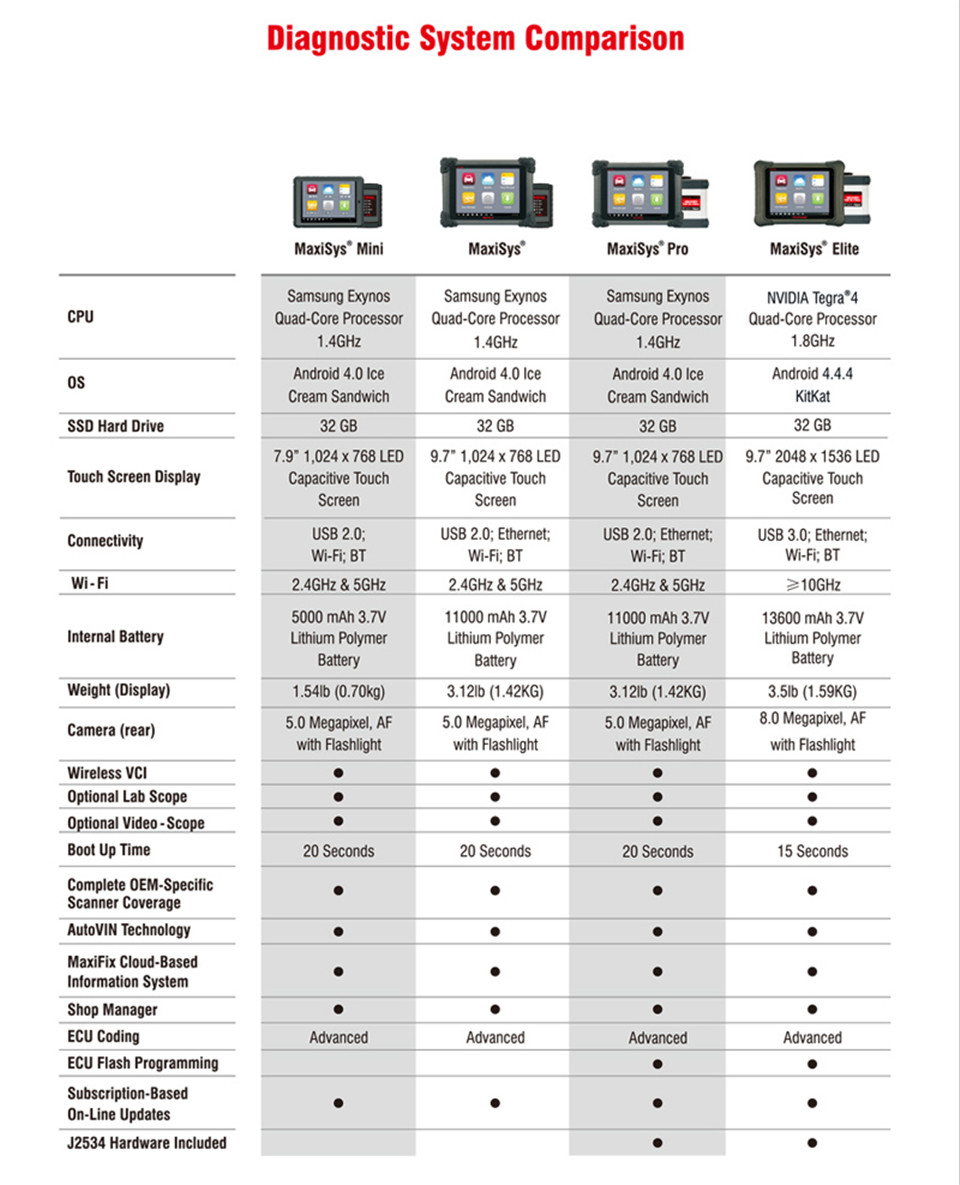
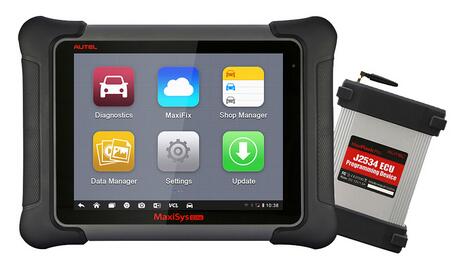
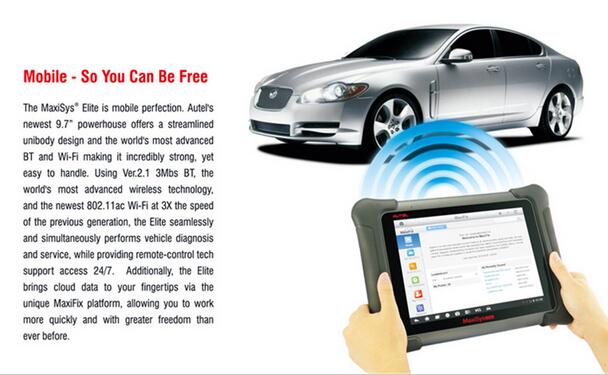
The Maxisys Elite rapidly performs every job from comprehensive vehicle diagnostics & analysis to advanced ECU programming. 2x faster than any comparable device, the MaxiSys Elite from www.obd2tool.com provides extended battery life and intelligent power saving. The MaxiSys Elite offers a super-sensitive capacitive screen able to respond to gloved, moistened, and even greasy fingers! The ergonomically angled docking station provides optimum visibility and convenient charging that eliminates power concerns.
MaxiSys Elite Features
1. The most extensive complete system coverage for more than 80 US domestic, Asian and European makes and models
2. Exceptional OE-Level functionality from comprehensive OBDII diagnostics & services to advanced ECU coding and programming
3. Uniquely integrated vehicle programming capabilities working with a
SAE J2534-1 & -2 compliant vehicle programming pass-thru interface
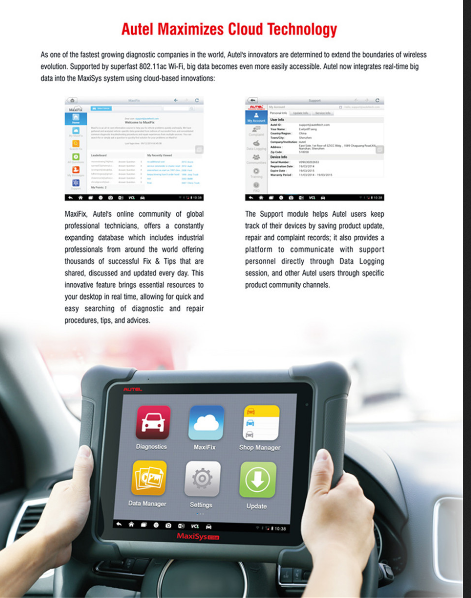
4. Automatic system and software updates with real-time push message notifications via internet
5. Instant remote control tech support anytime, anywhere
6. Interactive Data Logging sessions enable direct contact with Autel
Support for first-hand troubleshooting of diagnostic bugs and errors
7. One-stop multitasking designed for ideal management of workshop
operations to keep all data files, customer info, and vehicle records
well organized
8. Unique ergonomic design with rubberized outer protection and a rugged internal housing
9. Hardware running speed is twice than Maxysys MS908P.
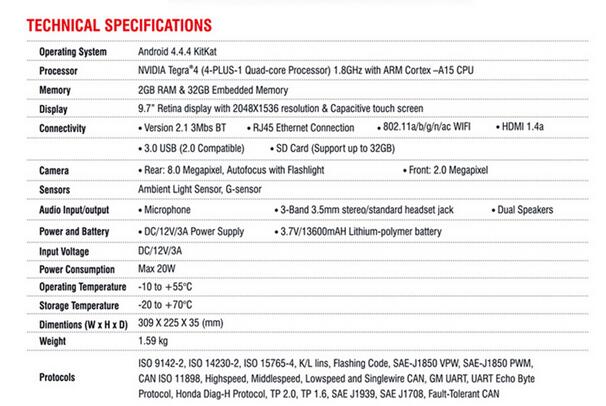
MaxiSys Elite Specifications
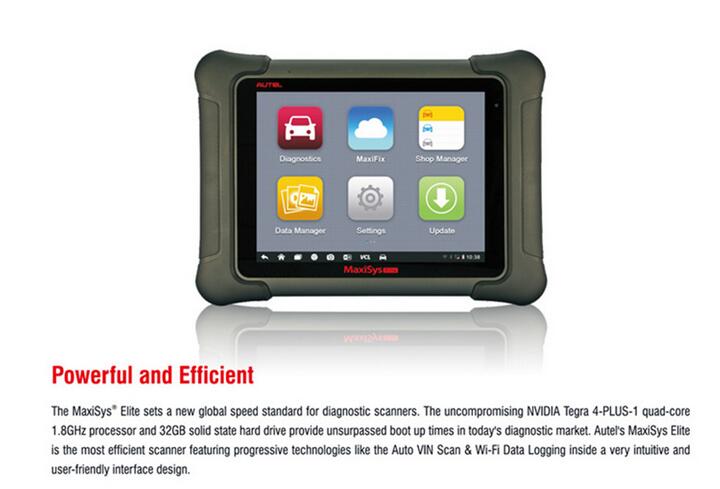
Operating System Android 4.4.4 KitKat
Processor NVIDIA Tegra? 4 (4-PLUS-1 Quad-core Processor) 1.8GHz with ARM Cortex – A15 CPU
Memory 2GB RAM & 32GB Embedded Memory
Display 9.7†Retina display with 2048X1536 resolution & Capacitive touch screen
Connectivity 802.11abgnac WIFI
Version 2.1 3Mbs Bluetooth
RJ45 Ethernet Connection
3.0 USB (2.0 Compatible)
HDMI 1.4a
SD Card (Support up to 32GB)
Camera Rear 8.0 Megapixel, Autofocus with Flashlight
Front 2.0 Megapixel
Sensors Ambient Light Sensor, G-sensor
Audio InputOutput Microphone
Dual Speakers
3-Band 3.5 mm stereostandard headset jack
Power and Battery 3.7V13600mAH Lithium-polymer battery
DC12V3A Power Supply
Input Voltage DC12V3A
Power Consumption Max 20W
Operating Temperature -10 to +55°C
Storage Temperature -20 to +70°C
Dimensions (W x H x D) 309 X 225 X 35 (mm)
Weight 1.59 kg
Protocols
ISO 9142-2, ISO 14230-2, ISO 15765-4, KL lins, Flashing Code, SAE-J1850 VPW, SAE-J1850 PWM, CAN ISO 11898, Highspeed, Middlespeed, Lowspeed and Singlewire CAN, FOR USAGM UART, UART Echo Byte Protocol,for Honda Diag-H Protocol, TP 2.0, TP 1.6, SAE J1939, SAE J1708V
SUPPORTED CARS:
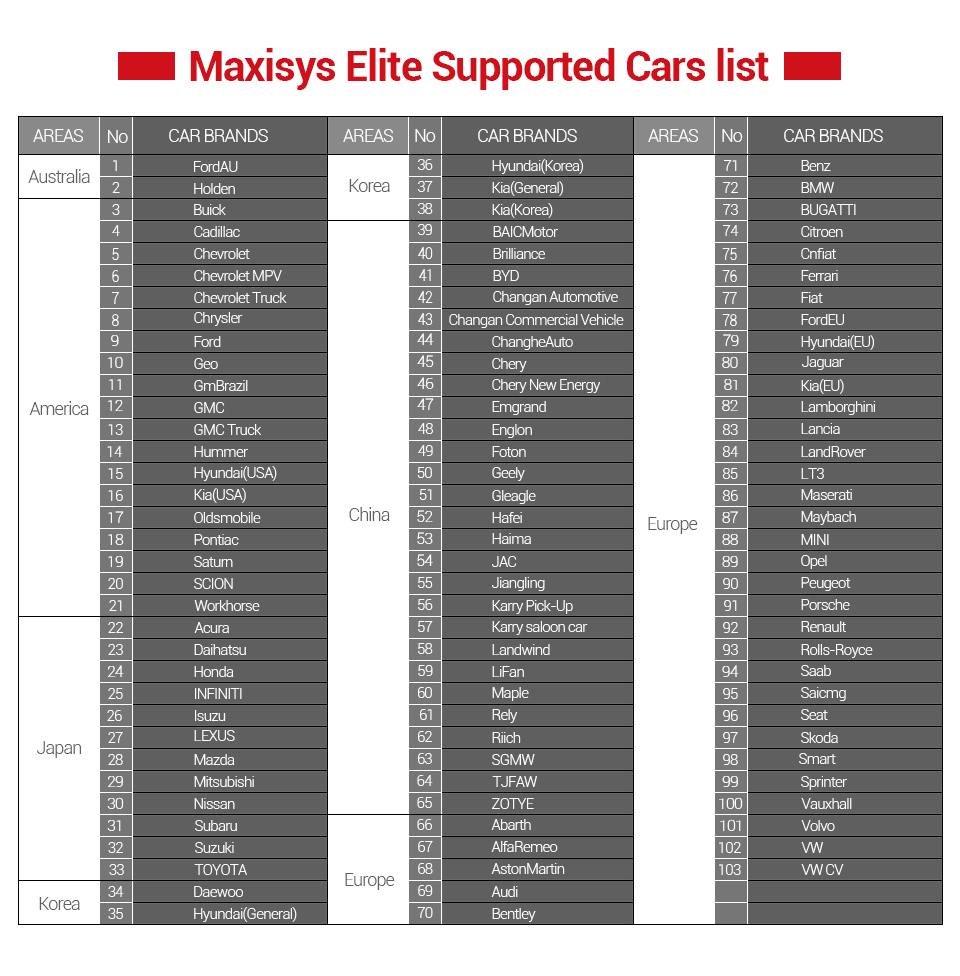
PRODUCT CPMPARISION:
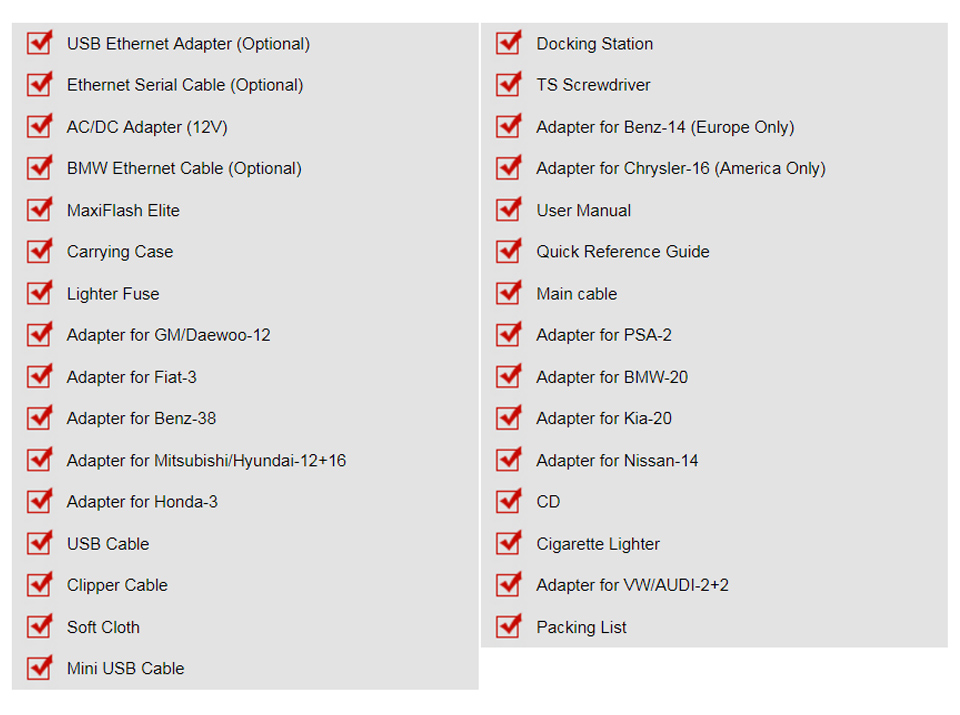
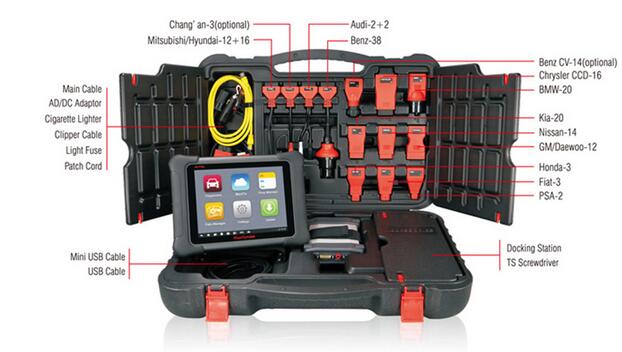
PACKAGE LIST:
PRODUCT PICTURES:


https://autelscantools.blogspot.com/
Posted by: Emily white at
02:03 PM
| No Comments
| Add Comment
Post contains 406 words, total size 7 kb.
October 30, 2017
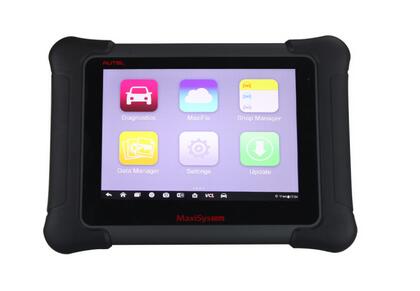
Autel Maxisys Elitewith J2534 ECU Preprogramming Box is in store now only 2449USD
If you need it , you can buy it from our webiste now, as it have out of store more than 2 months, And in our warehoue,We only have 7 set in our warehouse
Four Reason To Get Autel MaxiSys Elite:
1.The MaxiSys Elite rapidly performs every job from comprehensive
vehicle diagnostics & analysis to advanced ECU programming.
2.2X faster than any comparable device, the MaxiSys Elite provides extended battery life and intelligent power saving.
3.TheAutel Scan Tool MaxiSys Elite offers a super-sensitive capacitive screen able to respond to gloved, moistened, and even greasy fingers!
4.The ergonomically angled docking station provides optimum visibility and convenient charging that eliminates power concerns.
MaxiSys Elite Features:
1. The most extensive complete system coverage for more than 80 US domestic, Asian and European makes and models
2. Exceptional OE-Level functionality from comprehensive OBDII diagnostics & services to advanced ECU coding and programming
3. Uniquely integrated vehicle programming capabilities working with a
SAE J2534-1 & -2 compliant vehicle programming pass-thru interface
4. Automatic system and software updates with real-time push message notifications via internet
5. Instant remote control tech support anytime, anywhere
6. Interactive Data Logging sessions enable direct contact with Autel
Support for first-hand troubleshooting of diagnostic bugs and errors
7. One-stop multitasking designed for ideal management of workshop
operations to keep all data files, customer info, and vehicle records
well organized
8. Unique ergonomic design with rubberized outer protection and a rugged internal housing
9. Hardware running speed is twice than MaxiSYS MS908P.
https://autelscantools.blogspot.com/
Posted by: Emily white at
03:01 AM
| No Comments
| Add Comment
Post contains 272 words, total size 3 kb.
October 28, 2017
Topic: Have Toyota Land Cruiser Prado 2016 remote key, firstly useAuto Key Programming SKP1000 programmer to match 72 (with G) 433MHZ, then match the remote key manually
Chip model: 72 (with G)
remote control frequency: 433MHZ
Unlock direction: Clockwise
Key embryo: NO. 02
OBD position: under the steering wheel
Comes with another NO.1 & NO.2 ignition lock
Able to copy
No need Pin code
The remote control is able to generate
Chip maker: SKP1000 tablet key programmer
Remote control match tool: manually
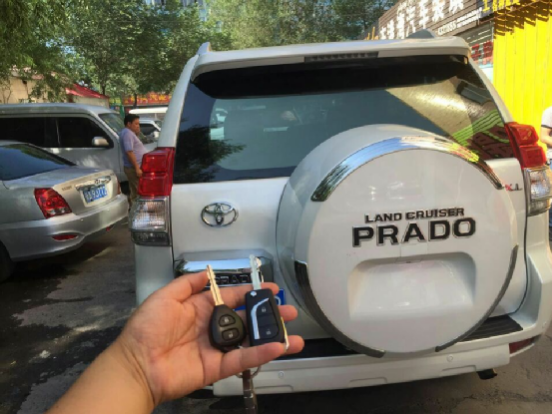
Here we go!
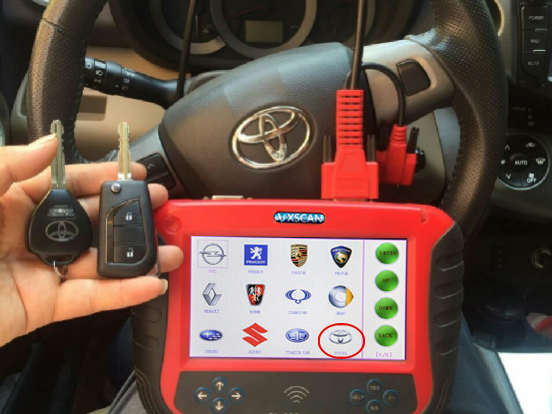
Part 1: Chip 72 (with G) 433MHZ match with SKP1000 programmer
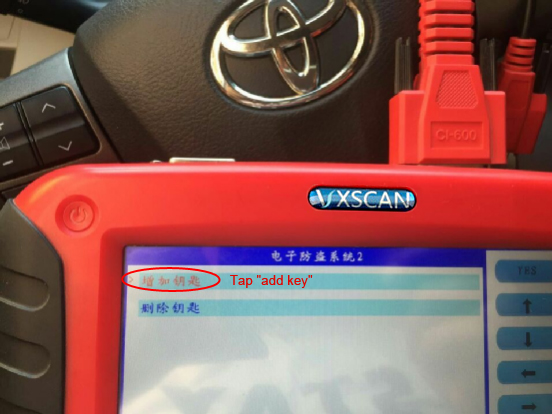
Tap †Toyota†then "Immobilizer system 2â€
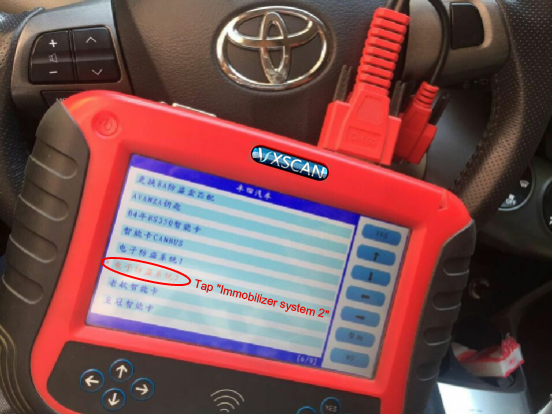
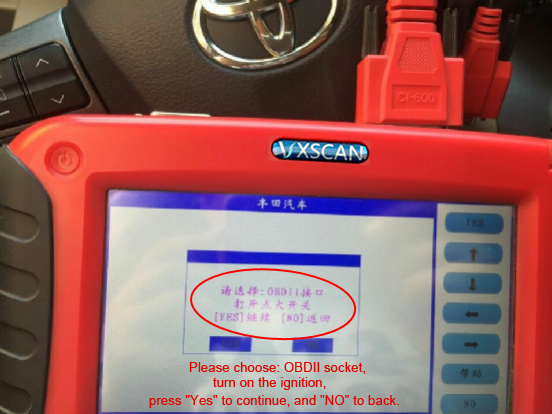
Please choose: OBDII socket, and turn on the ignition, press "Yes†to continue, and "NO†to back.
Tap "add keyâ€
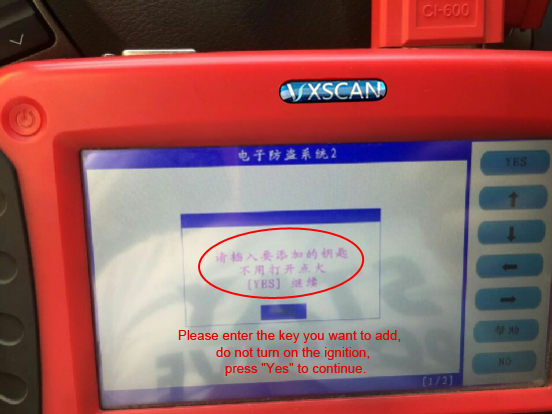
Please enter the key you want to add, do not turn on the ignition, press "Yes†to continue.
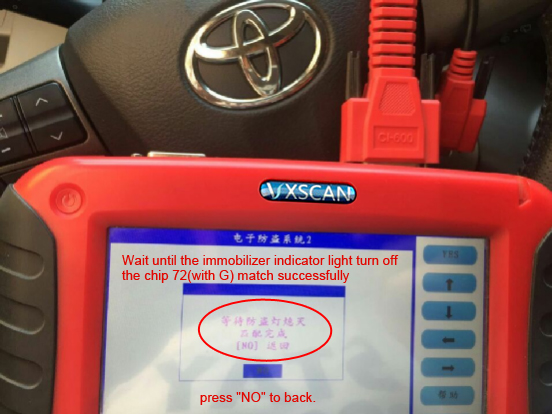
Wait until the immobilizer indicator light turn off, the chip 72(with G) match successfully, press "NO†to back.
Part 2: Remote key match manually
Procedure:
1.Close all car doors, insert the key, open the main door, pull out the key.
2.Insert the key into the ignition and pull out for two times.
3.Close and open the side door for two times.
4.Insert the key into the ignition and pull out for one time.
5.Close and open the side door for two times.
6.Insert the key into the ignitionswitch, close the door.
7.the ignitionswitch ON-OFF for one time is the "add†mode, ON-OFF for two time is the "Reset†mode.
8.Pull out the key from the ignition switch, at this time the door lock
should move for 2 times, meanwhile hold the "LOCK†and "UNLOCK†buttons
for one second then release, after 1 second repeat the same action. At
this time, the OBD-II scan tool lock will automatically unlock and lock for one time. Move for one time means success and for two times means failure.
9.Reset the other remote control, repeat the step 8.
If failure manually, recommend CI-pro to match the remote key.
http://obd2lily.mihanblog.com/post/124
Posted by: Emily white at
06:30 AM
| No Comments
| Add Comment
Post contains 347 words, total size 5 kb.
October 20, 2017
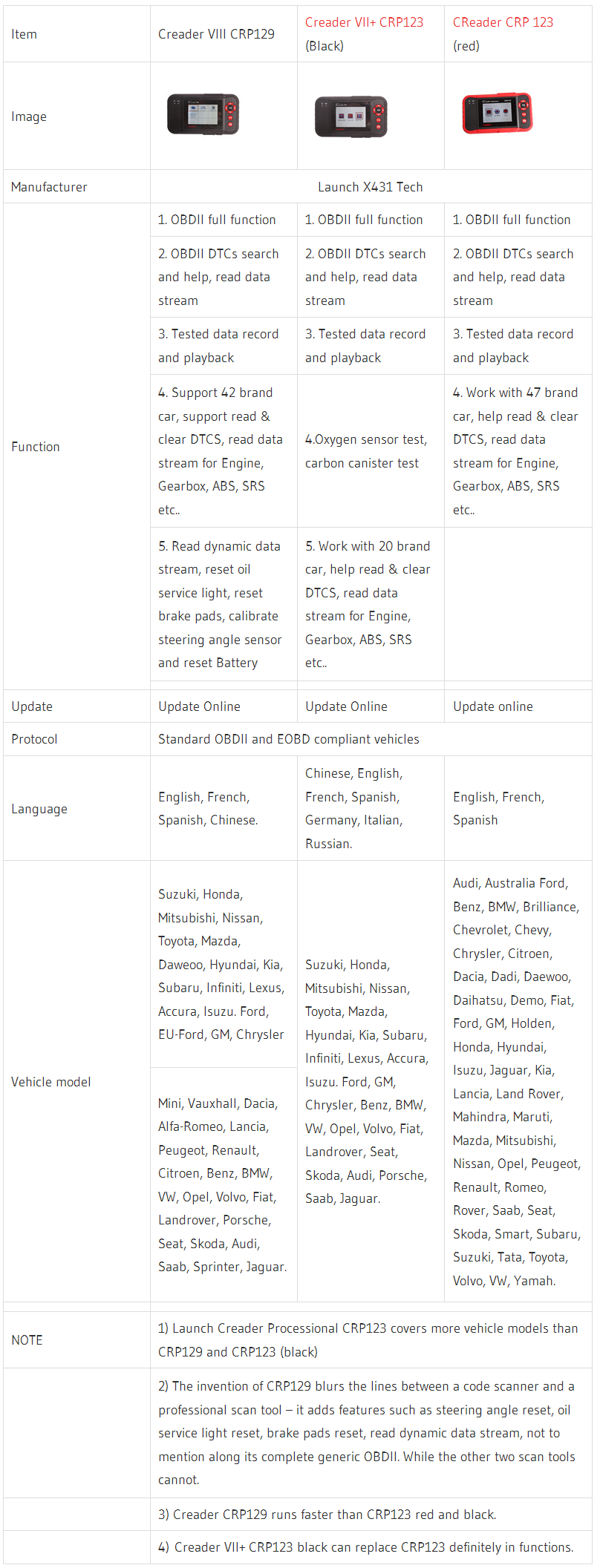
Launch Creader CRP129 and CRP123 Scanner,CRP123 Scanner includes two one,one is red,one is black Creader VII+.CRP129 is an upgraded version of CRP123. CRP123 (red and black) share same functions, but differ in vehicle coverage.How to choose the suitable one?
Posted by: Emily white at
09:29 AM
| No Comments
| Add Comment
Post contains 49 words, total size 1 kb.
October 08, 2017
One of the most instant and easy devices to diagnose the performance of your car engine is the Obd2 codes. They are also important in reset your lighting systems, or all the lights so that they can be brighter, and more efficient in light rays emissions. When to incorporate with the scanner tool, CAN – stands fot the Control Area Network is also a good commnicating gadget tool, and its operation is really amazing!
If your car is frequently in broking, then an OBD2 reader can be an invital tool in your warehouse. It is used to connect scanning system, and then enable you to be aware of your car’s current performance. If some serious breakdown is happening, it will imform you with detailed particulars, and also detect where it is suffered from. Sometimes, it can be really helpful when telling you the protential issues that can come out in the near future, help you to fix it before any real brokedown situations take place in the roads!
The OBD2 can also help to save a lot of time, and money if you bring your car to a mechanic man to have a total check or repairing. All of oil emisstions are well in control of this tool too. If any emission come up in random formulas, it will force shut-down and stop the emission process.
OBD means on-board diagnostics, so that they can communicate with your on board computer too, to give you very detaied information about the status of your car. Therefore, you can base on these knowledge to detect where the problem is rooted from. You can control in hand all the systems in your car, even the current performing or emission system. Of course I do not mean by some abnormal situations when the tool can not handle with. But it seldom happens, so do not worry much, a machine can never be perfect.
The process of anAuto Scanner Tool is, they will get and clarify genetic codes, also with the pending
codes to display them in a understandable in a screen. Sometimes there
can be a connector device to connect a tool with a laptop or computer to
be showed on.Then you can easily read all those information. This tool
is handheld, and small, so that we can bring it together easily, without
taking up much space, or affecting other normal functions of the car.
Handheld-wide-band-coms-receiver
You should remember that there is no way an OBD2 scanner tool can be suitable with any kind of car! Therefore, there are tons of genres, types or functions that can be choosed from, in fitting with every kind. There is a famous tool recommended, Actron CP9680 AutoScanner Plus?. It is compatible with 1996 or newer vesions of import, domestic, diesel and hybrid vehycles, as well as being compliant with the 1995, 1996 OBD2 models. It has a code connect system to show a comprehensive load of database. A kind of software helps you a lot in using OBD2 tool.
Moreover, the better functions of OBD2 can be automaticly repairing all the small errors. Those errors (or faulty codes) of the car can be displayed in a numeric order by the Car Diagnostic Tool operations. After all, if the fault is so big and out of its control, the whole system will send you a signal, and enclosed with a solution that you should carry out next. The reader can operate DTC scan if your car is in need, then therefore turn off the engine lights. A software are able to be installed too, to help boosting the display of emission and operating errors.
What is even more amazing about OBD2 scanning tool is you do not have to worry about its duration. It can be used for such a long time, and that means it can help us a lot in their lifetime.
http://obd2tool88.blogspot.com/2017/10/have-car-diagnostic-tools.html
Posted by: Emily white at
01:05 AM
| No Comments
| Add Comment
Post contains 654 words, total size 4 kb.
October 01, 2017
There are many OBD2 Scanner on the market today. With so many of them promising to deliver the best user experience, we decided to see whether the most popular models on the market actually live up to the expectations that the manufacturers set out for them. Below is a review of four of the top rated car diagnostics tools that you can buy right now, with a short commentary of how they compare to each other.
1.US$879.00 – Piwis Tester II V18.100 with CF30 Laptop for Porsche
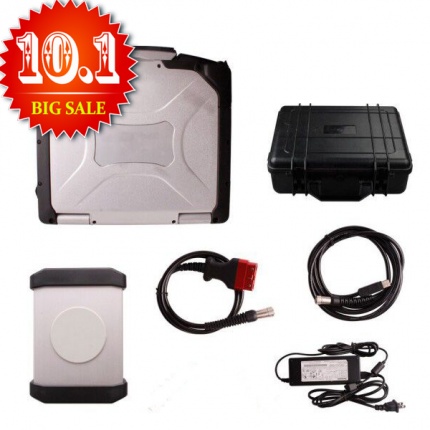
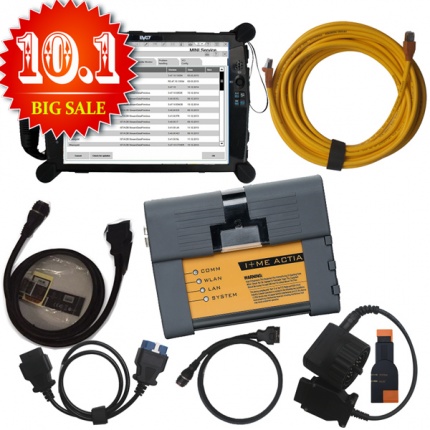
Piwis Tester II is the latest professional tester for Porshe,the most poweful diagnose and offline programming tool for Porsche,with latest tester for Porsche,powerful functions,full access.
Piwis Tester II with CF30 Laptop For Porshe
1. Software Version: 18.100
2. Laptop: CF-30 (Second Hand)—Software is inside the Hard Drive. No need Installation
3.Support Languages: Russian, English, French, Spanish, Italian, German, Portuguese, Japanese, Chinese, Dutch
4. Update Method: By CD or HDD (One Year for Free, It can not be updated
online. 200USD for one time update after one year.) Software contains
operating system win XP only. you just need to insert into your computer
and use it.
5. Requires Online Modules: (F BCM R BCM DME ELV SRS KEY)
6. Bluetooth,GPS and Navigation Function are available. But you need to pay for the authorization of them.
7. Support Key Programming function,cost 210USD per time ( you need
consult our customer sevice first with the type and year of your car)
Warning: Please do not take out the hard disk from CF-30 laptop and install on other laptops, it may cause data lose and hard to recovery.
2.US$758.00 – BMW ICOM A2 With V2017.09 Engineers software Plus EVG7 Tablet PC Ready to Use
This is the package offer for BMW ICOM A2+B+C for with 2017.09V Software Plus EVG7 Diagnostic Controller Tablet PC, buy them together, save you a lot.Our engineer can install and test ok for you to use.
Compatible with BMW ICOM, ICOM A2, ICOM A3.ICOM PRO+A3
Software Version: 2017.09
ISTA-D 4.06.31
ISTA-P 3.62.1.003
VIN: 2017.07
Not connected 9000 days remaining
BMW ETK: 2017.8
BMW KSD 08.2017 Multilanguage
BMW FSC Navigation Code Generator
BMWAiCoder for BMW Coding
With free BMW Engineer Software (INPA, NCS, WinKFP, E-Sys 3.27.1, Psdzdata 59.0), BMW FSC code generator and BMW AiCoder
Multi-language available in diagnosing, programming and TIS diagram circuit: American English, British English, German, Spanish, French, Italian, polish, Portuguese, Turkish, Czech, Swedish, Dutch, Indian, Greek, Russian, Simplified Chinese, Traditional Chinese, Japanese, Korean and Thai.
3 US$2,150.00 – Original Autel MaxiSys Pro MS908P Wifi OBD Full System Diagnostic with MaxiFlash Elite J-2534 programming
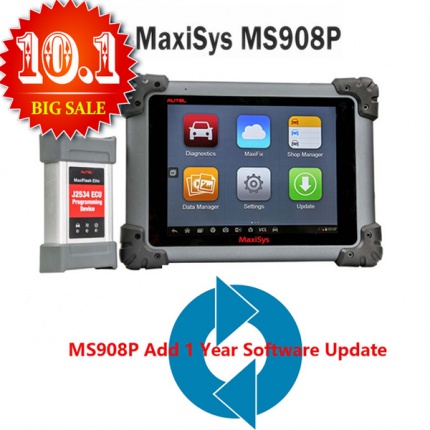
Top 4 Reasons to Get Maxisys Pro 908P:
1. Software Version: Every Car Model Software Has A Different Version.
2. Wi-Fi Technology: The VCI connects wirelessly to the main unit with Long-Range Class 1 Bluetooth
3. Update: 1 Year Free Update Online, After One Year, the Update Fee
1295USD (Contact our sales, you can add 1 more year free update)
4. Shipping by DHL All Around the World, 3-5 Days Delivery
Language:English ,Spaish
Description:
The MaxiSys? Diagnostic Platform is an evolutionary smart solution for
specialized automotive diagnosis and ECU programming. Designed with the
DNA of Autel’s diagnostics family, the MaxiSys is built to offer many of
the prestigious qualities of the MaxiDAS DS708 with extreme ease of use
and powerful diagnostic performance. However the MaxiSys has evolved
far beyond the original capabilities. Utilizing an A9 quad-core 1.40GHz
processor that offers 50% increase in speed versus competing products, a
9.7†LED screen with a resolution of 1,024 x 768 capacitive touch
screen, the revolutionary multitask-capable Android Operating System,
combined with the best possible coverage of OE-level diagnostics, the
MaxiSys is the perfect diagnostic solution for shops and technicians who
demand unrivalled smart technology and smart repairs.
It also reads information from the OBDII system only, which means that should you lights from sensors that are not directly connected to the OBDII system start flashing (such as ABS, SRS, Stability and Maintenance lights) then you will have to use another car diagnostic tool to find out what the problem is.
Overall, a very good Professional Diagnostic Tool for those who would like to carry out basic analysis on their cars, and for the price tag, it is also the most affordable piece of tech that you will buy.
http://forobd2tool.com/blog/2017/09/26/2017-top-rated-car-diagnostic-tools-reviews/
Posted by: Emily white at
04:28 AM
| No Comments
| Add Comment
Post contains 727 words, total size 7 kb.
September 24, 2017
Here is show how to update skp1000 key programmer
Take out the TF card and insert it into the card reader
plug into the computer USB port
go to My Computer/local disk (H
"Format†disk H:
Tip: Tick on the "Quick format†and click on"Startâ€
format completes
go to the official site to download the update file
then copy and paste the file into the TF card
plug the TF card into the machine
power on the machine to the main interface

click on "Firmware updateâ€

choose "System firmware updateâ€, press "Yesâ€

Update successfully

Press "No†to back.

goto †Adapter firmware updateâ€
after finish, reboot the machine foruse

Done
http://cheapobd2.com/2017/09/14/how-to-update-skp1000-key-programmer/
Posted by: Emily white at
01:14 PM
| No Comments
| Add Comment
Post contains 117 words, total size 2 kb.
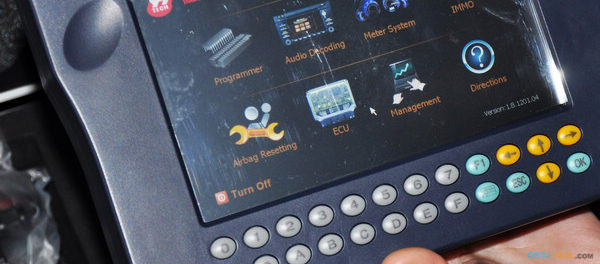
Here a list ofYanhua Digimaster 3 mileage correction Feedback on what works and what does not work.
1.DIGIMASTER 3 What works.
1) For Mercedes Benz
-Benz E63 2010 W204 EZS – Cluster OBD ok
-Digimaster is hit or miss on everything. I’ve been using the Digimaster 3 for several years now.
I got the DSPIII and use that for almost everything now.
– Benz 2004 C180 W203 Dash Ezs – OBD no good.
Dash Ezs – programmed manually – good
-Benz 2004 C180 Compressor W203 – OBD no good.
Dash Ezs – programmed manually – good.
-Done Mercedes E270 2005 W211 by obd, and it was ok.
-CLK 230 2004 W209 EZS-CLUSTER OBD-NO GOOD
EZS-CLUSTER MANUALY-GOOD
-CLK 230 2004 W209 EZS-CLUSTER OBD-NO GOOD
EZS-CLUSTER MANUALY-GOOD
2) For BMW:
– BMW X6 2009 CAS-DASH OK
– 2009 1 series E88 CAS-DASH OK
-BMW & MERCEDES ecu cloning 29f800 good
-BMW F10 CAS4 + Dash Ok
3) For VW
-2012 vw polo obd ok
-Digimaster3 on 2011 Audi A5 – DASH – OBD2 – OK!
– volvo s80 2003 wires direct – good
– I did programme a 1999 s500 key with it
– I use it for toyota corolla
-i started withMileage Correction digimaster 3 about three years back, could not do many cars it claims to do. so customers go to someone else and never come back. it does however have other functions like key programming of some cars and immo/airbag clear.
DIGIMASTER 3 Does not work?
1) 01-06-2014 update:
Mercedes E270 2005 W211 by OBD no good !
EZS Manually no good ! (no connection ) Any ideas anyone ?????118
Cluster Plug no good ! Cluster eeprom Good !
Cas BDM Adaptor faulty ! Tried another bdm adaptor and worked.
2) Ford Fiesta 2009 obd-No Good Obp-No Good
3) mb a class a170 wires direct – Not good
http://yanhuadigimaster3.blogspot.com/2017/09/digimaster-3-connector-instruction.html
Posted by: Emily white at
02:47 AM
| No Comments
| Add Comment
Post contains 323 words, total size 3 kb.
September 15, 2017
This is a how-to guide ofwiTech MicroPod 2 Chrysler diagnostic tool setup.
If your dealership purchased a new microPOD and you would like to convert your existing microPOD for using with wiTECH 2.0 System, you need to download and install the microPOD Setup Utility to configure/setup your microPOD for wiTECH 2.0.
NOTE: microPODs with a serial number beginning with "WFP†should NOT be used with this utility.
PROCEDURE
If you have a restricted network, you must first make sure that all sites listed below are enabled to be able to successfully use microPOD Setup Utility and the wiTECH 2.0 System from Obd2tool.com.
mixpanel.com
bugsnag.com
fcawitech.com
chrysler.com
dealerconnect.com
jeep.com
witechsystem.com
Note: Please disable any Anti-Virus software that you have on your computer in order to allow the microPOD Setup Utility to install and run properly.
How to download and install the microPOD Setup Utility
IMPORTANT: Once the microPOD is configured using the microPOD Setup Utility, all the microPOD Wireless Settings will be deleted. You will be required to follow the instructions from the KB link titled "How to configure a Wireless Profile on a microPOD IIâ€.
To download the application, please login to DealerCONNECT > Service > wiTECH Information > microPod Setup Utility
Step 1
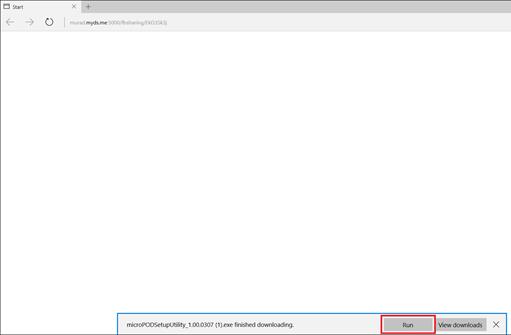
Click on "Run†to begin the downloading process of microPOD Setup Utility.
Step 2
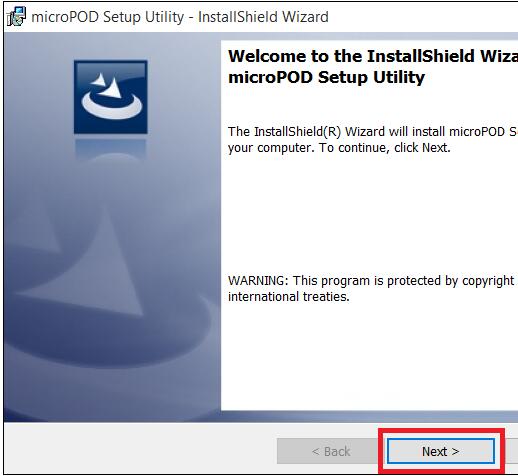
The install wizard will appear to install the wiTECH Driver x64 onto your computer if your PC has not been installed with wiTECH 1.0 application.
If the PC has been installed with wiTECH 1.0 App, you will not see the screen below and proceed to Step 6. Otherwise, click "Next†to proceed.
Step 3
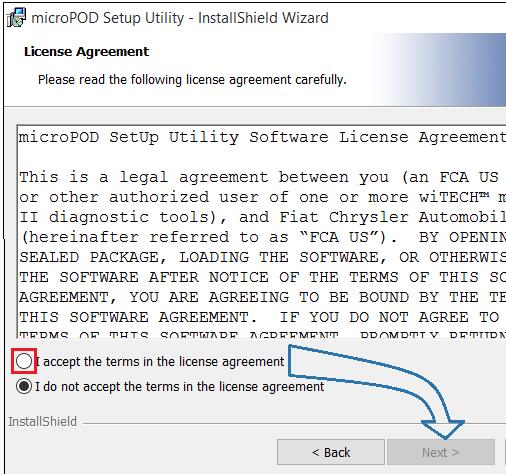
Read the License Agreement carefully, and accept the terms in the license agreement. Then, click "Next†to continue.
Step 4
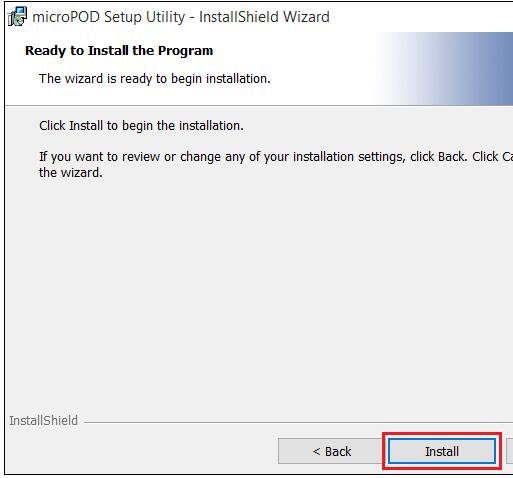
You are now ready to start the actual installation of the driver. You now need to click on "Install†for it to start.
Step 5
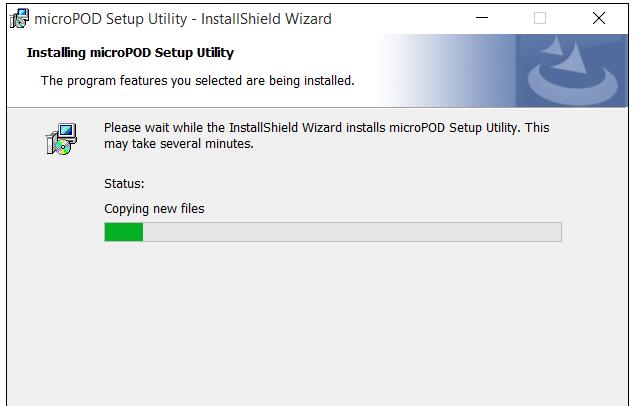
This will now install theAuto Scanner Tool wiTECH Driver x64. Once complete, the program will automatically proceed to the next step.
Step 6
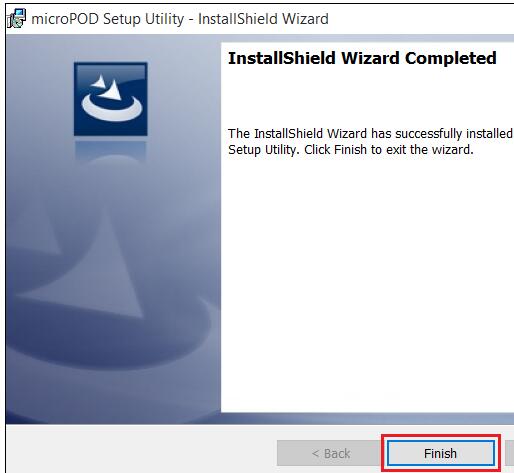
Once the installation has completed, click "Finishâ€. Proceed to the following section, "Using the microPOD Setup Utilityâ€.
Using the microPOD Setup Utility
NOTE: Please make sure that your computer is connected to the internet and the microPOD is connected to the computer via USB before starting this process. This application will help you configure your microPOD for wiTECH 2.0.
Step 1
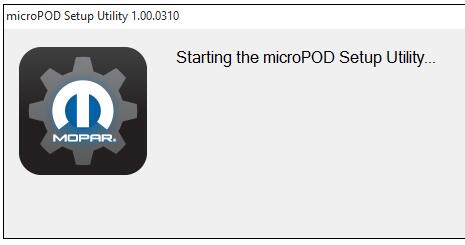
Start microPOD Setup Utility by clicking the icon on the desktop:
If the microPOD Setup Utility that is installed is out of date, you will be forced to update to the newer version of the application.
Step 2
Please make sure your microPOD is connected to the PC via USB.
Step 2a
If you see the following screen you may not be connected to the internet, or have a firewall that blocks 1 or more of these websites.
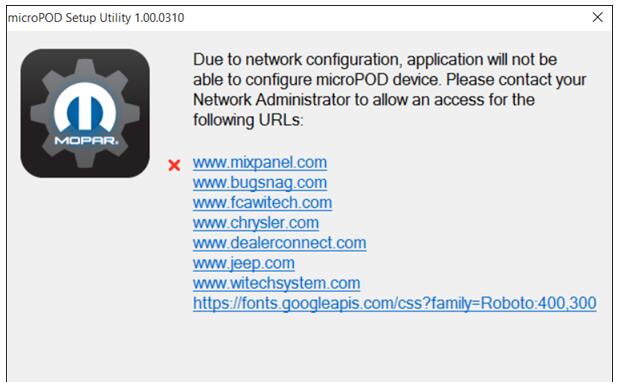
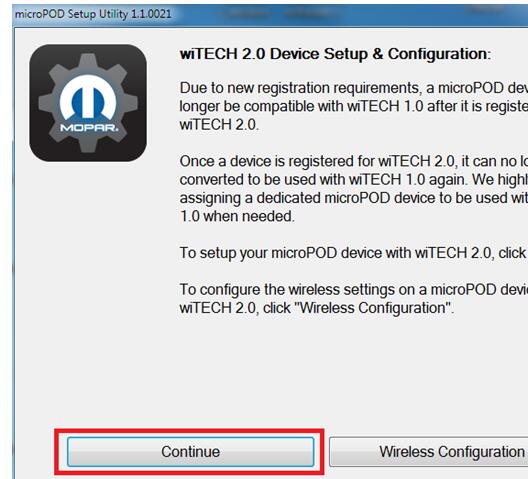
Select "Continue†on the next screen for wiTECH 2.0 Device Setup and Configuration.
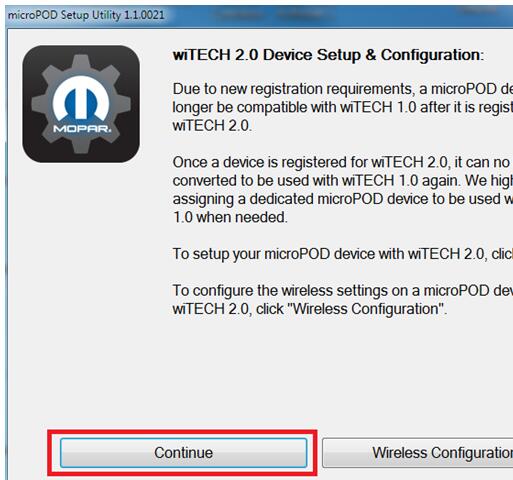
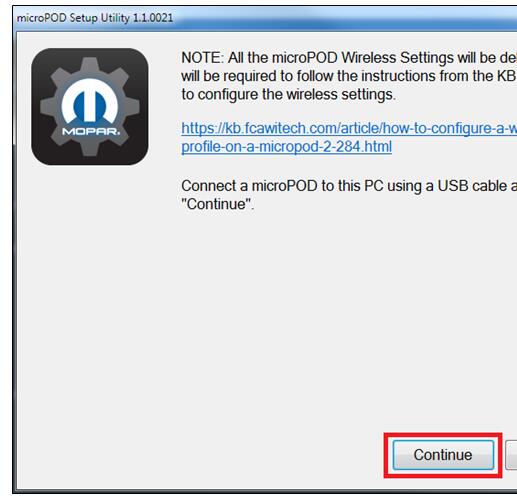
NOTE: If you only want to configure the wireless setting on a microPod device to use with wiTECH 2.0, click "Wireless Configuration†and follow instructions.
Select "Continue†on the next screen to begin attempting to connect to the microPOD device.
Step 3
Once your microPOD II is recognized by the utility, select "Continue†to proceed with the configuration.
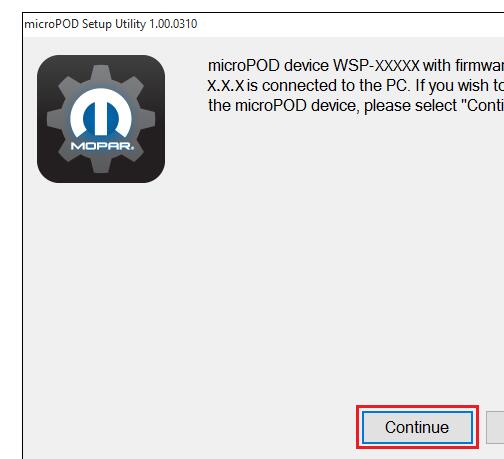
NOTE: microPODs with a serial number beginning with "WFP†should NOT be used with this utility.
Step 3a
If the utility does not find the microPOD device, please assure that the microPOD is connected via USB and click "Refreshâ€
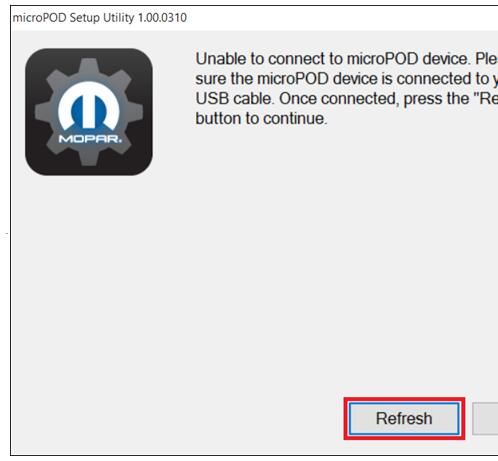
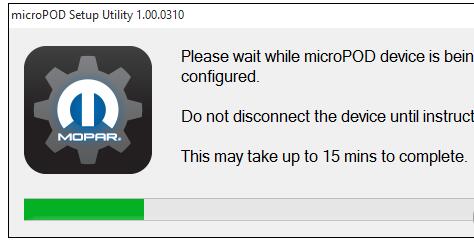
Step 4
The following screen will appear for up to 15 minutes while the microPOD device is being configured.
Step 5
The following screen will appear when the utility completed the configuration of microPOD for wiTECH 2.0 Application.
Note: After microPOD Setup Utility is ran, all existing wireless networks will be removed from the microPOD.
Important! Leave the microPod Setup Utility window running as you will be required to complete software updates to the microPod device before configuring the wireless.
Step 5
Login into wiTECH 2.0. The microPOD II that was just configured using the microPOD Setup Utility should appear in the wiTECH 2.0 discovery. You will need to update the operating system of your microPOD II before it can be used with wiTECH 2.0. Click "Continueâ€, and your web browser will redirect you to the page to download and install the operating system update as seen in the following step.
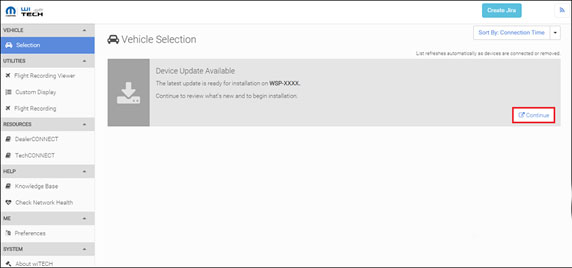
*NOTE: If microPOD II does not show up in discovery after a couple of minutes please power cycle your microPOD II by unplugging it and plugging it back in.
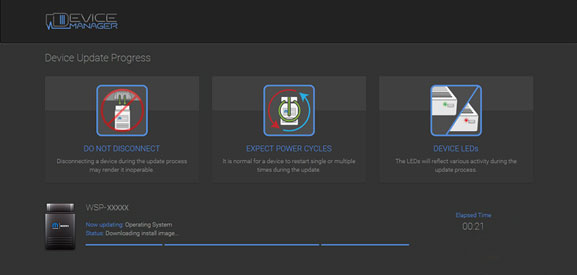
Step 6
Click "Update Now†and your microPOD II should continue to the update screen. Once updating, do not interrupt your microPOD II at any point until the update is complete.
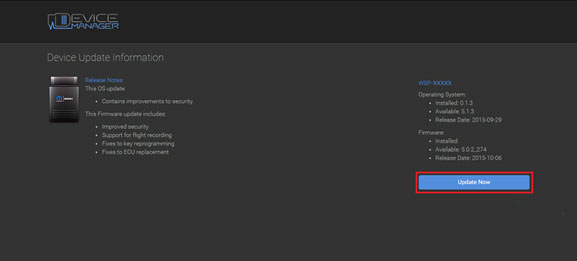
*NOTE: This can take upwards of 9 minutes. It is normal activity for the microPOD II to reboot.
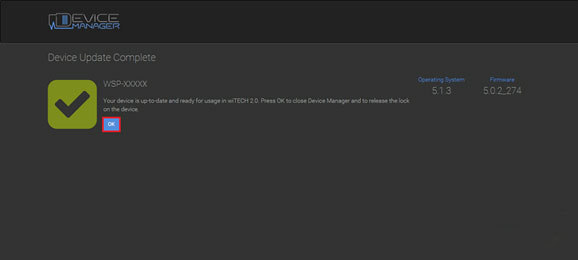
Step 7
Click "OK†and you will be navigated back to the wiTECH 2.0 discovery page. Your microPOD II should appear updated and ready for use.
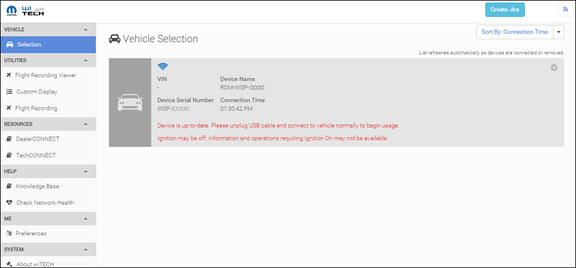
Step 8
With the microPod Setup Utility still running, configure wireless on the wiTECH microPod II device.
Enjoy!
http://cheapobd2.com/2017/09/13/how-to-set-up-witech-micropod-2-chrysler-diagnostic-tool/
Posted by: Emily white at
09:34 AM
| No Comments
| Add Comment
Post contains 873 words, total size 10 kb.
September 13, 2017
As a professional mechanic, I have done a lot of research on ECU programmer, I was impressed on two products KTAG and KESS V2 from Obd2tool.com. Here I will Share my understanding of them.
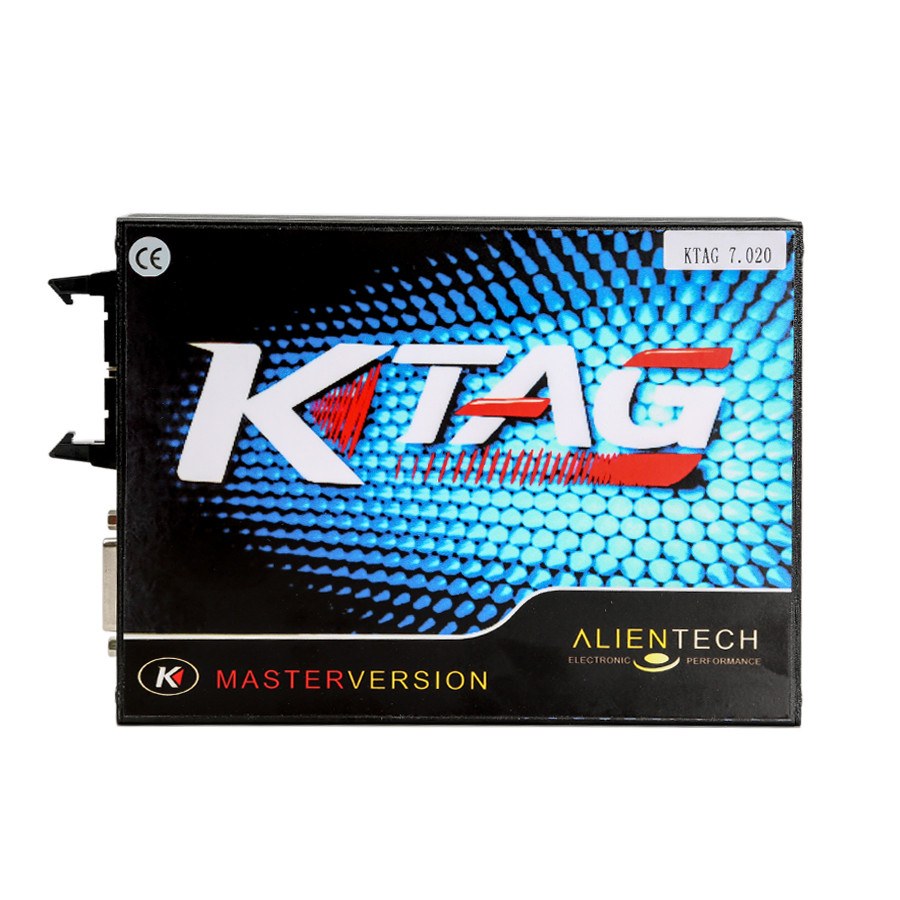
KTAG ECU Programming Tool
KTAG V7.020introduces another brand new novelty to Alientech world: J-Tag communication for Asian vehicles.
The main difference between KTAG is the hardware version, the software can be arbitrarily matched, but my advice is using lower version of the software which may support more models than higher version.
Why? I think the hardware cannot keep up with a higher version of the software and will lead to a lot of gray buttons mean some function cannot be used.
Well, some friends asked me that will KTAG easily burn the ECU out? The answer is never. FGTECH may get ECU damage if the power supply is reversed, but KTAG will never damage ECU. But you should notice that disconnect Internet while using KTAG, otherwise It Will Get Damaged. As for the operate system, it is better to Use Win XP3.
KTM100
KTM100 clone features the same as KTAG
You should notice Never use the original software, it may damage the device. With their software, even is safe if connect to the network. I download the original software to use with and get My KTM100 damaged, its buttons are all gray, nothing can be used, finally back to factory for repair cost me much money.
Although it is much more expensive than ktag, but KTM100 has no-replaced highlights:
1.KTM100
can read encrypted ECU, for example: someone wants to read BOSCH
MEV1746BMW (P171) this is encrypted ECU, then he can use the KTM100 to
read.
2.Can read BMW N55 N20, BENZ and other encrypted computers
3.KTM100 and KTAG can be used to do CHECKSUM, KESS V2 cannot. If you
want to do power upgrade, read data using KTAG or KTM100, you need to
change the data, and then do KTAG or KTM100 checksum, and write the ECU
computer. If CHECKSUM error, usually the user’s data problems. KTAG and
KTM100 can be used to verify those errors.
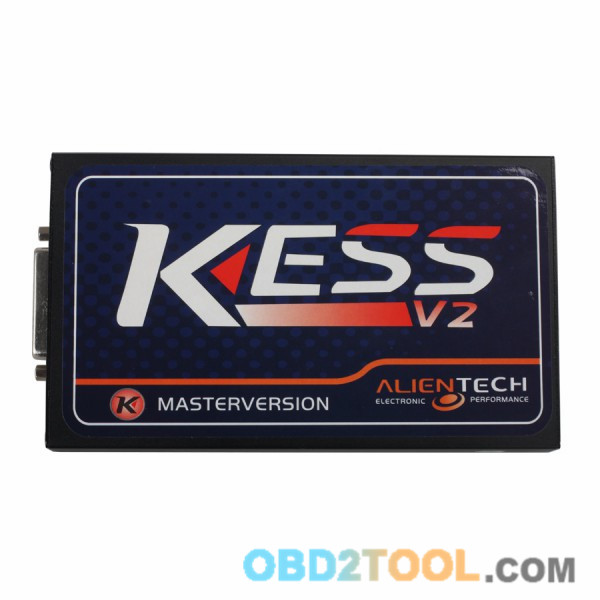
The main difference between KESS V2 is also the hardware version. Some use the old hardware version V3.099, they just come from different manufacturers, so the price is different. And some use the new hardware version, V4.036.
The big KESS family has a version supports for more trucks, and we call it truck version, that is really a big highlight.
I am here simply to talk with you about the attention points of these three products. I have bought a ktag and aECU Chip Tuning kess v2 for personal use, someone wants the different version can get them here:
https://www.kiwibox.com/obd2lily/blog/entry/141460853/notes-on-using-ktag-k-tag-ecu-programming-tool
Posted by: Emily white at
03:27 PM
| No Comments
| Add Comment
Post contains 461 words, total size 4 kb.
September 10, 2017
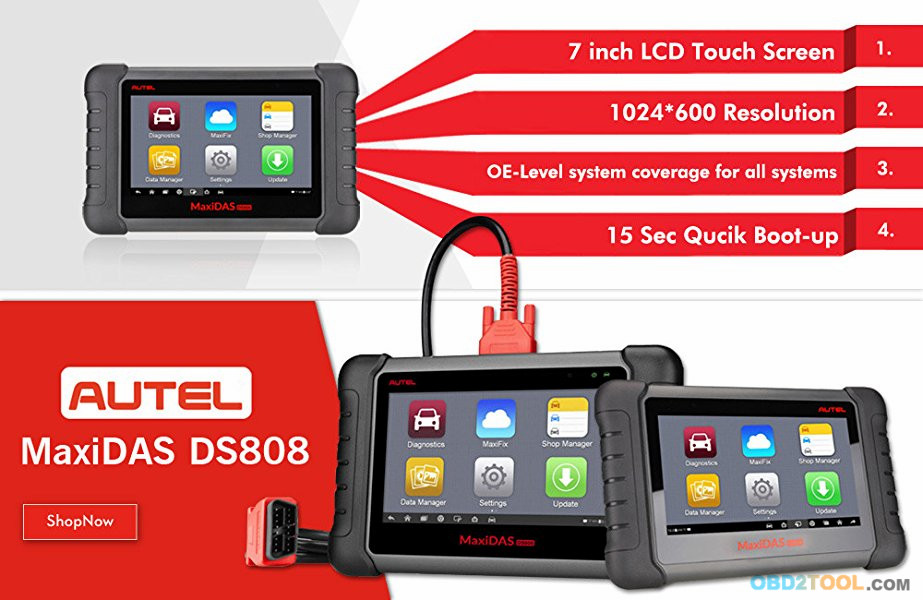
Autel MaxiDAS DS808Kwith Full Connector Kit Table Auto Diagnostic Tool Support Injector Coding and Key Coding Upgrade Version of DS808 DS708 Light Package
1.Full Kit Autel MaxiDAS DS808K including OBD1 connector and adapters, is upgrade version of Autel DS708, based on Android operating system
2.MaxiDAS DS808K support Injector coding and key coding, TPMS Basic Function,Battery Register/Battery Maintenance and Electronic Throttle Position Reset/Learn
3.Autel DS808 support protocols including ISO9141-2, ISO14230-2,ISO15765, K/L-Line, Flashing Code, SAE-J1850 VPW, SAE-J1850 PWM, ISO11898(Highspeed, Middlespeed, Lowspeed and Singlewire CAN, fault-tolerant CAN), SAE J2610,GM UART,UART Echo Byte Protocol, Honda Diag-H Protocol, TP2.0, TP1.6
4.Language: English, if you need other language like Spanish or French, need pay additional 120usd. DS808 support one year free update online, after one year update cost about 349.5usd/year
5.Autel MaxiDAS DS808K FROMobd2tool.com is equipped with a fast quad-core processor and a 7-inch LCD touchscreen (1024X600 quality), and offers maximum convenience and efficiency for your diagnosis; This is light packaging set, easy to carry, additionally we provide free gift with purchase of MaxiDAS DS808K
Based on the Android operating system and with 7-inch LCD touch screen (1024*600 resolution), MaxiDAS DS808K (With Conkit) full set is featured with an extensive coverage of OE-level diagnostics. Installed with a fast quad-core processor, DS808 (With Conkit) offers maximum convenience and efficiency for your diagnosis and analysis.
MaxiDAS DS808 (With Conkit) Features:
Extensive vehicle coverage for more than 80 US, Asian and European vehicle makes
Exceptional OE-Level system coverage for all electronic systems
Complete capabilities for codes, live data, active test, ECU information, adaptation, matching, etc.
Smart AutoVIN technology for identifying vehicles easily
Automatic system and software updates with real-time push message notifications via Wi-Fi
Instant remote control tech support anytime, anywhere
Cloud-based MaxiFix online community provides a vast database of diagnostic and repair tips and proven filed fixes
Interactive Data Logging sessions enable direct contact with Autel
Technical Support for first-hand troubleshooting of diagnostic bugs and
errors
One-stop multitasking designed for ideal management of workshop
operations to keep all data files, customer info, and vehicle records
well organized
Convenient data management system for managing internal program applications and reviewing data
Super Durable Material and Poweful Hardware
MaxiDAS DS808K (With Conkit) Specifications:
Operating System:Android 4.4.4
Processor:Cortex-A9 processor (1.5 GHz)
Memory :32GB
Display:7-inch LCD capacitive touchscreen with 1024×600 resolution
Connectivity: Mini USB 2.0 USB 2.0 Wi-Fi Micro SD card (supports up to 32GB)
Sensors:Ambient light sensor for brightness auto changing
Audio Input/Output: Input: N/A Output: buzzer
Power and Battery:3.7 V/3200 mAh lithium-polymer battery Charges via 5 VDC power supply
Tested Battery Life:Around 4.5 hours of continuous use
Battery Charging Input:5 V/1.5 A
Power Consumption:500 mA (LCD on with default brightness, Wi-Fi on) @3.7 V
Operating Temp:-10 to 60°C(14 to 140°F)
Storage Temp:-20 to 70°C (-4 to 158°F)
Operating Humidity:5% – 95% non-condensing
Dimensions (W x H x D):237.8 mm (9.4â€) x 148.6 mm (5.9â€) x 35.5 mm (1.4â€)
Net Weight:788 g (2.42 lb.)
Full kit including OBD1 connectors and cables
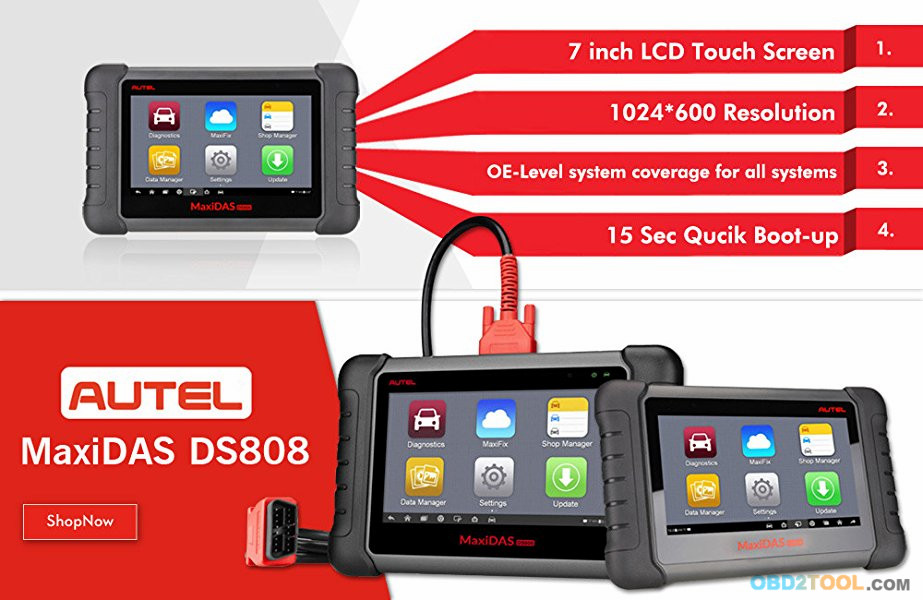
Auto Scanner Tool Full
kit MaxiDAS DS808 package contain not only DS808 main unit and OBD2
cable, but also contain OBD1 connector and cables for old vehicles.
Posted by: Emily white at
02:49 AM
| No Comments
| Add Comment
Post contains 519 words, total size 5 kb.
September 02, 2017
Problem:
Feedback from some KESS V2 user: Car ECU Programmer KESS V2 not works with some k-line or does not work well.
Solution:
The 9613 chip is Chinese standard, not international standard, so the
technical parameter is not compatible, and neither is the chip from
Malaysia Thailand and Taiwan. Advice users buy the America-made 9613
chip to replace it.
In the near future, Chinese factory will use Chinese 9637 to replace 9613, and this error will gradually disappear.
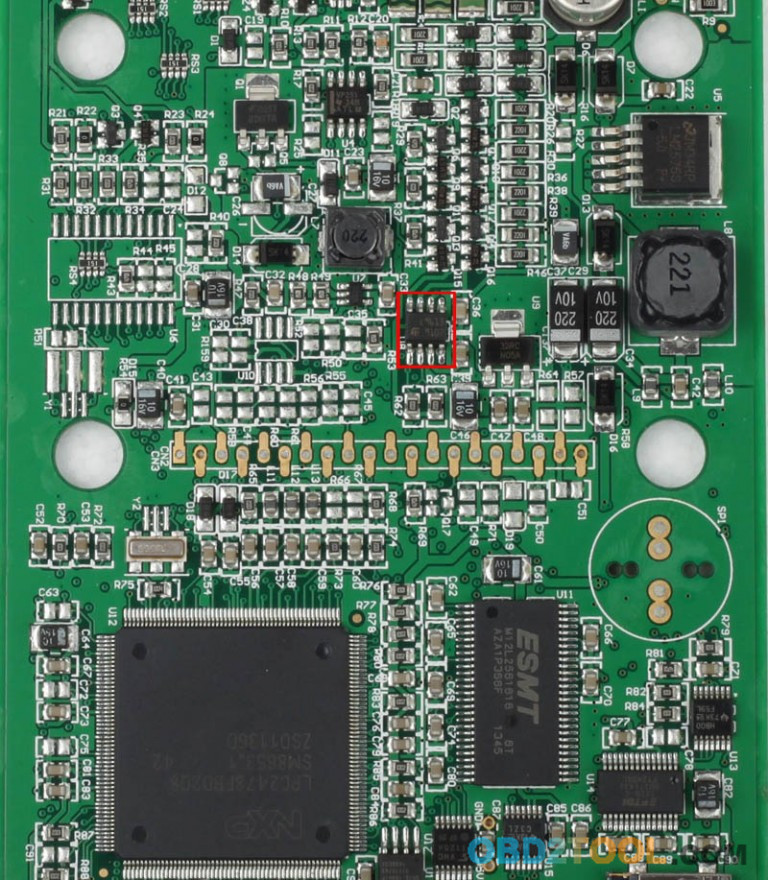
In the near future, Chinese factory will use Chinese 9637 to replace 9613, and this error will gradually disappear.
If you have more problem about KESS V2 pls read:FAQs aboutV2.23 Kess V2 OBD2 Tuning Kit
Hope it can help you solve you problems.
Our customers feedback some problem about kess v2 at Obd2tool.com,we sovled it and have written below,if you have same problems,it will help you.
http://obd2tools.microblr.com/post/85860/How_to_solve_KESS_V2_Wake_up_error
Posted by: Emily white at
03:21 PM
| No Comments
| Add Comment
Post contains 156 words, total size 2 kb.
32 queries taking 0.1721 seconds, 196 records returned.
Powered by Minx 1.1.6c-pink.

